How to Automate Lead Follow-Up: A Practical Guide for Small Business
If your business relies on enquiries, quotes or consultations, the speed and consistency of your follow-up can make a big difference. The good news is that you do not need a complicated system to automate lead follow-up. A simple workflow can help you capture enquiries, respond instantly, assign them to the right person and keep the process moving without adding more admin work.
This guide explains what lead follow-up automation actually does, which steps are worth automating first, where AI can help, and what Australian privacy and spam rules you need to keep in mind.
null
For small businesses, the aim is not to remove the human side of sales. It is to stop good leads from going cold because someone was busy, offline or simply missed the message. If you want a broader overview of practical systems for smaller teams, small business automation is often the best place to start.
What lead follow-up automation actually does
Lead follow-up automation is the process of using software to handle the early, repetitive parts of your enquiry process. Instead of manually copying details into a spreadsheet, sending a standard reply, assigning the lead and remembering to follow up later, the system does those steps for you.
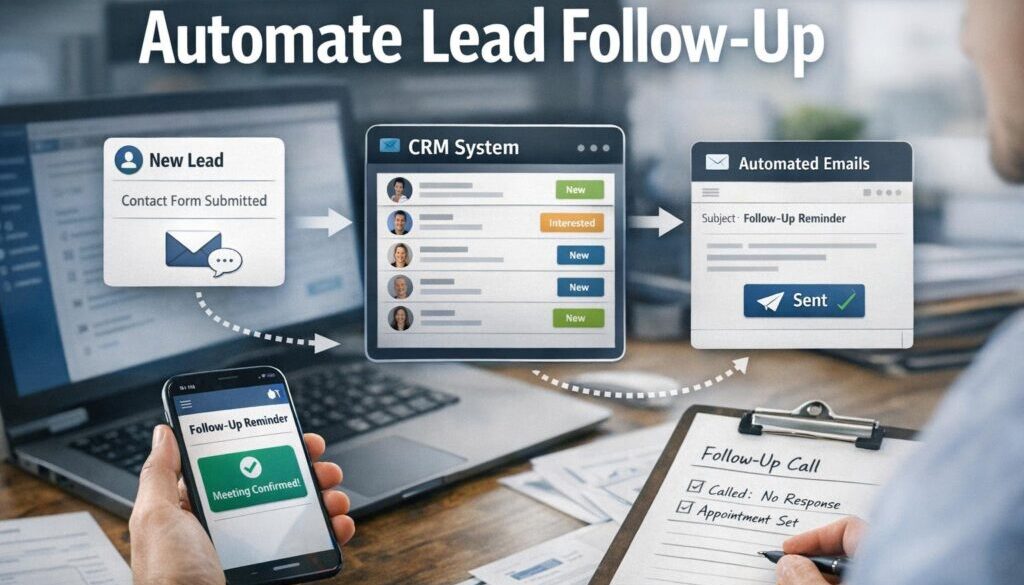
When you automate lead follow-up, you are usually building a chain of simple actions. A lead comes in through a form, email, chat, ad or phone system. The information is captured in your CRM. An instant acknowledgement is sent. A task is created for a person to review. If the lead does not reply, a reminder or nurture sequence follows.
The basic workflow
- A new enquiry is submitted.
- The lead details are added to your CRM or lead list.
- An automatic reply confirms the enquiry.
- The lead is assigned or tagged.
- A follow-up task or reminder is created.
- If needed, a short nurture sequence is sent.
- The outcome is logged for reporting.
This structure is simple, but it solves a common problem: too many businesses rely on memory and manual checking. That creates delays, and delays can cost opportunities.
Why speed and consistency matter
Fast response times matter because leads often contact more than one business. If your reply is delayed until the end of the day, the lead may have already booked elsewhere or moved on.
Consistency matters just as much. A manual process depends on who is available and how busy they are. Automation helps every lead get the same basic treatment, even after hours.
That does not mean every message should be automated. It means the first step should be reliable. For businesses that handle high volumes of enquiries, that reliability is often the difference between a lead being captured properly or lost in an inbox.
Which parts of lead follow-up should you automate first?
If you are starting from scratch, do not try to automate everything at once. Focus on the steps that save time and reduce missed leads.
1. Capture
The first priority is getting lead details into one place automatically. That might mean a web form creating a CRM record, an email enquiry being turned into a lead, or a booking request being added to a pipeline.
This reduces manual data entry and helps avoid duplicate records. It also makes it easier to see which channel produced the enquiry.
2. Immediate acknowledgement
A simple confirmation message is often the best first automation. It tells the lead their enquiry has been received and sets expectations about what happens next.
This message can be short and helpful. For example, it might confirm receipt, explain typical response times and include a booking link or next step.
3. Routing and assignment
Not every lead should go to the same person. Some should go by location, service type, enquiry size or urgency. Routing rules can send the right lead to the right inbox, team member or pipeline stage.
This is especially useful for businesses that handle multiple services or have more than one person responding to enquiries.
4. Tasks and reminders
Acknowledgement alone is not enough. A human follow-up task should usually be created as well. That might be a call, a quote, a discovery meeting or a second email.
Automated reminders help stop leads from sitting untouched. Even a simple reminder in your CRM can improve follow-through.
5. Follow-up sequences
If the lead does not reply, a short follow-up sequence can keep the conversation going. This is where businesses often save the most time, because the same reminders do not need to be written manually every time.
Keep these sequences short and useful. The goal is to help the lead, not overwhelm them.
How to build a simple lead follow-up workflow
If you want to automate lead follow-up properly, build the process in stages. That makes it easier to test and refine.
Step 1 — Capture the lead
Start with the main enquiry source. For many small businesses, this is a website contact form or booking form. For others, it may be inbound email, live chat or a quote request form.
The key question is: where should the lead land automatically once it is submitted?
At this stage, the aim is to reduce manual copying and make sure every enquiry enters the same system.
Step 2 — Create or update the CRM record
Your CRM becomes the central record of the lead. It should store the contact details, the enquiry source, the service requested and any important notes.
If the contact already exists, the system should update the existing record rather than creating duplicates. Good data hygiene matters because duplicate leads create confusion later.
Step 3 — Send an instant response
Once the lead is captured, send an automatic confirmation. This is often the easiest and most valuable automation to implement first.
The response might say:
- thanks for the enquiry
- what happens next
- when they can expect a reply
- how to book or provide more details
If the enquiry is time-sensitive, you can also direct the lead to a booking page or FAQ.
Step 4 — Assign the lead
Lead assignment rules can route enquiries by postcode, service type, team member or priority level. This keeps follow-up organised and prevents leads from sitting in a general inbox.
For example, a trade business might route urgent jobs differently from general quote requests. A service business might send new leads to the right consultant based on the service requested.
Step 5 — Create a follow-up task
A CRM task or reminder gives the human side of the process structure. This is where someone reviews the lead, checks the details and prepares the next conversation.
Tasks are especially useful when the lead needs a quote, personalised answer or manual qualification.
Step 6 — Nurture if there is no reply
If the lead does not respond, a short follow-up sequence can remind them without your team having to chase manually each time. This might be one or two emails, not a long campaign.
Use nurture carefully. Too many messages can feel pushy, especially in a small-business setting where the lead may simply be comparing options.
Step 7 — Log outcomes
Finally, record whether the lead booked, replied, went cold or was not a fit. This helps you understand which sources produce better-quality enquiries and which follow-up steps need improvement.
Once you have this information, you can make better decisions about where to spend time and where to improve the process.
Where AI helps, and where a human should still review
AI can be useful in lead follow-up, but it should usually act as an assistant rather than a replacement for judgment. The safest use is to help people work faster, not to make final decisions on their behalf.
Drafting replies
AI can draft a first-response email or reword a message so it sounds clearer and more professional. This is handy for standard enquiries where the structure is predictable.
It is still best for a person to review anything that includes pricing, promises, deadlines or custom terms.
Summarising enquiries and calls
AI can turn a long message or call transcript into a short summary. That saves time when your team needs to quickly understand what the lead wants and what follow-up is needed.
This is especially useful when enquiries arrive in different formats, such as forms, emails and recorded calls.
Classifying lead intent
AI can also help sort leads into categories such as urgent, general enquiry, pricing request or existing customer follow-up. That can make routing faster and more consistent.
Just be careful not to rely on AI alone for important decisions. A human should review sensitive or high-value leads.
Why pricing and sensitive cases need human approval
When a lead asks about pricing, scope, legal terms, financial commitments or anything sensitive, human review is important. AI can assist, but it should not be the final voice on the message.
That same principle applies to complaints, unusual requests and service issues where context matters.
Document-heavy workflows often benefit from this kind of careful automation. For example, our trust account automation case study shows how a repetitive process can be simplified while still keeping the business logic clear.
What software small businesses typically use
To automate lead follow-up, small businesses usually combine a few software categories rather than relying on one all-in-one tool.
CRM systems
A CRM stores contact details, tracks the lead stage and keeps a record of interactions. It is often the centre of the whole process.
Many CRMs also support workflows, lead assignment rules and follow-up tasks. Examples include HubSpot, Salesforce, Zoho CRM and Pipedrive. Their capabilities change over time, so it is worth checking the official documentation before choosing a platform.
Email and marketing automation
Email automation tools are useful for acknowledgements and nurture sequences. They are different from a CRM, although the two often work together.
For practical guidance, you can review official documentation from platforms such as HubSpot workflows or Zoho CRM workflow rules.
Workflow automation tools
Workflow tools connect systems that do not naturally talk to each other. They are often used to move data from a form into a CRM, trigger an email, create a task or update a spreadsheet.
Common tools in this category include Zapier and Make.
Scheduling and booking tools
If your follow-up process involves appointments, booking tools can reduce back-and-forth email. Microsoft Bookings is one example of a scheduling tool that can support consultation workflows.
See the official Microsoft guidance for Microsoft Bookings.
SMS and calling tools
SMS and phone systems are useful when the lead needs a quick response. They can be part of your follow-up system, but they should be used carefully and in line with consent requirements.
The right mix depends on how your business works. A simple setup with forms, CRM, email and reminders is often enough to get started.
If you are looking for a practical setup rather than enterprise software, automation solutions can be tailored around your current tools instead of replacing everything at once.
Australian privacy and spam rules to keep in mind
When you automate lead follow-up, you are handling personal information and often sending commercial messages. That means compliance matters.
Privacy and data handling
Australian businesses may need to consider the Privacy Act 1988 and the Australian Privacy Principles when collecting and storing lead information. The exact obligations depend on the business and the type of information collected, so it is worth checking the official guidance.
Useful starting points include the Australian Privacy Principles overview and the OAIC page on the Privacy Act 1988.
Practical things to think about include:
- collecting only the details you need
- storing lead data securely
- limiting access to staff who need it
- being careful with offshore software and data handling
- deleting records when they are no longer needed
Consent and unsubscribe requirements
If your automation sends marketing emails or SMS, the Spam Act is highly relevant. Commercial electronic messages generally require consent, sender identification and a functional unsubscribe option.
For current guidance, refer to the ACMA spam guidance and the Spam Act 2003.
Transactional vs marketing messages
It is important to separate simple service messages from promotional messages. A confirmation that an enquiry was received is different from a nurture campaign promoting your services.
That difference matters because the compliance expectations may not be the same. When in doubt, keep your follow-up messages narrowly focused on the lead’s request.
How to tell whether automation is working
Once you have built your workflow, track a few simple measures. You do not need a complicated dashboard to know whether it is helping.
Response time
How quickly does a lead get the first acknowledgement? If that time has dropped, your automation is doing one of its main jobs.
Lead-to-booking or lead-to-sale conversion
Are more leads turning into booked calls, quotes or sales? This is one of the clearest signs that the follow-up process is improving.
Task completion and follow-up rates
Are your team members completing follow-up tasks on time? Automation should make the human steps easier to manage, not disappear into the background.
Message engagement and opt-outs
If you are using email or SMS nurture, pay attention to replies, bookings and unsubscribes. Too many opt-outs may mean your messages are too frequent or not relevant enough.
For businesses that rely on repeatable content and communication workflows, our content calendar automation case study is a good example of how a structured process can reduce manual coordination.
A simple starting point for a sole trader or small team
You do not need a perfect system to begin. In fact, the best way to automate lead follow-up is usually to start small and build confidence.
Start with one form, one CRM and one instant response
If you have a website enquiry form, connect it to your CRM and set up an automatic confirmation email. That alone can save time and reduce missed leads.
At this stage, keep the message short, clear and helpful.
Add routing and reminders next
Once the first step is stable, add assignment rules and a follow-up task. This helps make sure someone is responsible for the lead.
From there, you can decide whether a simple reminder sequence is needed.
Expand only when the process is stable
Do not add more automations until the basics are working. Many small businesses end up with complicated systems because they try to fix everything at once.
Simple, well-designed automation is usually easier to maintain and easier for staff to trust.
That same principle applies to digital delivery workflows too. For instance, our digital product automation example shows how a straightforward process can remove repetitive manual steps.
When to get help with lead follow-up automation
You may be able to set up a basic workflow yourself. But if your leads come from several sources, your team is missing follow-up, or your data needs to move between multiple tools, professional help can make the process much simpler.
That is where a practical automation build can help you map the workflow, choose the right tools and set up the logic in a way that fits your business. If you are at that stage, practical automation solutions can be designed around the way your business already works.
Ready to Simplify Lead Follow-Up?
If your team is losing time to manual enquiry handling, a simple automation workflow can help you respond faster, stay organised and reduce admin.
Conclusion
To automate lead follow-up well, start with the basics: capture the lead, send an instant acknowledgement, assign the next step and keep a human involved where judgment matters. That approach gives small businesses a faster, more reliable process without making communication feel robotic.
AI can help with drafting, summarising and sorting, but the best systems still leave room for human review, especially around pricing, sensitive enquiries and important decisions. If you build carefully, follow-up becomes more consistent, your team spends less time on repetitive admin and your leads are less likely to slip through the cracks.
For more practical guidance on simplifying everyday business processes, visit Simple Automations.