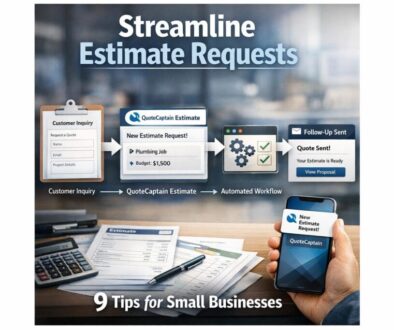
How to Speed Up Estimate Preparation
If your team spends too long putting together quotes, you are not alone. For many Australian small businesses, estimate preparation takes more time than it should because the same details are being collected, checked, copied, priced and reformatted over and over again. The good news is that a faster process does not have to mean a sloppier one.
This guide explains where estimate preparation slows businesses down, what can be automated, what still needs human review, and how to build a simpler quoting workflow that is faster, more consistent and easier to manage.
null
We will also cover practical Australian considerations such as GST, record keeping and privacy, so your estimate process stays efficient without creating avoidable problems later.
For businesses that want a broader view of practical automation opportunities, the small business automation page is a useful starting point. You can also explore the automation solutions page if you are already identifying parts of your quoting workflow that could be improved.
What is estimate preparation automation?
Estimate preparation automation is the use of software, templates, integrations and sometimes AI to reduce the manual work involved in creating a quote or estimate for a customer. In simple terms, it helps move information from one step of the process to the next without having to retype the same details repeatedly.
This matters because estimate preparation often involves many small tasks: collecting customer details, understanding the job, calculating labour and materials, applying GST correctly, formatting the document and following up once it is sent. Individually, those tasks may not look difficult. Together, they take up a lot of time.
Why quoting takes so much time
In many small businesses, quoting starts with an email, phone call, form submission or site visit. From there, someone needs to work out what the customer wants, how much the work will cost, what should be included, and how the estimate should be presented.
That process is often slowed down by:
- double entry of customer and job details
- outdated pricing spreadsheets or templates
- unclear scope or missing information
- manual GST calculations
- formatting the same document again and again
- forgotten follow-up after the quote is sent
Australian Government guidance encourages businesses to use digital tools to reduce manual work, which is exactly why estimate preparation is such a good candidate for improvement. The more structured the process becomes, the easier it is to speed up.
For a practical example of how repetitive administrative work can be simplified, see this trust account automation project. It is a good reminder that document-heavy workflows can often be made much easier with the right approach.
What can be automated vs what still needs review
Not every part of estimate preparation should be automated. Some steps are ideal for automation, while others still need judgement from a person who understands the job, the risk and the customer relationship.
| Good candidates for automation | Still needs human review |
|---|---|
| Customer detail capture | Final scope and exclusions |
| Quote templates and formatting | Pricing decisions and margin checks |
| GST calculations | Commercial risk assessment |
| Follow-up reminders | Approval before sending |
| Quote-to-job handoff | Complex project assumptions |
The key is to automate the repetitive parts without removing the human check that keeps the estimate accurate and commercially sensible.
Where the time goes in a typical estimate workflow
To speed up estimate preparation, it helps to look at the whole workflow rather than just the document itself. Most quoting processes follow a similar path.
1. Enquiry capture
The process starts when a customer gets in touch. That might be through a website form, email, phone call, social message or referral. If the enquiry information is incomplete, someone has to chase the customer for more details before the estimate can even begin.
2. Costing labour, materials and margin
Next comes the part many businesses find slowest: working out what the job will really cost. That means checking labour time, materials, subcontractors, allowances, margin and any special conditions. If this information lives in different places, estimate preparation becomes even slower.
3. Drafting and formatting the quote
Once the numbers are known, the estimate still needs to be written in a clear, professional format. This often involves copying details into a document, matching branding, adjusting wording and making sure the structure is easy for the customer to understand.
4. Approval, sending and follow-up
Before the estimate goes out, many businesses want a final review. After it is sent, there is usually another task: following up. This is where opportunities are often lost, especially if no one tracks open quotes properly.
That is why content calendar automation and workflow management can be useful examples for business owners who want to reduce manual coordination. You can see a similar practical approach in this content calendar automation case study.
Which estimate tasks are best suited to automation?
Some estimate tasks are repetitive, rule-based and easy to standardise. Those are usually the best places to start.
Lead capture and intake forms
A structured form can collect the same key information every time: customer name, contact details, job type, preferred timing, site address and notes. This reduces back-and-forth and gives your team a better starting point for the estimate.
Standard quote templates
If your business quotes similar work regularly, a template can save a lot of time. The template can include headings, terms, exclusions, standard wording and branding, so staff are not rewriting the same material for every customer.
Pricing calculations and GST
Calculation steps are often ideal for automation because they are based on rules. The system can add line items, calculate totals, apply GST and display the final amount consistently. For Australian businesses, this matters because the ATO expects GST-registered businesses to charge GST correctly and keep proper records.
For official guidance, see the ATO’s GST overview.
Follow-up reminders and status tracking
Once a quote is sent, automation can help track whether it is still open, accepted or declined. It can also remind staff when a follow-up is due, which helps reduce lost opportunities caused by slow response times.
Quote-to-job or quote-to-invoice conversion
When a quote is accepted, some businesses can move that information into the next step of the workflow, such as a job, project or invoice draft. This reduces duplicate data entry and keeps the customer record consistent.
For businesses that deliver digital products, another example of automating a handoff from sale to delivery is digital product automation. The workflow is different, but the principle is the same: once the process is structured, the admin becomes much lighter.
What tools Australian small businesses commonly use
Most estimate automation does not rely on one magic app. It usually works best when a few tools are connected in a sensible way.
Accounting software
Accounting platforms are often the starting point because they already hold customer details, invoice data and tax information. Official product documentation for tools such as Xero, MYOB and QuickBooks Online should always be checked directly before you assume a feature is available.
CRM and job management tools
A CRM or job management system can hold enquiry details, customer history, job notes and quote status. This is especially useful for tradies, service businesses and project-based businesses that need a clear view of where each estimate sits.
If you want to understand how workflow design fits into broader business improvement, the Business Hub is a helpful place to continue learning.
Document generation and approval tools
Document tools help turn structured data into a branded estimate. Some businesses also use approval tools so a manager can review higher-value quotes before they are sent.
Automation platforms
Workflow tools such as Zapier, Make and Microsoft Power Automate can connect forms, email, CRM systems and document tools. In plain English, they help different apps pass information to each other automatically.
If you are exploring broader options for setting up these kinds of workflows, it may be worth reviewing automation solutions that suit your business process rather than forcing your team to work around the software.
Official documentation for Microsoft Power Automate, Zapier and Make is also worth checking when comparing tools:
How AI can help speed up estimates
AI can be useful in estimate preparation, but it should be treated as a drafting and support tool rather than the final decision-maker. That distinction matters.
Summarising enquiries
If a customer sends a long email or a detailed brief, AI can help summarise the request into a shorter scope for the estimator to review. That can save time and make it easier to move quickly.
Drafting scope language
AI can help write clear, customer-friendly wording for a quote. This is especially useful when the same type of work is quoted often and the business wants consistent language.
Extracting details from documents
Some businesses receive quote requests in attachments, PDFs or notes. AI can help pull out names, dates, quantities or service requirements so the estimator does not have to manually read everything from scratch.
Why human review is still essential
AI is not suitable for final pricing decisions on its own. It can miss exclusions, invent details or create wording that sounds polished but is commercially wrong. For that reason, AI should be used to support the workflow, not replace the person responsible for the estimate.
That same practical approach shows up in many real-world automation projects. The goal is not to remove people from the process. It is to remove the repetitive work so people can focus on judgement, accuracy and customer service.
Australian considerations to get right
For Australian small businesses, estimate preparation is not just about speed. It also needs to be accurate, secure and compliant with basic business obligations.
GST handling
If your business is GST-registered, the way GST is displayed in a quote matters. Pricing should be presented consistently with your tax settings and your accounting workflow. If in doubt, check the ATO guidance and your own accounting advice.
Official ATO guidance on GST can be found here: GST overview.
Record keeping
Quotes, estimates, customer communications and accepted proposals should be retained appropriately. That keeps your business organised and makes it easier to resolve questions later. The ATO and business.gov.au both provide useful record-keeping guidance.
Helpful references include ATO record keeping for business and business.gov.au record keeping.
Privacy and security
When you collect customer details through forms, CRMs or AI tools, you need to think about privacy and access control. The OAIC’s guidance on the Australian Privacy Principles and the Privacy Act is useful background, especially if you handle personal information regularly.
See the OAIC’s Australian Privacy Principles and small business and the Privacy Act.
Consumer law clarity on scope and exclusions
Estimates should be clear about what is included, what is excluded and what assumptions have been made. That is not only good customer service; it also helps reduce disputes and confusion later.
How to start simple
You do not need a full system redesign to speed up estimate preparation. In many businesses, the biggest gains come from a few practical changes.
1. Standardise your quote template
Start with one clean template that already contains your branding, standard wording and usual terms. If you are rewriting the same text repeatedly, this is one of the easiest places to save time.
2. Use structured forms and item libraries
Structured forms help you collect consistent information. Item libraries help you reuse common services, materials or packages without rebuilding them each time.
3. Automate one handoff at a time
Do not try to automate everything at once. A simple first step might be sending enquiry details from a form into your CRM, or sending accepted quotes into a job workflow. One clean handoff is usually better than five messy ones.
4. Add approval checks before sending
For higher-value estimates, build in a quick approval step so someone checks pricing, scope and exclusions before the customer receives the document. That keeps speed and accuracy in balance.
Some businesses find it helpful to map the process before changing software. A simpler workflow often becomes obvious once you identify where the delays are.
Common mistakes to avoid
Speeding up estimate preparation is worthwhile, but there are a few common traps that can undo the benefit.
Using old pricing data
If your templates or item libraries are out of date, automation will simply make the wrong information appear faster. Always keep your pricing sources current.
Leaving out exclusions
A fast quote is not helpful if it is unclear. Make sure exclusions, assumptions and scope notes are easy to include in the template.
Over-automating approvals
Not every quote should be sent automatically. Some jobs need a human review because the pricing, risk or scope is more complex than a standard workflow can handle.
Letting AI generate final pricing unchecked
AI can support the drafting process, but it should not be trusted to set final numbers without review. That is especially true when the estimate involves custom work, variable labour, or unusual site conditions.
These practical guardrails are one reason businesses often start with a targeted automation project rather than a full system overhaul. A focused improvement is easier to test, easier to adopt and easier to trust.
What to check before choosing software
When you are comparing tools, look past the marketing and focus on whether the software fits the way your business actually works.
GST support
Does the tool handle Australian GST in a way that suits your quoting process? Check this carefully before committing.
Integrations
Can the software connect to your CRM, accounting platform, job management tool or document system? Integration is often what turns a good tool into a genuinely faster workflow.
Mobile access
If staff quote on-site, mobile access matters. A desktop-only system may create delays even if it looks powerful on paper.
Security and permissions
Can you control who sees pricing, customer details and approval steps? Good permission settings help protect sensitive information.
Ease of use for staff
If the system is too hard to use, the team may go back to manual work. The best solution is usually the one people will actually use consistently.
For Australian small businesses, simple and dependable often beats complex and impressive.
A practical way to think about faster estimate preparation
If you want to speed up estimate preparation without creating chaos, think in four steps:
- Capture better information with structured forms or a consistent intake process.
- Reuse standard content with templates, pricing libraries and approved wording.
- Connect the systems so information moves from enquiry to estimate to follow-up with less retyping.
- Keep human review in the loop for pricing, scope and approval before the quote goes out.
That approach gives you speed without sacrificing accuracy. It also helps reduce errors, improve consistency and make your quoting process easier to scale.
Ready to Simplify Your Quoting Process?
If estimate preparation is taking too much time, Simple Automations can help you identify the repetitive steps and build a practical workflow that suits your business. The goal is to make quoting faster, clearer and easier to manage.
Conclusion
Speeding up estimate preparation is not about removing judgment from the quoting process. It is about removing the repetitive admin that slows your team down and increases the chance of mistakes. With better intake forms, cleaner templates, structured data, sensible automation and careful human review, you can create a quoting workflow that is both faster and more reliable.
If you are ready to take the next step, start with the parts of the process that are repeated most often. From there, a focused automation approach can make a real difference without adding unnecessary complexity. You can also revisit small business automation or explore more practical ideas through the Business Hub.