How to Choose the Right Automation Tool
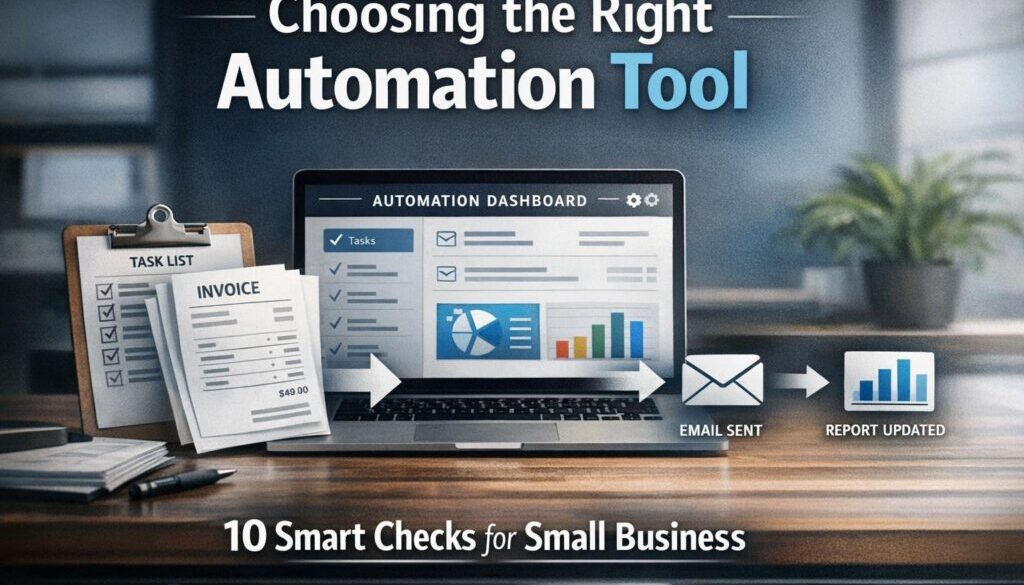
If you are trying to choose the right automation tool, the best place to start is not the software itself. Start with the workflow you want to improve. That simple shift can save you from buying something too complex, too limited, or not suitable for the way your business actually works.
For small businesses, the goal is usually straightforward: reduce repetitive admin, cut down on manual data entry, improve consistency, and make everyday tasks easier to manage. The challenge is that there are many types of automation tools, and they are not all designed for the same job.
In this guide, we will walk through a practical way to compare options, understand the differences between workflow automation, AI tools and RPA, and choose an automation tool that fits your systems, budget and compliance needs.
null
If you are also looking for practical help with business process improvement, Simple Automations works with small businesses to simplify repetitive work through small business automation and tailored automation solutions.
What Is an Automation Tool?
An automation tool is software that carries out part of a business process automatically. Instead of a person copying information from one system to another, sending the same reminder every week, or updating records by hand, the tool completes those steps based on rules you set.
That might sound simple, but it can make a meaningful difference to daily operations. A good automation setup can handle tasks such as routing enquiries, sending notifications, updating records, creating documents, or triggering approvals.
What automation does in a small business
In small business terms, automation is about removing the repetitive parts of a process so people can focus on the work that needs judgment, customer service or decision-making.
- A new form submission can create a record in your CRM.
- An invoice can trigger a reminder if it remains unpaid.
- A completed job can create the next internal task.
- A file upload can be renamed and filed automatically.
That is why choosing the right automation tool matters. The tool needs to match the task, not just the brand or price point.
Automation vs AI vs RPA
These terms are often used together, but they are not the same thing.
- Workflow automation moves information and actions through a set process.
- AI tools help interpret, summarise, classify or draft information.
- RPA (robotic process automation) is often used when software has to work through screens in older or desktop systems.
Microsoft’s official Power Automate documentation describes automation across apps and services, including cloud flows, desktop flows, approvals and connectors. Google also documents automation through Apps Script and AppSheet.
The key point is simple: AI can help with thinking-type tasks, but an automation tool is still needed to move work from one step to the next.
Start With the Process, Not the Software
The biggest mistake small businesses make is starting with the tool. A better approach is to map the process first, then choose software that fits.
Before you compare platforms, write down the workflow in plain English:
- What starts the process?
- What information comes in?
- What needs to happen next?
- Are there exceptions?
- Does anyone need to approve it?
- Which systems need to be updated?
- Does the task involve personal information or sensitive data?
That process map will quickly show whether you need a simple trigger-action setup, a more complete workflow engine, or something that can handle approvals and exceptions.
Map the trigger, input, action and exception
A useful way to assess any automation tool is to think in four parts:
- Trigger: what starts the workflow
- Input: what data is available
- Action: what the system should do
- Exception: what happens when something is missing or unusual
This matters because many tools work well for the first three parts but fall apart when exceptions appear. If your business process often needs human review, choose a tool that supports approvals and conditional steps rather than assuming a simple connector will be enough.
Identify approval steps and compliance needs
If the workflow involves money, customer records, legal documents or personal information, approvals and access control become more important. In that case, the right automation tool is not just the one that is easiest to set up. It is the one that can support visibility, auditability and proper permissions.
For Australian businesses, privacy and record-keeping should also be part of the selection process. The Australian Privacy Principles and the Privacy Act 1988 are important references where personal information is being handled. For record keeping, the ATO record-keeping guidance and business.gov.au are useful starting points.
Which Workflows Are Best to Automate First?
If you are not sure where to begin, start with the work that is repetitive, rule-based and time-consuming. These are usually the best candidates for your first automation tool implementation.
Repetitive admin tasks
These are the obvious wins because they happen often and follow a clear pattern.
- copying form details into another system
- sending the same follow-up email
- updating spreadsheets or records
- filing documents in the right location
- creating recurring reminders
Approval and notification workflows
Approval flows are a strong fit for automation because they usually follow a predictable path. For example, a request can be routed to the right person, approved or declined, and then moved to the next step automatically.
Reporting, routing and record updates
If your team spends time moving information between systems, updating reports or routing tasks, a well-chosen automation tool can reduce manual handling and keep information more consistent.
Document-heavy workflows are often a good place to begin. Simple Automations’ trust account automation case study is one example of how a repetitive administrative process can be simplified.
The Main Types of Automation Tools
Not all automation products do the same thing. Understanding the main categories will help you choose the right automation tool for the job.
Trigger-action connectors
These tools are best for simple workflows. A trigger happens, then one action follows. They are useful for straightforward tasks, but they can become limiting if your process has more than one step or if exceptions need special handling.
Workflow automation platforms
These are more flexible and usually better for multi-step business processes. They can often route tasks, update records, send notifications and support approval steps in one sequence.
Built-in Microsoft 365 automation
If your business already uses Microsoft 365, it may make sense to begin there. Microsoft’s Power Automate is designed for workflow automation across apps and services and includes approvals, connectors and desktop flows.
That does not mean it is always the right fit, but it is often worth checking before you buy a separate platform. For businesses already invested in Microsoft tools, the simplest automation tool may be one that fits the ecosystem you already use.
Built-in Google Workspace automation
Google Workspace users should also look at the tools already available in their stack. Google documents Apps Script for extending and automating Workspace apps, and AppSheet help confirms automation capabilities in the AppSheet product.
If your team mostly works in Gmail, Sheets, Docs and Drive, the right automation tool may already be part of your existing subscription or environment.
AI-assisted tools
AI-assisted tools are useful where the job is less about moving data and more about understanding it. They can help summarise emails, classify requests, extract details from documents or draft content for review.
But AI alone is not the same as workflow automation. In many cases, the best result comes from using AI inside a broader automation tool so the business can both interpret information and act on it.
RPA for legacy systems
RPA can be useful when you need to automate work in older systems that do not connect easily through modern integrations. Microsoft’s Power Automate Desktop documentation is one example of how desktop automation is used in that style of workflow.
If your business software is older or screen-based, an RPA-capable automation tool may be a better fit than a simple connector platform.
How to Compare Automation Tools
Once you know the kind of workflow you want to improve, compare tools using practical business criteria rather than marketing language.
Integrations and app compatibility
The first question is whether the tool connects to the systems you already use. If it cannot talk to your CRM, accounting software, file storage or calendar, it may create more work than it removes.
Check whether the automation tool supports the exact apps and data sources in your process. Do not assume every platform connects to everything you use.
Ease of setup and maintenance
Some tools are easy to start but difficult to maintain. Others may take a little more setup but are easier to manage once they are running.
For a small business, the right automation tool is often the one that is simple enough to maintain without specialist help every time a change is needed.
Security and access control
Automation tools often need access to email, files, calendars and customer records. That means permissions matter.
Look for user access controls, role-based permissions and clear admin settings. If more than one person will manage the workflow, make sure the tool supports that in a sensible way.
Privacy and data handling
If personal information is involved, check where data is stored, who can access it and what the vendor says about privacy. The OAIC guidance and Australian privacy law may be relevant depending on the workflow.
This is especially important when a automation tool is connected to forms, customer records or staff information.
Scalability and cost structure
A tool can look affordable at first and become expensive later if pricing increases with usage, users or premium connectors. Before you buy, check how the cost changes as your workflow grows.
You do not need the biggest platform. You need the automation tool that fits the current workflow and can grow without becoming unwieldy.
When Microsoft or Google Automation Is Enough
For many small businesses, built-in automation in Microsoft 365 or Google Workspace will be enough for the first stage of improvement. That is especially true if the workflow is simple and most of the work already happens inside that ecosystem.
Best fit for existing ecosystem users
If your business already lives in Microsoft or Google tools, it may be sensible to start there rather than adding another platform to manage. Your best automation tool might be the one you already pay for or use every day.
When a dedicated platform is still better
A dedicated platform may be a better choice if you need:
- more advanced logic
- multiple system connections
- approval workflows
- stronger exception handling
- better cross-team visibility
The key is not whether the tool is popular. It is whether the automation tool fits the job you need it to do.
Privacy, Security and Australian Compliance
For Australian small businesses, privacy and compliance should be part of the selection process from the beginning, not an afterthought.
Personal information and the APPs
If your workflow handles customer or staff information, review the Australian Privacy Principles and think about collection, use, disclosure and storage. A suitable automation tool should support careful handling of that information.
Records, retention and access controls
Automation can improve record keeping, but only if records are stored in a way that makes sense for the business. Make sure your workflow does not bury important files in a system nobody checks.
Consider whether the tool supports sensible retention, searchable records and controlled access. That matters as much as the automation itself.
Cross-border data considerations
Some tools store data or process information outside Australia. That may not automatically rule them out, but it should be understood before rollout. When choosing an automation tool, ask where data is held, how it is protected and who can access it.
How to Test a Tool Before You Roll It Out
Never roll out a new system across the whole business on day one. Start with a small pilot and test the workflow in a controlled way.
Run a low-risk pilot
Choose a simple process first. Ideally, it should be repetitive, low risk and easy to monitor. That gives you a chance to see how the automation tool behaves in practice.
Check failure points and exceptions
Look for what happens when the input is incomplete, when someone uses the wrong format, or when another system is unavailable. Good automation is not only about the happy path.
Confirm ownership, permissions and support
Before going live, decide who owns the automation, who can edit it, and who will troubleshoot it if something breaks. Many businesses underestimate the ongoing maintenance side of an automation tool.
This is also where a practical implementation partner can help. Simple Automations’ content calendar automation case study shows how a workflow can be structured around a repeatable business process, while the automation case studies page gives more examples of automation in real business settings.
Questions to Ask Before You Buy
If you are comparing vendors or platforms, ask direct questions before you commit.
Pricing, usage limits and premium connectors
Find out what is included, what costs extra and how pricing changes as you add users or automate more tasks. A low-cost automation tool can become expensive if the features you need sit behind premium tiers.
Data storage, security and vendor support
Ask where data is stored, what security controls are available, and how support is provided if something goes wrong. These questions matter more than the sales pitch.
What happens when integrations break?
Every automation depends on systems staying connected. Ask what happens if an app changes, an account expires or a field name is updated. A reliable automation tool should be manageable when things do not go perfectly.
Simple Decision Checklist for Small Businesses
If you want a quick way to narrow things down, use this checklist.
- Is the process repetitive and rule-based?
- Do you know exactly what starts the workflow?
- Do your current systems already support part of the process?
- Does the task involve personal information or approvals?
- Will you need human review at any stage?
- Can the tool integrate with your existing software?
- Is the pricing structure sustainable as you grow?
- Can your team realistically maintain it?
If you answer yes to most of those questions, you are probably close to the right automation tool. If the answers are unclear, the workflow may need more planning before you buy anything.
Conclusion
The best way to choose the right automation tool is to start with the workflow, not the software. Map the process, understand the systems involved, check privacy and security needs, and compare tools based on how well they fit the job.
For many small businesses, that means starting with the tools already available in Microsoft or Google, then moving to a dedicated platform only when the workflow needs more flexibility. The goal is not more technology. The goal is simpler business operations.
If you are ready to explore what could be automated in your business, Simple Automations can help you identify the right approach and build practical automation solutions that reduce admin without adding unnecessary complexity.
Ready to Simplify Your Business Processes?
If you are not sure which automation tool is right for your workflow, we can help you work through the options and identify a practical next step.
Note: For businesses interested in well-designed, self-service digital experiences, the same principle applies beyond automation — simple, thoughtful systems make life easier for customers too. That is a core value behind related brands like Roamzy Connect and Walkables.