Business Approval Automation: How to Simplify Approvals Without Losing Control
Manual approvals can slow a business down quickly. Requests sit in inboxes, people chase decisions by email, and nobody is quite sure which version is the latest. Business approval automation helps solve that by creating a clearer, more consistent way to send, review, approve, and record everyday requests.
For small businesses, the goal is not to remove human judgement. It is to remove the repetitive admin around it. In the right workflow, business approval automation can reduce email chasing, improve visibility, and make approvals easier to track when money, payroll, contracts, or sensitive information are involved.
null
This guide explains what business approval automation is, which processes are easiest to automate, what tools can help, and what Australian businesses should keep in mind around privacy, record keeping, and security.
If you are also looking for broader ways to reduce admin across your business, small business automation is a good starting point.
What is business approval automation?
Business approval automation is the use of forms, rules, notifications, routing, and sometimes AI to move approval tasks through a business process with less manual follow-up. Instead of people emailing back and forth to ask for sign-off, the request is sent through a defined workflow.
In practical terms, the workflow usually does a few things:
- captures a request in a standard format
- sends it to the right approver
- reminds people if a decision is overdue
- records the outcome
- starts the next step only after approval is given
How it works
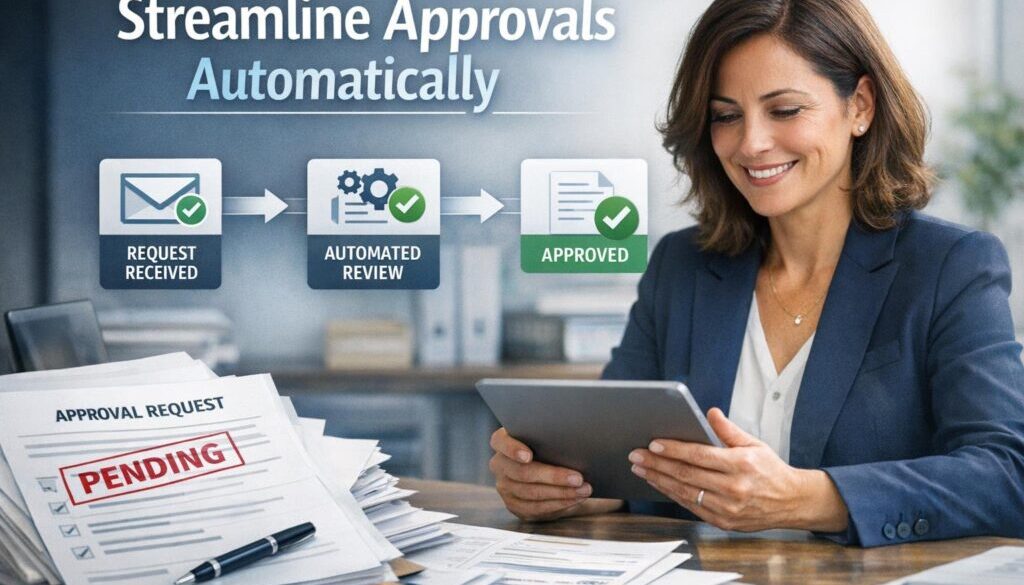
A simple approval workflow usually starts with someone filling out a form or submitting a request. The request is then checked, routed, and sent to the right person or group. Once approved or rejected, the system records the decision and may trigger the next action, such as payment, filing, task creation, or contract signing.
This is where business approval automation becomes useful: it keeps the process moving without removing accountability.
Common approval types it can handle
Small businesses often use business approval automation for:
- purchase approvals
- invoice approvals
- expense claims
- leave requests
- contract or document sign-off
- quote or job approval
- onboarding or change-request approvals
These are common because they repeat often, involve multiple people, and can become messy when managed only through email or chat.
Why small businesses automate approvals
Many small businesses still handle approvals with inboxes, spreadsheets, paper forms, or shared folders. That can work for a while, but it often becomes slow and hard to track as the business grows. Business approval automation helps create a more reliable process without forcing a large-system overhaul.
Faster decisions
When requests arrive in a standard format and go directly to the right approver, there is less back-and-forth. That means less time spent chasing missing information and fewer delays caused by requests sitting unnoticed.
Better visibility and accountability
A well-designed workflow shows who approved what, when they approved it, and what happened next. That is useful for team accountability and for internal control.
Less email chasing and version confusion
Approval conversations spread across email threads can make it hard to know which file or request is current. Business approval automation keeps the request, the comments, and the outcome together in one place.
If your business is trying to remove repetitive admin from everyday workflows, the automation solutions page is a useful place to see how process problems can be turned into practical workflows.
Which approval processes are easiest to automate?
Not every approval process should be automated in the same way. The easiest ones are usually repetitive, rule-based, and structured. That makes them a strong fit for business approval automation.
Expense claims
Expense approvals are a common starting point because they usually follow a clear pattern: submit the claim, attach evidence, route it to the approver, and record the result.
Invoice approvals
Invoices often need checking before payment. Automation can help route invoices to the right person based on amount, supplier, department, or project.
Leave requests
Leave approvals are often straightforward once the rules are defined. A workflow can check the request, notify the manager, and update the record once approved.
Purchase requests
Purchase approvals are another strong candidate because businesses often want visibility before spending money. A workflow can capture the request, apply approval rules, and stop the process until sign-off is received.
Contract or document sign-off
Some documents need internal review before they are signed. Business approval automation can keep the process moving while preserving a record of each step.
Onboarding or change requests
When a new team member joins or a process changes, there are often a few approval steps to complete. A workflow can help make sure the right people review the request before work begins.
What parts of an approval workflow can be automated?
One of the easiest ways to think about business approval automation is by breaking the process into steps. Some steps are good candidates for automation, while others should stay human-reviewed.
Request submission
Instead of asking someone to send an email, a form can collect the request in a consistent format. That reduces missing details and makes routing easier.
Validation
The workflow can check whether required fields are completed, whether an attachment has been included, or whether the request meets basic rules before it moves forward.
Routing
The request can be sent to the correct approver based on amount, department, project, location, or request type. This is one of the most useful parts of business approval automation because it removes manual sorting.
Notifications and reminders
Approvers can be notified automatically, and reminders can be sent if a decision has not been made. Escalation can also be used if a request sits too long.
Approval capture
The workflow can record whether the request was approved, rejected, or returned for more information. It can also store comments, timestamps, and the approver’s identity.
Downstream actions
Once approved, the workflow can trigger the next step, such as creating a task, updating a record, or sending the request to another system. This keeps approved work from sitting idle.
Audit trail and reporting
Approval history, comments, and timestamps should be retained where relevant. That helps with accountability, reporting, and internal review.
Document-heavy workflows are often a strong fit for automation. The trust account automation case study is one example of how a repetitive administrative workflow can be simplified when documents and approvals need to move through a process in a controlled way.
What tools can small businesses use?
You do not usually need a large enterprise system to start. In many cases, business approval automation can be built from tools a business already uses.
Microsoft Power Automate and Teams
Microsoft’s workflow tools can support approvals across Microsoft services and connected apps. Microsoft also documents approvals in Teams, which can be helpful for teams already working in that environment.
For official documentation, see Approvals in Microsoft Teams and the Power Automate documentation.
SharePoint and Microsoft 365 tools
SharePoint and SharePoint Lists can be used as a data source for structured requests, with workflows layered on top.
Google Workspace and AppSheet
Google Forms, Sheets, Drive, Gmail, and AppSheet can support simple request and routing workflows. The exact setup depends on the business process and the tools in use.
See the AppSheet support hub for current documentation.
Xero and accounting add-ons
Accounting-related approvals often sit around invoices, bills, and expenses. Xero and connected apps can be part of that workflow, but the exact approval capability should always be checked in current product documentation.
Refer to the Xero Central help centre for the latest guidance.
Monday.com, Asana, Smartsheet, Airtable, and Jira
Workflow and project tools can handle approvals through forms, statuses, notifications, and permissions. These are often a good fit for businesses that want a visible process without building something too complex.
Zapier and Make
Automation tools such as Zapier and Make can connect forms, email, spreadsheets, task tools, and other systems. They are often used to move data from one step to the next in a simple approval workflow.
See the Zapier Help Center and the Make Help Center for current product information.
DocuSign and Adobe Acrobat Sign
When the approval process ends in a signature, e-signature tools can be more appropriate than a general workflow app. They are useful where the final step is formal sign-off rather than an internal approval note.
See the DocuSign Support Center and Adobe Acrobat Sign Help for official documentation.
What AI can and cannot do in approval workflows
AI can be helpful in business approval automation, but it should support the process rather than replace human judgement. That matters especially when approvals affect money, payroll, legal documents, or sensitive customer information.
Good uses for AI
- extracting information from invoices or scanned documents
- classifying request types
- summarising approval requests for faster review
- drafting approval emails or comments
- highlighting unusual or missing details that may need attention
Where human review is still required
Human review should stay in place for important decisions, especially when the request affects finances, compliance, privacy, or legal commitments. AI can help organise and summarise the request, but it should not be treated as the final authority.
If you are interested in how workflow automation can also support structured content planning and repetitive process management, the content calendar automation case study shows another example of turning a repetitive workflow into a clearer process.
Australian privacy, security, and record-keeping considerations
For Australian businesses, approval workflows are not just about speed. They can also involve privacy, record keeping, security, and internal control. That is particularly important when requests contain personal information, invoices, contracts, bank details, or staff records.
Privacy and personal information
If personal information is collected, stored, or transmitted through the workflow, the Australian Privacy Principles may be relevant. The Office of the Australian Information Commissioner provides guidance on the APPs and privacy governance.
Read more at the Australian Privacy Principles page.
Record retention
Approval records may need to be retained alongside related business documents. That is important for internal control, disputes, and business records management. The Australian Taxation Office has guidance on record keeping for businesses.
See the ATO’s record keeping for business guidance.
Security and access control
Approval systems often contain sensitive information. Access should be limited to the right people, and the workflow should be designed with reasonable security in mind. The Australian Cyber Security Centre’s Essential Eight is a useful reference point for practical controls.
Review the Essential Eight guidance.
Data breach response
If a system holding personal information suffers an eligible breach, the Notifiable Data Breaches scheme may be relevant. For businesses automating approvals, it is worth understanding how breach handling fits into the overall process.
See the OAIC’s Notifiable Data Breaches scheme page.
How to avoid common approval automation mistakes
Business approval automation works best when it is simple, clear, and designed around real business rules. The most common mistakes usually come from trying to automate too much too soon.
Overcomplicated workflows
If the workflow has too many steps, too many exceptions, or too many approval branches, people stop using it properly. Start with the simplest version that solves the main problem.
Wrong approver routing
If a request goes to the wrong person, the system creates more friction than it removes. Clear routing rules are essential.
Missing audit records
Approvals that happen outside the workflow can create gaps in the record. Make sure the system captures the decision, the date, and any relevant comments.
Too much reliance on one notification channel
If the only reminder is a single email, important approvals can still be missed. Good workflows often use more than one notification method or escalation rule.
When businesses need a more customised workflow than an off-the-shelf setup provides, automation services can help map the business process and build something practical.
How to start with one workflow first
The easiest way to introduce business approval automation is to begin with one process that causes regular friction. That way, the business can learn from a small rollout before expanding.
Choose a high-friction process
Look for a workflow that involves repeated chasing, delays, or confusion. Expense claims, purchase requests, and invoice approvals are often good first candidates.
Map the steps
Write down how the approval currently works. Include who submits the request, who reviews it, what information is required, what happens when the request is approved, and what happens when it is rejected.
Test, refine, then expand
Start with a simple version, test it with the team, and refine the steps before expanding to other workflows. Small improvements usually lead to better adoption than a large, complicated rollout.
That staged approach is often the most practical way to automate your small business without creating unnecessary complexity. You can explore the broader approach on the automation for small business page.
When a simple workflow is enough
Not every approval process needs a dedicated system. In some cases, a simple form plus a notification plus a clear record is enough. In other cases, especially where there are financial, legal, payroll, or compliance concerns, the workflow may need more structure and better controls.
The right answer depends on the risk, the number of requests, and how much manual follow-up the business is currently doing. If the main problem is slow approval chasing, business approval automation often delivers value quickly even in a simple form.
Practical examples of approval workflows
Here is a simple way to think about business approval automation in practice:
| Workflow step | Manual process | Automated opportunity |
|---|---|---|
| Submission | Email or paper form | Standard online request form |
| Routing | Someone forwards it manually | Automatic routing by rule |
| Reminder | Someone follows up by email | Automated reminder or escalation |
| Approval record | Decision buried in inboxes | Captured timestamp and comments |
| Next action | Someone starts the next task | Approved request triggers the next step |
This type of structure helps a business keep approvals moving without losing the human review that matters.
How Simple Automations can help
If your business has approval-heavy processes that are still managed through email, spreadsheets, or manual follow-up, Simple Automations can help identify a workflow that is worth simplifying. The focus is on practical automation that fits the way small businesses actually work.
For businesses wanting to see how automation is applied in real projects, the automation case studies page is a useful place to start.
Ready to Simplify Your Approvals?
If your team is spending too much time chasing sign-offs, it may be time to map a simpler approval workflow. Start with one process, keep human review where it matters, and build from there.
Final takeaways
Business approval automation is most useful when it reduces admin without removing control. The best workflows are usually simple, clearly routed, and designed around the real decision-making process in the business.
If you start with one approval process, keep the workflow easy to understand, and make sure the record is captured properly, you can often remove a lot of manual chasing and confusion. For Australian businesses, privacy, security, and record keeping should be built in from the start, not added later.
Used well, business approval automation is not about making things more technical. It is about making approvals simpler, clearer, and easier to manage.