How to Automate Job Status Updates: A Practical Guide for Small Businesses
If your team is still sending job updates manually, you already know how quickly the admin adds up. Calls, emails, texts, follow-ups and internal handovers can take more time than the job itself. That is where job status automation can make a real difference.
This guide explains how to automate job status updates in a way that is practical, clear and suitable for small businesses. You will learn which job stages are worth automating, how status-triggered workflows work, what tools can help, and what Australian privacy and spam rules you need to keep in mind.
null
The goal is not to automate everything. The goal is to reduce repetitive admin, improve communication and keep updates accurate without creating more problems than you solve.
What is job status automation?
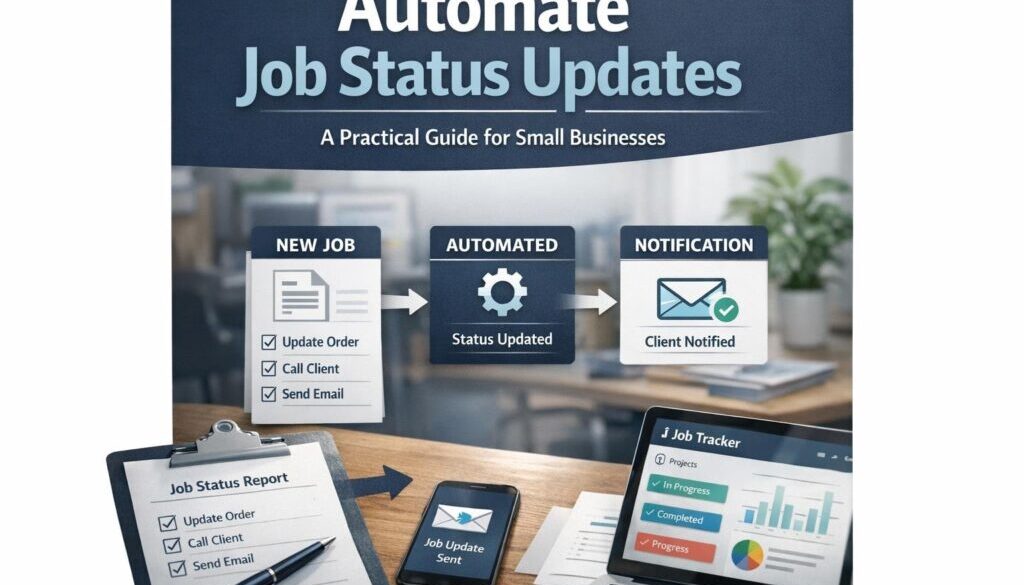
Job status automation is the process of sending an update automatically when a job changes stage. Instead of someone manually checking a job and sending a message, the system reacts to a status change and sends the right update to the right person.
In practice, a “job” might be a repair, a service call, a project task, a support ticket, a quote, or an order. The status could be things like scheduled, in progress, waiting on parts, completed, invoiced or paid.
What a job status update means in practice
A job status update is simply a message that tells someone where the job is at. It may go to a customer, a technician, an office manager, a project lead or an internal team.
- “Your job has been booked for Tuesday.”
- “The technician has been assigned.”
- “We are waiting on parts.”
- “The job is complete and ready for invoicing.”
Manual vs automated updates
Manual updates work, but they depend on someone remembering to send them. That is where delays and mistakes creep in. With job status automation, the update is triggered by the workflow itself, which makes communication more consistent.
| Manual update | Automated update |
|---|---|
| Someone checks the status and sends a message | A status change triggers the message automatically |
| Updates can be delayed or missed | Updates happen as part of the process |
| More time spent on admin | Less repetitive follow-up |
| Greater risk of inconsistency | More consistent communication |
Why automate job status updates?
Most small businesses do not need more software for the sake of it. They need less chasing, less repetition and fewer handoffs that rely on memory. That is the real value of job status automation.
Reduce admin and follow-up work
When status updates are handled manually, staff spend time checking records, drafting messages and following up on jobs that should already be moving. Automation can remove a lot of that repeat work.
That is why job-heavy businesses often start with automation around repetitive admin. If you are looking at broader ways to automate repetitive tasks, Simple Automations’ small business automation page is a useful starting point.
Improve customer communication
Customers want to know what is happening without having to chase. A simple update at the right time can reduce uncertainty and cut down on inbound calls or emails asking, “Has anything changed?”
Cut delays and missed handoffs
Many workflow problems happen at handover points: a job is assigned, a part is ordered, a technician finishes, or an invoice should be sent. A status-triggered workflow helps keep those transitions visible.
If your business wants help designing practical workflows, the automation solutions page explains how Simple Automations approaches these kinds of problems.
Which job stages are best to automate?
The best place to start is usually with a few clear, low-risk stages. Not every status needs a message. Focus on the stages where customers or staff genuinely benefit from knowing what changed.
Job created
This is a good stage for an automatic confirmation. It tells the customer or internal team that the request has been received and logged.
Scheduled or assigned
When the job is booked or assigned, an update can confirm who will attend and when the work is expected to happen.
Work started
This stage helps keep customers informed that the job is underway. For internal teams, it can signal that a task has moved from planning into action.
Waiting on parts or blocked
This is one of the most useful stages to automate because it reduces uncertainty. If the job is delayed, the customer can be informed before they need to ask.
Completed
Completion updates can trigger next steps such as invoicing, follow-up, review requests or internal closeout.
Invoiced or paid
These are useful milestones for internal tracking and, where appropriate, customer communication.
How job status automation works
At its simplest, job status automation uses a trigger and an action. The trigger is the status change. The action is the update that follows.
Status-change triggers
Many tools support automations based on status changes, task movement, form submissions or workflow events. In plain English, that means the system notices when something changes and then does something in response.
Microsoft explains this kind of event-based setup in its Power Automate triggers and actions documentation. Zapier also describes the same general model in its how Zapier works overview.
Internal alerts vs customer notifications
Not every status update needs to go to a customer. Some are better kept internal.
- Internal alerts can notify staff, dispatchers, or account managers.
- Customer notifications can confirm booking, progress, delay or completion.
- Task updates can move work between team members or departments.
A good rule is to decide who needs to know, what they need to know, and whether the update should be automatic or checked first.
Cross-system syncing
In some businesses, the job status lives in one system while customer communication or invoicing happens in another. That is where integrations can help. For example, a job system may update a CRM, send a message through email or SMS, or create a follow-up task in another platform.
If you are exploring broader workflow automation, Simple Automations has more general guidance on business automation resources.
What tools can automate status updates?
There is no single best tool for every business. The right option depends on how your jobs are managed, who needs the updates and what software you already use.
Job management software
Many trade, field service and job management platforms already include statuses, notifications and workflow features. Official help centres for tools such as ServiceM8, Simpro, Tradify and Jobber are useful places to check current automation and notification features.
CRM and help desk tools
If your “jobs” are really sales opportunities, support tickets or client requests, CRM and help desk systems may be a better fit. Tools like HubSpot and Zendesk often support status changes, workflows and customer communication.
Microsoft 365 and Power Automate
For businesses already using Microsoft tools, Power Automate is a common way to connect apps and create event-based workflows. It can be useful when a status change in one system needs to trigger an email, approval or task elsewhere.
Google Workspace and automation tools
Businesses using Google Workspace often combine Gmail, Sheets, Forms and other tools with automation platforms such as Make, Zapier or custom scripts. Google’s official Google Workspace and Gemini in Workspace pages outline the main tools and AI features available in that environment.
Zapier, Make, n8n and similar platforms
General automation platforms are often used when a business needs to connect different tools without building a custom system from scratch. Official documentation for Make and n8n is helpful if you want to understand how workflows are structured.
If you need a tailored setup rather than a generic tool, Simple Automations’ automation services page is the best place to start.
Where AI can help
AI can be useful in job status automation, but it should support the workflow rather than replace human judgement.
Drafting updates
AI can help draft customer-friendly status messages, delay notices or internal summaries. That can save time, especially when staff are turning technical notes into plain English.
Summarising notes
If a technician, consultant or support agent leaves detailed notes, AI may help turn those notes into a shorter update for the next person in the workflow.
Classifying statuses
Some tools may use AI to help categorise messages or notes into a status such as urgent, waiting on customer, blocked or completed.
Why human review still matters
AI can make mistakes, especially if the message involves dates, costs, safety issues or service commitments. For customer-facing updates, a human check is often the safer option.
That is especially important in sensitive or document-heavy workflows. Simple Automations’ trust account automation case study is a good example of why accuracy and control matter in administrative workflows.
Australian privacy and spam considerations
If your automation sends email or SMS updates, you need to think about privacy, consent and message type. The details matter because job records often include personal information such as names, phone numbers, addresses, notes and photos.
Privacy Act and APPs
The Office of the Australian Information Commissioner explains the Australian Privacy Principles and its guidance on small business and privacy. These are relevant when customer information is collected, stored, shared or accessed through automation tools.
Spam Act and commercial messages
The Spam Act 2003 and ACMA’s spam guidance are important if automated messages could be considered commercial electronic messages. If you are unsure, it is worth checking the rules before sending anything at scale.
Data security and access control
Automations should only expose the information that people need to see. Good access control, secure logins and clear permissions help reduce the risk of sending the wrong update to the wrong person.
Common risks to avoid
Automation is useful, but only if the workflow is built carefully. A rushed setup can create new headaches.
Wrong status data
If the source status is wrong, the automation will send the wrong message. That is why status discipline matters.
Over-communication
Too many updates can annoy customers and dilute the value of the messages that matter.
Broken integrations
Automations can fail if a field changes, a connection breaks or a software update affects the workflow.
AI-generated inaccuracies
AI is helpful for drafting and summarising, but it should not be trusted blindly. Inaccuracy in a customer update can damage confidence fast.
How to start with a simple workflow
The easiest way to begin is to keep the first version small. Do not try to automate every possible stage on day one.
- Choose one status. Start with a clear stage such as booked, started or completed.
- Decide who gets notified. Customer, staff or both.
- Write the message first. Keep it short, clear and useful.
- Test before switching on. Check the trigger, timing and recipient.
- Add human approval where needed. Especially for delays, complaints or sensitive jobs.
If you want to see how an automation project is approached in practice, Simple Automations’ content calendar automation case study shows how a repeatable workflow can be structured clearly, while the digital product automation case study shows how automated delivery can simplify a process that would otherwise be manual.
When should a human approve the update?
Some updates are safe to automate straight away. Others should be reviewed first.
- Delay explanations
- Price changes
- Complaints or disputes
- Safety-related information
- Any message that could create legal or commercial risk
A sensible approach is to automate routine updates and keep exceptions in human hands.
Quick answers about job status automation
What should be automated first?
Start with the status changes that happen most often and cause the most follow-up. For many businesses, that is booked, started, blocked and completed.
Should customers or staff get different messages?
Yes, often they should. Staff may need detailed operational notes, while customers usually need a simpler progress update.
Can AI write the updates for us?
AI can help draft messages, but it should not be the only control mechanism for customer-facing communication.
Do we need a complex system?
Not always. Many businesses can begin with a simple workflow in the software they already use, then expand later if needed.
Conclusion
Job status automation is one of the most practical ways to reduce repetitive admin and improve communication in a small business. The best setups are simple, status-driven and designed around real workflow needs, not technical complexity.
Start with one useful stage, keep the message clear, and make sure privacy, spam and data-handling considerations are covered. If you need help designing a workflow that fits the way your business actually operates, Simple Automations can help with practical automation for small business.
Ready to Simplify Your Job Updates?
If manual follow-ups are slowing your team down, Simple Automations can help you identify the right status-triggered workflow and build it in a way that is simple, reliable and business-focused.