How to Automate Customer Reminders: A Practical Guide for Small Businesses
Customer follow-up is one of those jobs that matters a lot, but is easy to forget when the business gets busy. If you want to automate customer reminders, the goal is simple: reduce missed appointments, improve payment follow-up and take repetitive admin off your team’s plate.
Done well, reminder automation helps customers get the right message at the right time. Done poorly, it can feel spammy, confusing or out of step with Australian privacy and spam rules. This guide explains how to set up reminder workflows in a way that is simple, reliable and customer-friendly.
We’ll look at the types of reminders you can automate, how the workflow works, which tools are commonly used, where AI can help, and what to watch for when it comes to consent and compliance.
null
If you are looking for broader ways to automate your small business, reminder workflows are often one of the easiest places to start because the process is repetitive, time-sensitive and easy to measure.
What is customer reminder automation?
Customer reminder automation is the use of software, workflows and sometimes AI to send timely reminders without a person manually chasing every customer. In practice, it means a system can look at an event or date, then send the right message automatically.
For small businesses, this is often used for appointment reminders, invoice follow-ups, booking confirmations, review requests and renewal notices. The main benefit is consistency. Instead of relying on staff to remember every follow-up, the process runs in the background.
Common reminder types
- Appointment reminders
- Invoice and payment reminders
- Booking confirmations and rescheduling nudges
- Subscription renewal reminders
- Service follow-up reminders
- Review requests after a job is completed
- Document or form completion reminders
- Abandoned cart reminders for ecommerce
Why businesses automate reminders
Most businesses automate reminders for the same practical reasons:
- to reduce missed appointments
- to improve payment timing
- to lower manual follow-up work
- to standardise communication
- to reduce human error
- to keep customers informed without adding admin
If the process is repetitive and date-driven, it is usually worth exploring whether you can build an automation solution around it.
Which reminders can be automated?
Not every message should be automated, but many routine reminders are a good fit. The key question is whether the workflow is predictable enough to follow rules.
Appointment reminders
Appointment reminders are one of the clearest use cases. A booking is made, a date is confirmed, and the system can send a reminder before the appointment. This is useful for clinics, consultants, trades, salons, tutors and other service businesses.
You can also add a second reminder, such as a same-day message or an internal alert if the customer has not confirmed.
Payment and invoice reminders
Invoice reminders can help reduce late payments and reduce the need for awkward manual follow-up. A simple reminder sequence might begin before the due date and then continue if the invoice remains unpaid.
For businesses using accounting software, it helps when the reminder workflow connects cleanly to the invoicing process. Official support documentation from Xero, MYOB and QuickBooks Online can be useful when checking what is possible in each platform.
Booking confirmations and rescheduling nudges
Confirmation reminders can reduce no-shows and help customers feel more organised. If a customer needs to reschedule, an automated reminder can include a simple next step rather than leaving them to dig through emails or call the office.
Subscription, review and follow-up reminders
Some reminders are less about urgency and more about relationship management. Renewal notices, post-service check-ins and review requests can be automated to arrive at the right time without staff having to manually schedule each one.
For businesses that rely on repeat engagement, this sort of workflow can support consistency and customer experience. It is also the kind of process that can be built into broader business automation resources as part of a more organised follow-up system.
How customer reminder automation works
At a basic level, reminder automation follows a simple chain: something happens, the system checks the rules, and a message goes out. You do not need to be technical to understand the structure.
Triggers, data, templates and timing rules
A typical workflow uses four main parts:
- Trigger: the event that starts the reminder, such as a booking date or invoice due date
- Customer data: the contact details and relevant record from your CRM, booking tool or accounting system
- Template: the reminder message written in advance
- Timing rules: when the reminder should be sent, such as 24 hours before an appointment or three days before a due date
That structure can be built in a CRM, a booking system, an automation platform or a combination of tools depending on how your business operates.
Escalation and logging
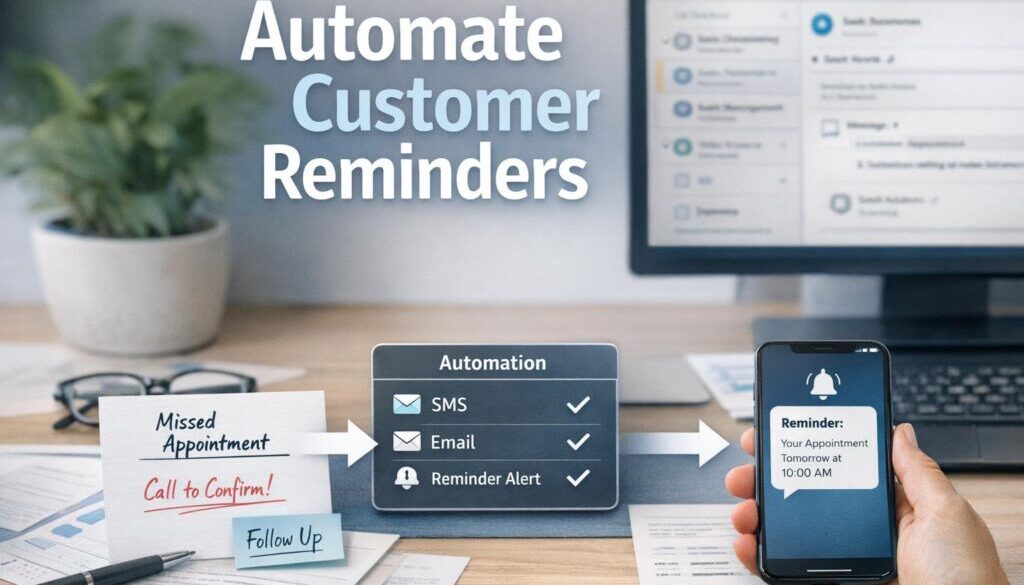
Good reminder automation does not stop at one message. It often includes a follow-up step if the customer does not respond. For example, if an appointment reminder is not confirmed, the workflow might create an internal task for staff to call the customer.
Logging is also important. If a reminder is sent, you want a record of it. That makes it easier to monitor performance, troubleshoot problems and maintain a reliable process.
Example workflow from booking to follow-up
- A customer books an appointment.
- The booking system stores the appointment date and contact details.
- The reminder workflow checks the appointment time.
- An email or SMS is sent at the chosen interval.
- If the customer confirms, the booking stays as scheduled.
- If the customer does not respond, a second reminder or internal task is triggered.
That is the basic logic behind many reminder systems. The details vary, but the idea is the same: reduce manual chasing and keep the process consistent.
Which channels should you use?
The best channel depends on the type of reminder, how urgent it is and how your customers prefer to communicate.
Email is still one of the most common and cost-effective reminder channels. It works well for appointment confirmations, invoice reminders, renewal notices and follow-up emails where there is enough room for detail.
Email is also useful when you want to include links, instructions or a summary of the booking or invoice.
SMS
SMS is often used for urgent reminders because people usually see it quickly. That can make it useful for appointments, delivery updates and payment reminders. But SMS must be used carefully, particularly where consent and message classification matter.
Because SMS is more direct than email, it should be used sparingly and with a clear purpose.
Phone calls and internal notifications
Some reminders are still better handled by a person. High-value customers, sensitive situations or cases where the customer has not responded may be better suited to a phone call. Internal notifications are also useful when staff need to be alerted rather than customers.
How to choose the right channel
A simple rule of thumb is:
- Email for detail and lower urgency
- SMS for short, timely reminders
- Phone call for personal follow-up or exceptions
- Internal notification when staff need to act
The right choice usually comes down to the customer experience you want to create. If the reminder is about a service you provide, the message should feel helpful, not pushy.
What software can small businesses use?
There is no single best platform for every business. The right software depends on where your customer information already lives and how much complexity you want to manage.
CRM and booking tools
Customer relationship management systems and booking tools are often the starting point because they already contain the information needed for reminders. A booking platform can trigger appointment reminders, while a CRM can trigger follow-up reminders based on lead or customer status.
Examples of software categories that may support reminder workflows include CRM systems, booking platforms and client management tools. Current feature sets should always be checked in the official product documentation before implementation.
Accounting and invoicing tools
For payment reminders, accounting software is often the most logical place to start. If invoices already live in your accounting system, you may be able to trigger reminder workflows from due dates or payment status.
Automation tools
Automation platforms connect different apps together so data can move from one system to another. Common tools used for this purpose include Zapier, Make and Microsoft’s Power Automate. Each has different strengths, so the best choice depends on your current systems and the type of workflow you want to build.
For many small businesses, the most practical automation is the one that connects the fewest systems while still solving the problem.
AI tools for drafting and reply handling
AI can help write reminder messages, adjust tone and summarise responses. It can also help classify replies such as “paid”, “need to reschedule” or “please stop”. That said, AI should support the workflow rather than replace business rules.
Microsoft’s guidance on Copilot in Microsoft 365 is a useful example of how AI can assist with drafting and productivity tasks. The important point is to keep human review in place when messages involve dates, payments, consent or sensitive customer details.
How AI can help with reminder automation
AI is useful when reminder communication needs to be fast, consistent and slightly personalised, but it should not be used blindly.
Drafting and personalisation
AI can help draft reminder text in a friendly, clear style. It can also adjust wording for different situations, such as a payment reminder versus a booking reminder. This is helpful for busy teams that do not want to write every message from scratch.
Reply classification and summaries
When customers reply, AI can help sort responses into categories. For example, a reply may indicate that the customer wants to reschedule, has already paid, or needs more information. That can speed up staff response and reduce inbox overload.
Where human review is still needed
Human review is still important for compliance, tone and accuracy. AI should not be trusted to make judgment calls about consent, legal classification or sensitive customer communication without oversight.
If your reminder workflow involves more complex logic, it may be worth reviewing your options through practical automation solutions rather than trying to patch multiple tools together yourself.
Australian privacy and spam compliance considerations
When you automate customer reminders in Australia, compliance matters. A reminder that feels simple from a business perspective can still involve rules around consent, identification and personal information.
Useful official sources include the Spam Act 2003, the Privacy Act 1988, the OAIC’s guidance on Australian Privacy Principles and the Notifiable Data Breaches scheme.
Consent and unsubscribe requirements
Commercial electronic messages generally require consent, identification and an unsubscribe option unless an exception applies. That is why it is important to be clear about whether a message is purely transactional, service-related or promotional.
If a reminder includes marketing content, it may no longer be treated as a simple service message. That is one reason to keep reminder workflows clean and purpose-specific.
Transactional vs marketing messages
A reminder about an appointment or an invoice is usually different from a promotional message. The more you mix the two, the more you risk confusion. A good rule is to keep reminders focused on the job they are meant to do.
Personal data, storage and record keeping
Reminder systems often use names, contact details, appointment information and payment status. That means you need to think about how data is stored, who can access it and how long it is kept. The Australian Cyber Security Centre has useful guidance for small businesses managing cloud software and connected systems.
Good record keeping also helps if you ever need to check what was sent, when it was sent and why.
Common mistakes to avoid
Most reminder systems fail because of poor setup, not because automation is a bad idea.
Wrong timing
Sending reminders too early makes them easy to ignore. Sending them too late reduces their usefulness. Timing should match the customer journey, the urgency of the task and the channel being used.
Over-messaging
Too many reminders can feel repetitive or annoying. A reminder sequence should be helpful, not noisy. If customers start ignoring your messages, the workflow may be too aggressive.
Poor data quality
If the customer record is wrong, the reminder will be wrong too. Incorrect names, dates or contact details are common causes of failed automation. Before you automate, make sure the source data is reasonably clean.
No monitoring or fallback process
Automation should be monitored. If a reminder system stops working, you need to know about it. It is also smart to have a fallback process for important reminders, especially where missed appointments or late payments create business risk.
Document-heavy processes can benefit from the same thinking. Our trust account automation case study is one example of a repetitive administrative workflow being simplified through automation.
How to start simply
You do not need a complex system on day one. In fact, the best results often come from starting with one workflow and doing it well.
Begin with one workflow
Choose a reminder that is repetitive, easy to define and valuable to the business. Appointment reminders and invoice follow-ups are common starting points because they are clear, measurable and routine.
Test before scaling
Before rolling the workflow out widely, test it with a small group or a single process. Check the wording, timing, customer experience and internal handoff. Make sure the automation behaves as expected.
Review results and adjust
Once the reminder is running, keep an eye on what happens. Are customers responding? Are staff still having to follow up manually? Are messages arriving at the right time? Small adjustments can make a big difference.
If you are automating content or customer communication more broadly, the same approach used in our content calendar automation case study shows how organised workflows can reduce manual coordination.
When to get help with customer reminder automation
Some businesses can set up a simple reminder workflow themselves. Others benefit from outside help when the process involves multiple systems, compliance concerns or more complicated logic.
That is often the point where a business looks for small business automation support. A good implementation should feel simple to the team using it, even if the behind-the-scenes workflow is doing a lot of work.
If your reminders are tied to digital delivery, the approach is similar to digital product automation, where a structured workflow handles a repetitive customer task without requiring manual chasing.
For businesses that want to explore practical options, Simple Automations focuses on building automation that makes everyday operations easier rather than more complicated.
Conclusion
To automate customer reminders well, start with a clear business problem, choose the right trigger, keep the message simple and make sure your workflow respects Australian privacy and spam requirements. The best reminder systems save time, reduce errors and improve the customer experience without creating extra noise.
If you begin with one workflow and test it carefully, customer reminder automation can become one of the most practical improvements in your business operations.
Ready to Simplify Your Customer Follow-Up?
If you want help designing a simple, reliable reminder workflow for your business, Simple Automations can help you map what should be automated and how to keep it customer-friendly.