“`html
Email
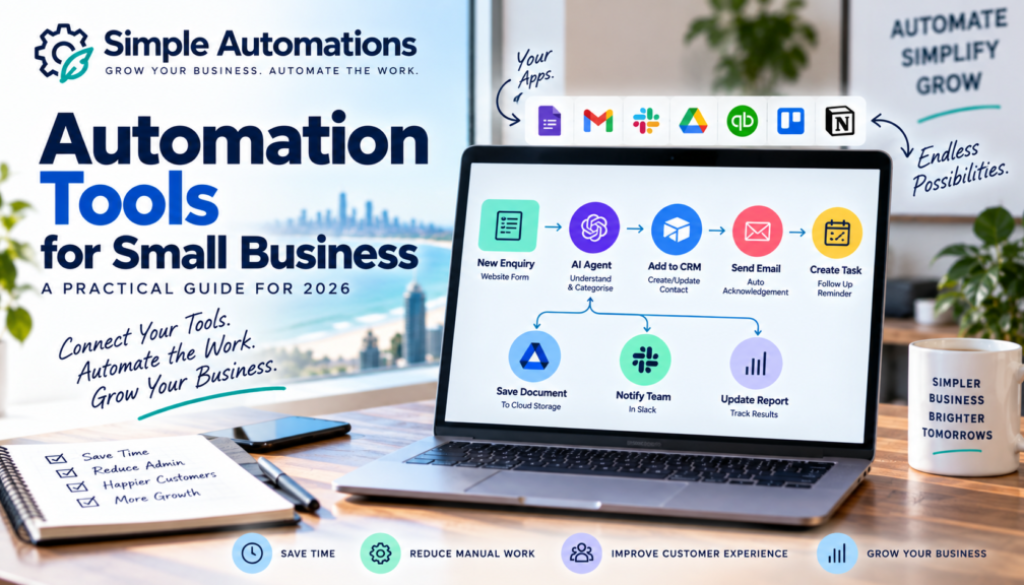
Automation Tools for Small Business: A Practical Guide for 2026
There are more automation tools available to small businesses than ever before.
AI platforms, workflow automation software, business applications, integrations and no-code tools can now connect many of the systems businesses already use every day.
That sounds like good news — and it is.
But it can also create a problem.
With so many different automation tools available, where do you actually start?
Do you need an AI platform? A workflow automation tool? A CRM? An AI agent? Make? Zapier? Something else?
The answer depends on what you’re trying to achieve.
Automation tools for small business should be chosen because they solve a genuine business problem, not simply because the technology looks impressive.
Start with the problem. Choose the technology second.
In this guide, we’ll look at the different types of automation tools available, what they can do, where AI fits in and how a small business can choose the right technology without making things unnecessarily complicated.
What Are Automation Tools?
Automation tools are software platforms that allow businesses to automate tasks, connect applications and create workflows that run with less manual involvement.
Some tools are designed specifically for automation.
Others are business applications that include automation features.
Some use artificial intelligence to interpret information, generate content or make decisions within defined boundaries.
A simple automation might look like this:
Customer completes a form
↓
Customer information is recorded
↓
Confirmation email is sent
↓
Business owner is notified
That process could happen automatically without someone manually moving the information between systems.
For more information about applying automation to a small business, visit our small business automation page.
Why Are Automation Tools Useful for Small Businesses?
Small businesses often operate with limited time and limited staff.
The business owner may be responsible for sales, customer service, administration, marketing and operations.
That means repetitive work can become a significant burden.
Automation tools can help by handling predictable tasks in the background.
For example, instead of manually:
- Copying customer details into a spreadsheet.
- Creating a follow-up reminder.
- Sending a routine acknowledgement.
- Moving a document into a folder.
- Updating several systems.
- Preparing recurring information.
an automation can perform some or all of those steps automatically.
The result isn’t necessarily fewer employees.
The real benefit is giving people more time to concentrate on work that requires human judgement, expertise and customer interaction.
What Types of Automation Tools Are Available?
There isn’t one type of automation tool that does everything.
Different technologies solve different problems.
The main categories include:
- Workflow automation platforms
- AI platforms
- AI agent platforms
- Business application automation
- CRM automation
- Email automation
- Marketing automation
- Document automation
- Data and spreadsheet automation
- Integration and API tools
Understanding the difference between these categories can make choosing the right tool much easier.
Workflow Automation Tools
Workflow automation platforms are designed to connect different applications and automate processes between them.
They are often useful when information needs to move from one system to another.
For example:
Website form
↓
Automation platform
↓
CRM
↓
↓
Follow-up task
Platforms such as Make and Zapier are examples of tools designed to connect applications and automate workflows.
These platforms can be particularly useful for small businesses because they can often connect the software the business already uses rather than requiring the business to replace everything.
AI Automation Tools
AI introduces another capability into automation.
Traditional automation is very good at following instructions.
AI can help when information needs to be interpreted before the next step can be determined.
For example:
A customer sends an email.
Traditional automation can recognise that an email has arrived.
AI can potentially help determine what the customer is asking about.
The automation can then use that information to decide which workflow should happen next.
This can be useful for:
- Email classification
- Customer enquiries
- Document analysis
- Text summarisation
- Lead classification
- Content generation
- Information extraction
- Customer support
AI platforms such as OpenAI and Claude can provide AI capabilities that may be incorporated into business workflows.
The important point is that AI doesn’t necessarily replace automation.
It can become another component within the workflow.
AI Agents as Automation Tools
AI agents are another development in business automation.
An AI agent can potentially be given a goal, access to information and permission to use specific tools to complete a task.
For example, an AI agent might be used to help manage incoming customer enquiries.
It could potentially:
- Read an enquiry.
- Understand what the customer wants.
- Check relevant information.
- Determine which process applies.
- Take an approved action.
- Escalate the enquiry if human assistance is required.
However, an AI agent isn’t automatically the right answer.
If a process simply requires a fixed series of actions, traditional automation may be simpler.
You can learn more about this distinction in our Business Hub as we expand our AI and automation resources.
CRM Automation Tools
Many CRM systems include their own automation features.
These can be useful for managing sales and customer relationships.
For example, a CRM might automatically:
- Create a new lead.
- Assign the lead to a salesperson.
- Change a customer’s status.
- Create a follow-up task.
- Send a notification.
- Trigger an email.
If the automation you need already exists within your CRM, using that feature may be better than adding another external platform.
This is an important principle when choosing automation tools for small business:
Use the simplest tool that reliably solves the problem.
Email Automation Tools
Email remains one of the most common areas for business automation.
Businesses send emails for enquiries, bookings, sales, support, reminders and follow-ups.
Some email automation can be handled by the email platform itself.
More complex processes can connect email to other business systems.
For example:
New enquiry received
↓
Customer information captured
↓
Customer added to CRM
↓
Confirmation email sent
↓
Follow-up task created
This can turn email from a manual process into part of a structured workflow.
Document Automation Tools
Documents are another common source of repetitive administration.
A business may receive forms, invoices, applications, reports or other documents that contain information that needs to be processed.
Automation tools can help move documents between systems.
AI can potentially help extract or interpret information contained within them.
A workflow might look like:
Document received
↓
Information extracted
↓
Information checked
↓
Business system updated
↓
Person notified if required
This can significantly reduce manual data entry in suitable processes.
Spreadsheet and Data Automation
Spreadsheets are still an important part of many small businesses.
They can also become a source of repetitive work.
Someone may have to manually copy information from emails, forms or other applications into a spreadsheet.
Automation can often eliminate that process.
For example:
Online form
↓
Customer information captured
↓
Spreadsheet updated automatically
↓
Notification sent
There may be no reason for someone to manually perform those steps every time.
Integration Tools
Integration is at the heart of many automation systems.
Your business might use one application for email, another for accounting, another for customer management and another for documents.
The challenge is getting those systems to work together.
Integration tools provide the connections between applications.
Platforms such as Make can connect applications through predefined integrations and, where appropriate, APIs and other methods.
This means you don’t necessarily have to replace your existing software simply because the systems don’t automatically communicate with each other.
How Do You Choose the Right Automation Tool?
With so many options available, it can be tempting to start by comparing platforms.
That isn’t usually the best approach.
Instead, work backwards from the problem.
1. Identify the Problem
What is taking too much time?
What keeps getting forgotten?
What process is frustrating your team?
2. Map the Process
Write down exactly what happens from beginning to end.
Don’t worry about the technology yet.
3. Identify Repetitive Steps
Look for copying, sorting, sending, updating, checking and reminding.
4. Identify Human Decisions
Some parts of the process will require experience or judgement.
Those steps may need to remain with a person.
5. Identify the Systems Involved
What software does the business currently use?
Can those applications already communicate with each other?
6. Decide Whether AI Is Necessary
If the process follows predictable rules, traditional automation may be sufficient.
If information needs to be interpreted or classified, AI may provide additional value.
7. Choose the Simplest Reliable Solution
Don’t choose a complicated system when a simple workflow will do the job.
Make vs Zapier: Does It Matter Which Platform You Use?
Make and Zapier are both widely used automation platforms, but choosing between them shouldn’t become the first question you ask.
The more important question is what you need the automation to do.
A simple workflow may be straightforward to build on either platform.
A more complicated process involving multiple branches, data transformations and business logic may require a different approach.
Both platforms continue to develop their AI and automation capabilities, so the most suitable choice can change depending on the workflow and the tools you need to connect.
You can explore Make and Zapier directly to understand their current capabilities.
At Simple Automations, the platform should be selected after the business process has been understood.
Do You Need More Than One Automation Tool?
Sometimes.
A business may use different tools for different jobs.
For example:
- An AI platform for understanding information.
- An automation platform for connecting applications.
- A CRM for managing customers.
- An accounting system for financial information.
- An email platform for communication.
The goal shouldn’t be to minimise the number of tools at all costs.
The goal should be to avoid unnecessary complexity.
If five tools are required to create a reliable solution, that’s fine.
If five tools are being used to perform something that could be handled by one, the system may need simplifying.
Automation Tools Should Work With Your Existing Software
Another common misconception is that automation requires businesses to replace their current software.
Often, it doesn’t.
A good automation solution should first look at what you already use.
For example, if your business already has:
- A CRM
- Accounting software
- Cloud storage
- Online forms
- Spreadsheets
the first question should be whether those systems can be connected.
Replacing software should only become part of the discussion when the existing tools genuinely cannot support the process you need.
What About the Cost of Automation Tools?
Automation software is available at many different price points.
Some tools have free plans or basic tiers, while more advanced features may require paid subscriptions.
But the subscription price isn’t the only cost to consider.
There may also be costs associated with:
- Designing the workflow.
- Building the automation.
- Testing it.
- Maintaining it.
- Monitoring errors.
- Training staff.
A cheap automation that constantly breaks may be more expensive in the long run than a properly designed system.
Likewise, an expensive platform may be unnecessary if a simple automation solves the problem.
The right solution is the one where the overall value makes sense for the business.
DIY Automation vs Professional Help
Many small businesses can build simple automations themselves.
If you’re comfortable learning new software and have the time available, tools such as Make and Zapier can provide a good starting point.
DIY can work particularly well for straightforward processes.
Professional help can make more sense when:
- The workflow involves several applications.
- AI needs to be incorporated.
- The process is important to the business.
- There are multiple decision points.
- Customer information is involved.
- You don’t have time to learn the technology.
- You need ongoing support.
The important thing is not who builds the automation.
It’s whether the final system is reliable, understandable and useful.
Common Automation Tool Mistakes
Choosing the Platform First
Don’t start with “Should I use Make or Zapier?”
Start with “What problem am I trying to solve?”
Using AI When You Don’t Need It
AI is powerful, but it isn’t required for every automation.
If a process follows fixed rules, traditional automation may be better.
Adding Too Many Tools
Every additional system introduces another dependency.
Use only what the solution actually requires.
Automating a Bad Process
If a process is unnecessarily complicated, automation may simply make the complicated process run faster.
Look for opportunities to simplify the process before automating it.
Ignoring Maintenance
Business software changes.
Applications update their features, APIs change and business processes evolve.
Automation should therefore be reviewed occasionally to make sure it is still doing what the business needs.
Automation Tools and AI Are Becoming More Connected
The distinction between automation software and AI software is becoming less clear.
Modern automation platforms increasingly include AI capabilities, while AI platforms are increasingly able to interact with business tools and carry out actions.
This means businesses have more options than they did previously.
But more options don’t necessarily mean more complexity is required.
The same principle still applies:
Use the right technology for the right job.
Sometimes that will be a simple automation.
Sometimes it will be an AI-enhanced workflow.
Sometimes it may be an AI agent.
And sometimes the best solution will simply be changing the process rather than adding another tool.
Automation Tools for Small Businesses from Northern Rivers NSW to Brisbane
Simple Automations is initially focused on helping small businesses across the Northern Rivers, Northern NSW, Gold Coast and Brisbane.
Local businesses may use very different software depending on their industry, but the problems are often similar.
They want to spend less time on repetitive administration, respond to customers more efficiently and make better use of the software they already pay for.
Whether you’re a trades business in Tweed Heads, a professional service in Brisbane, an ecommerce business on the Gold Coast or a small business in the Northern Rivers, the first step is understanding how your current processes work.
From there, the right automation tools can be selected around the business rather than forcing the business to adapt to the technology.
You can explore our broader automation solutions to see how we approach common business problems.
The Best Automation Tool Is the One That Solves the Problem
There is no single best automation tool for every small business.
One business might benefit from a simple workflow connecting two applications.
Another might need AI to interpret customer enquiries.
Another might need an AI agent to handle a defined business process.
And another might discover that the best solution is simply to simplify the process they already have.
That’s why automation should always start with the business problem.
Once you understand what needs to happen, it becomes much easier to determine which technology can help.
Ready to Find the Right Automation for Your Business?
You don’t need to understand every automation platform on the market.
You don’t need to become an AI expert.
And you don’t need to replace all the software your business currently uses.
Start by identifying one repetitive process that is costing your business time.
Understand how it works today.
Decide which parts genuinely require human involvement.
Then find the simplest reliable technology to handle the rest.
Simple Automations helps small businesses identify practical automation opportunities and build solutions around the way they already work.
From the Northern Rivers and Northern NSW through the Gold Coast to Brisbane, our focus is on making automation practical, understandable and useful for small businesses.
Whether you want to build an automation yourself or have someone design and build it for you, the objective remains the same:
Grow Your Business. Automate the Work.
Explore Simple Automations Solutions →
For more practical guides about automation, AI and business technology, visit the Simple Automations Business Hub.
“`