How to Automate Invoices for Small Business
If you are still creating, sending and chasing invoices manually, you are probably spending more time on admin than you need to. The good news is that you do not need a complicated finance system to automate invoices for small business. In many cases, you can start with a few simple workflows that save time, reduce mistakes and make it easier to stay on top of payments.
This guide explains what invoice automation is, which parts of invoicing you can automate, what to watch for in Australia, and how to choose a practical setup that suits a small business.
null
Invoice automation is usually most useful when invoices repeat, follow a pattern or need regular follow-up. That makes it a smart fit for sole traders, service businesses, consultants, contractors and small teams handling recurring billing or high-volume admin.
For a broader view of practical business workflows, you may also find our small business automation page useful. It explains how small, targeted automations can reduce repetitive work without making things more complex.
What is invoice automation?
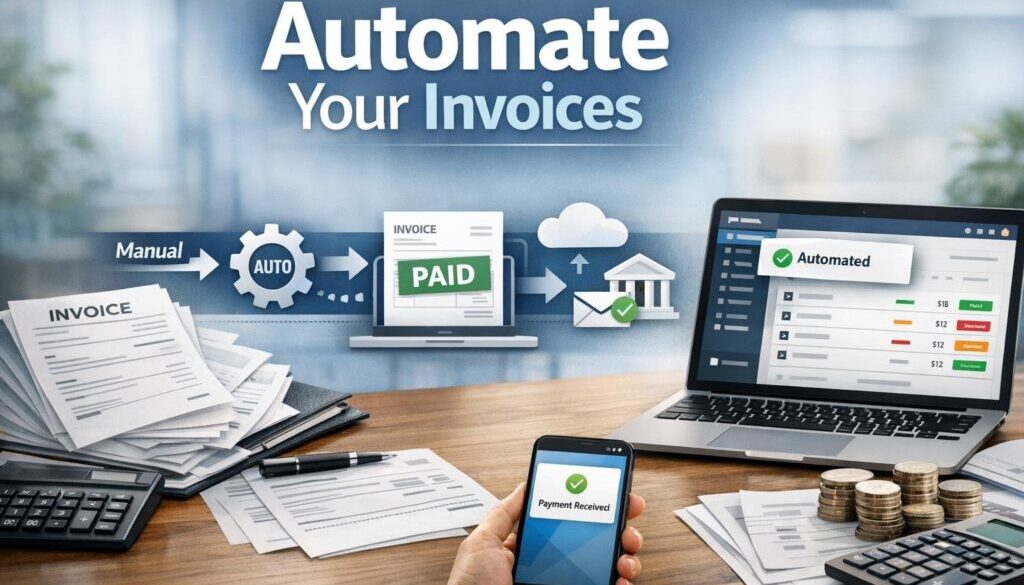
Invoice automation means using software or workflow rules to reduce manual work in the invoicing process. Instead of typing everything from scratch every time, the system can help create invoices, send them, remind customers about payment, and keep invoice data organised.
In simple terms, it is about removing repetitive steps from the invoice process so your team can spend less time on admin and more time on paid work.
How it differs from manual invoicing
With manual invoicing, you usually gather the customer details, type the invoice, check the totals, send it, then track payment separately. That can work for a very small business, but it becomes time-consuming as invoice volume grows.
With invoice automation, some of those steps can be handled automatically. For example, a saved template can pull in customer details, a recurring invoice can be sent on a schedule, and reminder emails can go out when payment is overdue.
Invoice automation vs e-invoicing vs accounts payable automation
These terms are often mixed up, but they are not the same.
- Invoice automation usually refers to automating parts of your own invoicing workflow.
- E-invoicing is a structured digital exchange of invoices through a supported network, such as Peppol in Australia.
- Accounts payable automation is usually about processing supplier bills and approvals, rather than sending invoices to customers.
For Australian businesses, the ATO’s guidance on invoices and tax invoices is a useful starting point if you need to understand GST-related requirements.
What parts of invoicing can small businesses automate?
You do not need to automate everything at once. In many small businesses, the best approach is to automate the most repetitive and error-prone parts first.
Invoice creation
If you invoice for the same services repeatedly, you can often use templates to pre-fill customer details, payment terms, tax settings and standard line items. That makes it quicker to prepare invoices and helps keep formatting consistent.
This is especially useful for retainers, monthly service fees, subscriptions and standard trade work.
Recurring invoices
Recurring invoices are one of the easiest ways to reduce admin. If you bill the same customer every week or month, a recurring schedule can generate invoices automatically instead of requiring manual re-entry each time.
That does not mean you should stop reviewing them. It simply means the repetitive setup step can be removed.
Payment reminders and follow-ups
Chasing overdue invoices can take more time than sending the invoice itself. Automated reminder workflows can help by sending a polite reminder before the due date and follow-up messages if payment is late.
This can make your accounts receivable process more consistent and reduce the chance that an overdue invoice gets forgotten.
Delivery and payment links
Some systems can send invoices by email automatically and include a payment link. That gives the customer a quicker way to pay and reduces friction between invoice delivery and payment.
For businesses that invoice regularly, a simple payment flow can make life easier for both sides.
Reconciliation and reporting
Invoice automation can also connect to accounting software and bank feeds so paid invoices are easier to match and track. Instead of manually checking each payment, you may be able to reconcile faster and see which invoices are still outstanding.
That said, reconciliation still needs proper oversight. Automation helps, but it should not replace basic checking.
What is the easiest way to start automating invoices?
If you are new to this, the best approach is to start small. A simple setup is often more valuable than a complex one you never fully use.
Start with templates and recurring invoices
The easiest first step is usually to standardise your invoice format. Save templates for your most common services and set up recurring invoices for customers you bill regularly.
This alone can remove a surprising amount of repetitive admin.
Add reminder workflows
Once invoicing is consistent, the next useful step is payment reminders. These can be built into accounting software or handled through a workflow tool, depending on your setup.
The benefit is straightforward: customers get a prompt reminder, and you do not have to remember every follow-up manually.
Connect accounting software and bank feeds
Many small businesses already use accounting software, and that is often the best place to begin. If your invoicing, payments and reconciliation sit in the same environment, there is less duplication and fewer places for data to go wrong.
Bank feeds can also make it easier to see when invoices are paid, which helps keep the records current.
Use OCR or capture tools for supplier bills if needed
Although this article is about sending invoices, many businesses also deal with incoming bills. OCR, or optical character recognition, is a way software can read text from a PDF or image and turn it into usable data.
That can reduce manual entry for accounts payable work, especially where supplier invoices arrive in different formats.
A practical example of this kind of repetitive workflow can be seen in our trust account automation case study, where document-heavy processing was simplified through automation.
What software do small businesses use for invoice automation?
The right tool depends on how you invoice, what accounting software you already use and how much complexity you are comfortable with. There is no one-size-fits-all answer.
Accounting platforms
Many businesses start with accounting software because invoicing is already built into it. That can be a practical choice if you want invoices, GST tracking, payments and reconciliation in one place.
Check the current official documentation before choosing a platform, because features can change.
Invoicing and payment tools
Some businesses use dedicated invoicing or payment tools for their customer billing workflow. These tools may be useful if you want to send invoices quickly, accept payments online or manage recurring billing with less manual work.
The Stripe invoicing documentation and Square invoices information are examples of official product documentation that can help you understand how invoicing tools are positioned by the provider.
Workflow automation tools
Some businesses also use workflow tools to connect systems. For example, a completed job in one system might trigger an invoice task in another. That can be useful, but only if the process is well designed and properly checked.
Microsoft’s Power Automate documentation is one example of a workflow automation platform that businesses may use to connect routine tasks.
Document capture and approvals
If your main pain point is supplier bills rather than customer invoices, document capture tools can help read invoice data from PDFs or scanned documents, then pass it into the accounting process for review.
The important thing is to choose software that fits the workflow you actually have, not the one you wish you had.
Australian rules to keep in mind
If you are setting up invoice automation in Australia, there are a few compliance and record-keeping considerations that matter.
GST and tax invoice requirements
If your business is GST-registered, you need to make sure your invoicing setup handles GST correctly. That means the system should use the right tax settings and produce invoices that match your obligations.
The ATO’s invoice guidance is the best place to confirm the current requirements for your situation. If you are unsure, it is worth checking the details rather than assuming the software will get it right.
Record keeping obligations
Invoice automation should make record keeping easier, not harder. You still need to store invoices and supporting records in a way that suits Australian record-keeping requirements.
The ATO’s record keeping for business guidance is a useful reference if you want to understand the broader obligation.
E-invoicing and Peppol
E-invoicing can reduce re-keying and speed up invoice exchange, but it is not the same as emailing a PDF invoice. In Australia, the official e-invoicing ecosystem is built around Peppol.
If you invoice other businesses or government entities that support e-invoicing, this can be worth exploring. The Australian Government e-invoicing site and the ATO’s e-invoicing guidance are the most reliable starting points.
Privacy and security
Invoices often contain names, contact details, ABNs, payment information and transaction history. That means privacy and security are not optional.
The OAIC’s Australian Privacy Principles and notifiable data breaches guidance are useful references if your systems hold personal information.
Where AI helps — and where it doesn’t
AI can be useful in invoice automation, but it should be treated as a helper, not a replacement for proper financial review.
Useful AI tasks in invoice processing
AI can sometimes assist with reading invoice data, categorising expenses, spotting duplicates, drafting reminder messages or summarising invoice lists. In the right workflow, that can reduce repetitive admin and help staff work faster.
This is most helpful when the task involves a lot of repetitive text or document handling.
Why human review is still important
Even a good automation setup still needs checking. Numbers, dates, tax codes, bank details and customer names must be correct before an invoice goes out. A small mistake can create confusion, delay payment or cause record-keeping issues.
The safest approach is to automate the repetitive part, then keep a human review step where the financial decision matters.
Common mistakes to avoid
Invoice automation can save time, but only if it is set up carefully.
Wrong tax codes and GST handling
If your settings are wrong, automation can quickly create the same mistake across many invoices. Always check tax codes and invoice templates before rolling them out broadly.
Duplicate or incorrect invoices
Recurring workflows are helpful, but they can also send duplicates if the trigger logic is not clear. That is why it is important to test any new setup before relying on it fully.
Over-automation without review
It is tempting to automate every step, but invoices are financial documents. A completely hands-off process may create more risk than it removes.
Weak security or poor integrations
If tools do not connect properly, people often fall back to exporting and re-entering data by hand. That defeats the purpose and increases the chance of error. Security also needs to be considered at every step, especially where customer data is involved.
Document-heavy automation is not limited to invoicing. Our content calendar automation case study shows how structured workflows can simplify repeatable business processes in another area of operations, while our digital product automation example shows how automated delivery can remove manual steps from a different kind of workflow.
What to look for in invoice automation software
When comparing tools, focus on practical fit rather than feature lists you may never use.
- Ease of use: The system should be simple enough for your team to use consistently.
- Accounting integration: It should fit with the software you already rely on.
- Recurring billing and reminders: These are often the first features that save real time.
- Security: Look for sensible access controls and a provider you trust.
- E-invoicing support: If relevant to your customers, this can be an important capability.
- Reporting: Clear visibility over unpaid invoices makes follow-up easier.
It is often better to choose a tool that does a few things well than a large platform that is hard to maintain.
When is invoice automation worth it?
For some small businesses, even a basic automation setup is worthwhile. For others, it becomes essential as volume grows.
Sole traders
If you only send a small number of invoices, automation may still be worth it for recurring clients, payment reminders and better record keeping. The aim is not complexity. It is consistency.
Growing teams
As more people touch the invoicing process, the risk of inconsistent data and missed follow-ups increases. Automation can help keep the process standardised.
High-volume or recurring billing businesses
If your business sends the same invoice every week or month, automation is often one of the quickest ways to reduce admin. It can also make reporting and follow-up easier to manage.
If you are looking for a more tailored approach, Simple Automations helps small businesses identify what should be automated, what should stay manual and how to keep the workflow practical. You can explore our automation solutions page to see how we approach business process improvements in a simple, structured way.
Ready to Simplify Your Invoice Workflow?
If your invoicing still relies on manual templates, reminders and follow-ups, there may be a simpler way to handle it. A practical automation setup can reduce repetitive admin without overcomplicating your business.
Conclusion
The best way to automate invoices for small business is usually to start with the parts that are repetitive, predictable and easy to review. Templates, recurring invoices, reminders, accounting sync and secure record keeping can make a real difference without creating unnecessary complexity.
In Australia, it is especially important to keep GST, e-invoicing, privacy and record-keeping in mind. If you approach automation carefully, you can reduce admin while keeping the process reliable.
If you are ready to make invoicing simpler, Simple Automations can help you find the right level of automation for your business and build a workflow that fits the way you work.
For further practical reading, visit our Business Hub for more business automation resources.