How to Automate Customer Booking Requests
If you spend too much time chasing booking details, checking calendars, and replying to the same questions over and over, this guide is for you. The easiest way to automate customer booking requests is not to remove people from the process entirely, but to automate the repetitive steps and keep human review where it matters.
For many small businesses, booking requests arrive by phone, email, web form, SMS, and social media messages. That creates back-and-forth, delays, and avoidable admin. In this article, you’ll learn what parts of the booking process can be automated, what should stay manual, and how to build a simple workflow that saves time without making the customer experience more complicated.
null
Simple automation can make booking handling faster, more consistent, and easier to manage. If you are looking for broader ways to automate your small business, booking requests are often one of the best places to start.
What is a customer booking request?
A customer booking request is any enquiry where someone wants to reserve a time, service, appointment, or job slot. For a small business, that might mean a haircut, a consultation, a site visit, a repair booking, a treatment, or a guided service.
Requests often come through several channels at once:
- Phone calls
- Web forms
- SMS
- Social media messages
- Online booking pages
In practice, the booking process usually involves collecting details, checking availability, confirming the appointment, and then adding it to a calendar or business system. That is why businesses often look for ways to automate customer booking requests rather than handle every step manually.
What information is usually needed?
Most booking requests need a few basic details before they can be confirmed:
- Name
- Contact details
- Service requested
- Preferred date and time
- Location or address
- Notes or special requirements
When this information is collected in a structured way, it becomes much easier to automate the next steps.
Why manual booking handling creates problems
Manual booking management can work for very small volumes, but it quickly becomes time-consuming once requests start coming in regularly. The main issue is that every booking needs the same basic checks and follow-up.
Too much back-and-forth
Many businesses spend a lot of time confirming availability, asking for missing details, or rescheduling when a preferred time is not available. This slows down response times and can create a frustrating customer experience.
Missed calls and delayed replies
When booking requests come in across different channels, it is easy to miss one or reply too late. A delayed response can mean the customer moves on to another business.
Double-bookings and diary errors
Manual calendar updates increase the risk of overlapping appointments, wrong times, or bookings being entered in the wrong place. Even a small error can create a larger problem later in the day.
Repetitive data entry
Booking details often need to be copied into a calendar, spreadsheet, CRM, job system, or email list. That repetition wastes time and creates opportunities for mistakes.
Weak follow-up
Without a consistent process, unanswered booking requests can be forgotten and no-shows may not be followed up properly. Automation can help create a more reliable workflow.
Document-heavy workflows are often a good starting point for automation. Our trust account automation case study shows how a repetitive administrative process can be simplified when the right steps are standardised.
What parts of booking requests can be automated?
The best way to think about booking automation is to separate the repetitive parts from the parts that need judgement. Most small businesses do not need a fully automated approval system. They need a simpler workflow that reduces manual admin.
1. Request capture
Instead of manually retyping every enquiry, a form or intake process can capture the customer’s details in a consistent format. This makes the rest of the workflow much easier.
A request can also be structured when it arrives by email or message, although unstructured messages usually need more checking.
2. Availability checking
If your calendar or booking system holds availability information, automation can help compare the requested time with open slots. That does not always mean the booking should be confirmed instantly, but it can reduce the time spent checking manually.
3. Immediate acknowledgement
A simple acknowledgement message can tell the customer their request was received and explain what happens next. This is one of the easiest ways to automate customer booking requests and improve response speed.
4. Confirmation and scheduling
For straightforward bookings, the system may be able to create a calendar entry, send a confirmation, or draft the next step for staff approval. For more complex businesses, confirmation may still be handled by a team member.
5. Reminders and rescheduling
Reminders are another strong automation opportunity. A reminder email or SMS can help reduce no-shows, and a rescheduling link can make it easier for customers to change a booking without calling the office.
6. Follow-up and internal notifications
Automation can also create tasks for staff, tag enquiries by status, or notify the right team member when a request comes in. That helps ensure bookings do not sit in an inbox unnoticed.
For example, our content calendar automation case study shows how a recurring workflow can be organised more efficiently when the steps are mapped clearly. The same principle applies to booking requests.
What should stay human-reviewed?
Automation works best when it supports decision-making rather than replacing it. In many businesses, a person should still review certain booking requests before confirming them.
Special requests and complex jobs
If the booking depends on unusual requirements, multiple team members, or a custom setup, it is usually better to have a human review the request first.
Pricing exceptions and changes
Bookings that involve discounts, extra charges, or non-standard pricing should not rely on a fully automated response.
Capacity-based or location-based bookings
Some appointments depend on job length, travel time, service area, or staff availability across multiple locations. These often need manual review or approval.
Sensitive appointments
For businesses handling sensitive information, human review is especially important before anything is confirmed or stored across multiple systems.
This is also where a practical approach matters most. Automate the repetitive steps, but keep people involved in the parts that need judgement.
What software is typically used?
You do not need one perfect tool to automate customer booking requests. In many cases, the workflow uses a combination of tools that already exist in the business.
Calendars and scheduling tools
Calendar tools help check availability, create appointments, and send invites. Official support and scheduling documentation from Google Calendar and Microsoft Outlook are useful starting points if your team already works in those systems.
Forms and intake tools
Forms can collect the same details every time, which makes automation easier. Tools such as Jotform and Typeform are commonly used for structured request capture.
Automation platforms
Automation platforms connect one tool to another. In plain English, they help one system pass information to another without someone copying and pasting it manually. Official documentation for Microsoft Power Automate, Zapier, Make, and n8n can help you understand the kinds of workflows these tools support.
CRM and customer record systems
If you want to keep a history of enquiries, follow-ups, and bookings, a CRM can be useful. Relevant documentation for HubSpot and Zoho CRM may help if your business already uses a customer database.
Messaging and reminders
Email and SMS reminders are often part of the workflow, especially where no-shows are a problem. The exact tool you use depends on your booking process, privacy requirements, and what your business already has in place.
If you want help figuring out what can be connected in your business, the automation solutions page is a good place to start.
How to build a simple booking automation workflow
If you want to automate customer booking requests without overcomplicating the process, start with a simple workflow and build from there.
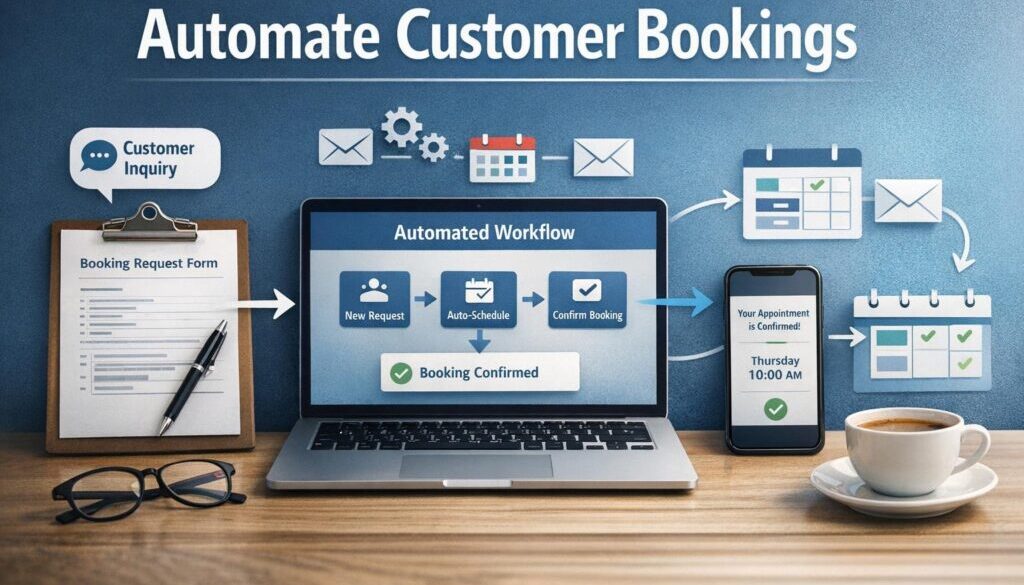
- Capture the request in a form, booking page, or monitored inbox.
- Store the customer details in a clear system such as a calendar, CRM, or spreadsheet.
- Send an instant acknowledgement so the customer knows the request was received.
- Check whether the requested time fits your availability rules.
- Create a draft booking or send the request to staff for approval if needed.
- Send a confirmation or follow-up message.
- Trigger reminders before the appointment.
- Create internal notifications or tasks for the team.
That workflow can be adapted for a wide range of businesses, including service businesses, trades, clinics, agencies, consultants, and sole traders.
A simple example
Here is what it might look like in practice:
- A customer submits a booking form.
- The form creates a record in your system.
- An acknowledgement email goes out immediately.
- The request is checked against your calendar.
- If the slot is available, the booking is queued for confirmation or added automatically.
- A reminder is sent the day before the appointment.
This kind of workflow keeps the customer informed while reducing the amount of manual admin your team has to do.
Australian privacy and security considerations
Booking requests often include personal information, and sometimes sensitive details. That means privacy and security need to be considered before you connect systems together.
The Australian Government’s Australian Privacy Principles provide guidance on how organisations handle personal information, while the OAIC’s guidance on small businesses explains when the Privacy Act may apply.
In practice, that means you should think carefully about:
- What data you collect
- Who can access booking information
- Where the data is stored
- Whether a third-party tool stores information overseas
- How long you keep the records
- How customer consent and privacy notices are handled
Security matters too. The Australian Cyber Security Centre provides business guidance through Cyber.gov.au for business and government. At a minimum, use strong passwords, access controls, and multi-factor authentication where available.
Where AI can help — and where it can’t
AI can be useful in booking workflows, but it should be treated as support, not the final decision-maker.
Useful ways AI can assist
- Summarising booking emails
- Classifying requests by type
- Extracting names, dates, and contact details
- Drafting reply messages
- Routing enquiries to the right team member
Where human validation still matters
AI should be checked carefully before any booking is confirmed. That is especially important for exact times, special requests, pricing exceptions, and any sensitive or compliance-heavy appointment types.
AI is most helpful for first-pass sorting and drafting. It is less reliable as the final authority on scheduling decisions.
What to check before choosing a tool
Before you commit to a software stack, make sure it fits the way your business actually works.
- Time zones and business hours: Confirm the tool handles Australian time zones and daylight saving correctly.
- Integration reliability: Check whether the tools you already use can connect reliably.
- Reminder options: See whether email or SMS reminders are supported.
- Privacy and storage: Understand where booking data is stored and who can access it.
- Approval rules: Decide which bookings should be confirmed automatically and which need review.
- Customer experience: Make sure the process is simple enough for customers to use.
It also helps to review the official help and documentation pages for each tool before you build a workflow. Features change over time, and the safest approach is to verify capabilities directly from the source.
How this applies to different business types
Different businesses will automate customer booking requests in different ways.
- Trades and field services: May need intake questions, location details, job type, and travel-time logic.
- Salons and clinics: Often need appointment type selection, staff allocation, and reminder messages.
- Consultants and agencies: Usually need qualification questions and calendar-based scheduling.
- Local service businesses: Benefit from faster replies and fewer missed enquiries.
- Small teams and sole traders: Often start with form capture and automatic acknowledgement before moving to more advanced workflows.
These are all good examples of how automation can reduce repetitive admin without removing the need for human judgement.
For businesses that also deliver digital products or downloads alongside services, workflow design matters in a similar way. Our digital product automation example shows how a recurring customer process can be streamlined once the steps are mapped clearly.
When to use request-and-approve versus full self-service booking
Not every business should move to instant self-service booking. Sometimes request-and-approve is the better choice.
| Approach | Best for | Why it works |
|---|---|---|
| Request-and-approve | Complex jobs, custom services, higher-value bookings | Lets staff review the request before confirming |
| Full self-service booking | Standard appointments with clear availability rules | Reduces back-and-forth and speeds up confirmation |
If your business has simple, repeatable appointment types, self-service booking may be enough. If each request needs review, a structured request-and-approve process is often safer and easier to manage.
Practical next step for small businesses
If you are just getting started, do not try to automate everything at once. Begin with the biggest time-waster in your current booking process.
For many businesses, that is one of these:
- Manually replying to every enquiry
- Re-entering booking details into a calendar
- Sending reminders one by one
- Following up unanswered requests
Once you identify the most repetitive step, you can decide whether a form, calendar rule, automation platform, or CRM workflow will solve it best.
That is where business automation resources can be useful if you want to keep learning before you build. You can also review automation case studies to see how practical workflows are approached in real projects.
Ready to Simplify Booking Admin?
If booking requests are taking too much time, we can help you identify the repetitive steps, choose a sensible workflow, and build automation that fits your business.
Conclusion
The smartest way to automate customer booking requests is to remove repetitive admin without removing human judgement where it matters. For most small businesses, that means automating request capture, acknowledgements, reminders, and internal routing while keeping complex or sensitive bookings under review.
If you focus on clear workflows, reliable tools, and sensible privacy practices, booking automation can make your business faster to respond and easier to manage. For help turning that into a practical setup, Simple Automations can help you plan a workflow that matches the way your business actually operates.
Automation for small business is often most effective when it starts with one frustrating process and improves it step by step.