Appointment Reminder Automation: A Practical Guide for Small Business
If your business relies on bookings, appointment reminder automation can save time, reduce no-shows, and make customer communications more consistent. For many small businesses, the real challenge is not sending reminders once in a while — it is doing it reliably, without adding more admin or creating compliance problems.
This guide explains what appointment reminder automation is, how it usually works, what tools are commonly used, and what Australian businesses should consider before setting it up. You will also see where AI can help, where human oversight still matters, and how to keep the workflow simple.
null
For service businesses, reminders are part of the customer experience. They help people turn up on time, remember the details, and reschedule more easily if plans change. They also reduce the amount of follow-up your team has to do manually.
If you are looking at broader ways to automate your small business, appointment reminders are often one of the best places to start because the workflow is repetitive, time-sensitive, and easy to measure.
What is appointment reminder automation?
Appointment reminder automation is software that sends reminder messages to customers before a scheduled appointment without someone on your team having to send each message manually.
How it works
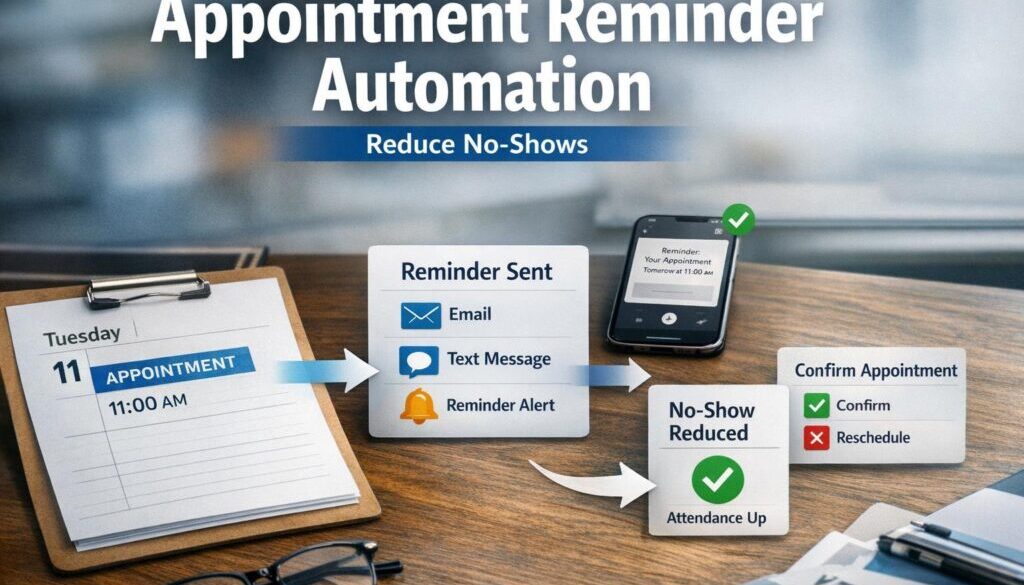
In a simple setup, a customer books an appointment, the booking is saved in a system, and a reminder is sent automatically at a chosen time — for example, 24 hours before the appointment or on the same morning.
Depending on the tools you use, the reminder might be sent by SMS, email, or both. Some systems also let customers confirm, cancel, or reschedule directly from the message.
Why small businesses use it
Most businesses use appointment reminder automation for a few practical reasons:
- to reduce missed appointments and late cancellations
- to cut down on phone calls and manual follow-up
- to improve consistency in customer communication
- to free staff from repetitive admin
- to create a smoother customer experience
For businesses with packed calendars, those small efficiency gains can make a real difference across the week.
What problems does it solve?
The value of appointment reminder automation is usually very practical. It helps with the everyday friction that comes from managing bookings manually.
Reducing no-shows and late cancellations
A reminder gives customers another chance to remember the booking, check the time, and reschedule if needed. That is especially useful for appointment-based businesses where missed sessions can leave gaps in the schedule.
Cutting manual admin
Without automation, someone has to check the booking list, draft reminders, send them, and keep track of replies. That may not sound difficult until it is repeated dozens of times a week.
With the right workflow, the reminder system does the routine work while staff focus on exceptions, customer service, and follow-up where human attention is actually needed.
Improving customer experience
Customers usually appreciate clear communication. A reminder that includes the time, location, and next step makes the process easier for them and reduces the chance of confusion.
Good reminder workflows are often part of broader automation solutions that make the business feel more organised and responsive without becoming complicated.
Which reminder channels are most common?
The most common channels for appointment reminder automation are SMS and email. The best option depends on your customers, your workflow, and how quickly you need the reminder seen.
SMS reminders
SMS is often effective because people usually see text messages quickly. It is useful when the reminder needs to be short, direct, and time-sensitive.
SMS is commonly used for:
- same-day reminders
- 24-hour reminders
- quick confirmation prompts
- reschedule links
Because SMS is a direct message channel, businesses should pay close attention to consent, message content, and sender identification.
Email reminders
Email is useful when you want to provide more detail. It can include appointment information, location notes, preparation steps, parking details, or links to reschedule.
Email also works well when the reminder is part of a larger sequence, such as booking confirmation, follow-up instructions, and post-appointment communication.
SMS + email combinations
Many businesses use both. For example, an email can confirm the booking immediately, then an SMS can follow closer to the appointment date.
This can be a sensible balance: email for detail, SMS for visibility. The right mix depends on what your customers respond to best and what your systems can support.
What can be automated, and what still needs human oversight?
Not every part of the reminder process should be automated in exactly the same way. The best appointment reminder automation setups automate the repetitive steps and leave humans to handle the edge cases.
Confirmation messages
Booking confirmations are usually a straightforward automation opportunity. As soon as a booking is made, the system can send a confirmation with the key details.
Pre-appointment reminders
These are often the core of the system. A reminder can be sent at a set interval before the appointment, such as the day before or a few hours before.
Cancellation and rescheduling workflows
Some businesses let customers cancel or reschedule from the reminder message. That can reduce back-and-forth calls and help keep the diary accurate.
However, it is still wise to have a staff process for exceptions, urgent changes, or appointments that need manual approval.
Staff review and exception handling
Automation is helpful, but it should not replace common sense. Staff may still need to check missing contact details, review special appointment types, or handle customer responses that do not fit the standard workflow.
This is the same principle that applies in other document-heavy or routine workflows. For example, our trust account automation case study shows how repetitive administrative work can be simplified when the process is designed carefully.
What software do small businesses typically use?
Appointment reminder automation is usually built from a few types of software working together. The right combination depends on how your business already operates.
Booking and scheduling platforms
Many booking systems already include reminder features. That is often the simplest option because the appointment data is already in the system.
Examples of official product documentation include Calendly Help Centre, Zoho Bookings help, and Acuity Scheduling support. These can be useful starting points if you want to understand how reminders are handled inside a booking platform.
CRM and workflow automation tools
If your customer details live in a CRM or another business system, you may be able to trigger reminders from there. This can be useful when the booking process is not isolated in one platform.
Email and SMS messaging tools
Some businesses send reminders through dedicated messaging tools instead of their booking platform. That can work well if you need more control over the timing, wording, or routing of messages.
For SMS messaging capability, Twilio’s SMS documentation is a useful reference for understanding how SMS delivery can work at a technical level.
Calendar-based workflows
Smaller businesses sometimes start with calendar tools such as Google Calendar or Microsoft Outlook. That can be enough for very simple reminder workflows, especially if you do not need a full booking system.
For Microsoft users, the official support pages for Microsoft Bookings and Bookings with me in Outlook show how scheduling fits into the Microsoft 365 environment.
How can AI help with reminder workflows?
AI can support appointment reminder automation, but it should not be treated as the engine that runs the whole process. In most small businesses, AI is better used as a helper than as the main system.
Drafting reminder text
AI can help write reminder messages in a clearer, friendlier tone. It can also help shorten text for SMS or adapt a message for different appointment types.
Categorising replies
If customers reply to reminders, AI may help sort common responses such as “confirm”, “running late”, “please reschedule”, or “cancel”. That can reduce manual triage for staff.
Supporting staff, not replacing the workflow
AI should be used carefully where accuracy matters. It should not invent appointment details, change policies, or send sensitive information without review.
In practical terms, AI works best when it supports the people already managing the workflow. That keeps the process useful without making it unpredictable.
For businesses exploring content or customer communication automation more broadly, our content calendar automation example shows how routine planning work can be structured more clearly.
What are the compliance and privacy issues in Australia?
This is one of the most important parts of appointment reminder automation for Australian businesses. Reminders are useful, but they still involve sending messages to customers and handling personal information.
Spam Act considerations
The Australian Government’s ACMA spam guidance explains the rules around commercial electronic messages. If you send reminders by SMS or email, you need to think carefully about whether the message is purely service-related or whether it also contains promotional content.
You can also refer to the Spam Act 2003 for the official legislation record.
Consent and unsubscribe requirements
A business should understand whether the customer has consented to receive appointment messages. If the reminder is mixed with marketing content, the compliance picture becomes more complex.
Privacy and customer data handling
Appointment data often includes names, phone numbers, email addresses, times, and service details. The Australian Privacy Principles set out how personal information should be handled, and the OAIC’s guidance on marketing and privacy is helpful when you are separating reminders from promotional messages.
If your business collects customer details for reminders, it should also consider whether it needs a clear privacy policy. The OAIC’s guidance on privacy policies is a useful starting point.
Service reminders vs marketing messages
This distinction matters. A reminder that says “Your appointment is tomorrow at 10:00am” is very different from a message that also promotes a discount or product offer.
Keeping reminders focused on the service usually makes the workflow simpler and lowers compliance risk.
What should a small business check before implementing reminders?
Before rolling out appointment reminder automation, it is worth checking a few practical details. A simple setup can still fail if the data or workflow is poor.
Data quality and contact accuracy
Your reminders are only as good as the contact details in the system. If phone numbers or email addresses are wrong, reminders will not reach the customer.
Time zones and scheduling rules
This matters more than many businesses expect. Reminders should account for Australian time zones, daylight saving changes, and different reminder intervals for different appointment types.
Delivery reporting and failure handling
If a message fails to send, someone should know about it. Look for delivery reporting, error alerts, or a process that flags messages that need manual follow-up.
Costs and message limits
Some tools charge per message or limit how many reminders you can send in a plan. Because these details change often, they should be checked directly with the provider before you commit.
What are the risks of over-automation?
Automation is useful, but more automation is not always better. A good appointment reminder automation workflow should be clear, useful, and unobtrusive.
Too many reminders
If customers receive too many messages, they may ignore them or opt out. A reminder strategy should be deliberate rather than noisy.
Poorly written messages
Short messages are helpful, but they still need to be clear. If the wording is confusing, customers may not know what to do next.
Integration failures
If your booking system, calendar, CRM, and messaging tools are not connected properly, staff can end up checking and correcting records manually anyway. In that case, the automation adds complexity instead of removing it.
This is why some businesses prefer to start with a simpler process and build from there rather than trying to automate every part of the appointment journey at once.
Which businesses benefit most?
Appointment reminder automation is useful for any business with repeat bookings, but it is especially valuable in service industries where no-shows directly affect revenue, staff time, or client care.
Clinics and allied health
Healthcare and allied health businesses often deal with busy appointment books, sensitive data, and the need for clear communication. Reminder systems can help reduce missed sessions and keep schedules organised.
Salons and beauty services
Salon appointments are often frequent and time-sensitive. Automated reminders can reduce no-shows and improve the customer experience.
Trades and repair services
For businesses that travel to a site, reminders help customers prepare and be available at the right time.
Consultants, tutors, and professional services
Any appointment-based service can benefit from fewer manual reminders and cleaner scheduling. This is especially true for solo operators and small teams who need simple systems that do not add overhead.
How to get started with a simple reminder workflow
If you are planning your first appointment reminder automation setup, keep it straightforward.
- Confirm how appointments are currently booked and stored.
- Check whether your booking or calendar tool already has reminder features.
- Decide whether SMS, email, or both is the better fit.
- Make sure customer consent and privacy handling are covered.
- Write short, clear reminder messages.
- Test the workflow with a small group before rolling it out fully.
- Check what happens when someone cancels, reschedules, or replies to the reminder.
That last step is important. Many reminder systems work well for the standard case but become messy when a customer changes plans. The best workflows include an easy path for exceptions.
Ready to Simplify Appointment Reminders?
If your business is still sending reminders manually, there may be a simple way to reduce admin and improve consistency. Simple Automations helps small businesses design practical workflows that fit the way they already operate.
Conclusion
Appointment reminder automation is one of the most practical ways for a small business to reduce missed appointments and save admin time. The best setups are simple, reliable, and built around real customer workflows, not unnecessary complexity.
If you keep the process focused on service reminders, check your consent and privacy obligations, and choose tools that match your booking process, you can improve both efficiency and customer experience.
For businesses wanting to explore the next step, small business automation can help identify other repetitive tasks that are worth simplifying once your reminder workflow is working well. You can also review more practical examples in our automation case studies and the broader Business Hub.
If you need a reminder system designed around your process, not the other way around, Simple Automations can help turn a manual task into a cleaner workflow.