Automate Business Data Entry and Reduce Admin Without Creating More Work
For many small businesses, the real admin problem is not just the amount of data entry. It is the constant re-keying of the same information across emails, forms, spreadsheets, accounting software and CRM tools. If you want to automate business data entry, the goal is to cut out that duplication, reduce errors and make everyday work simpler.
This guide explains what can be automated, which tools are commonly used, where AI can help, and what Australian businesses should keep in mind around privacy, GST and record-keeping. You will also see why a small, well-designed workflow is often better than trying to automate everything at once.
null
When done well, automation does not replace good admin. It removes the repetitive parts so your team can focus on checking exceptions, serving customers and keeping the business moving.
For businesses starting to automate repetitive admin, the best results usually come from one clear workflow at a time. If you are mapping out what could be improved first, the automation solutions page is a useful place to think about the kinds of problems that can be simplified.
What counts as business data entry admin?
Business data entry admin is any task where information is copied, typed, pasted or re-entered from one place into another. In small businesses, this often happens because systems do not connect properly, or because the business has grown around manual habits.
Common repetitive tasks small businesses handle
- Typing invoice details into accounting software
- Saving and filing receipts for expenses
- Creating contacts from website forms or emails
- Copying lead details into a CRM
- Updating spreadsheets from other systems
- Moving job or order details between tools
- Creating tasks, reminders or follow-ups from incoming messages
These tasks seem small on their own, but they add up quickly. They also create a hidden cost: each handoff between systems is another chance for a typo, a missed field or a delay.
Why manual re-keying creates delays and errors
Manual entry usually slows work down because someone has to stop what they are doing, find the source information, enter it into the right system and then check that it is correct. If the same data needs to be entered again later, the whole process repeats.
That creates a few common problems:
- duplicate data entry
- inconsistent formatting
- missed fields or attachments
- late invoicing or delayed follow-up
- more pressure on staff during busy periods
This is why many businesses look for ways to automate business data entry rather than just digitise the same manual process.
Which admin tasks are best suited to automation?
Not every admin task is a good candidate for automation. The best starting points are repetitive, rules-based tasks that follow the same pattern most of the time.
Invoice and bill capture
Invoices and supplier bills are often suitable because they usually contain predictable fields such as supplier name, amount, date, GST and reference numbers. A workflow can capture those details, then send them into a review step or the next system.
This is especially useful when businesses receive invoices by email and then re-enter details into accounting software by hand.
Receipt and expense processing
Receipt processing is another common automation opportunity. Staff often take photos of receipts, email them through, or upload them to a shared folder. A document capture workflow can extract the useful details and file them for review.
That reduces the need to search through emails or physical paperwork later.
Lead capture from web forms
When a website enquiry form is submitted, the business often needs that information in more than one place: email, CRM, spreadsheet, project tool or follow-up system. Automating this handoff helps make sure leads are not lost and reduces manual copying.
Email-to-record workflows
Some businesses still manage a lot of admin through the inbox. An incoming email can be turned into a task, contact, support ticket or job record automatically if the workflow is set up clearly.
This is useful when the message format is fairly consistent and the action required is standard.
Spreadsheet-to-app sync
Many small businesses still rely on spreadsheets as a working database. If a spreadsheet row is updated, it may be possible to sync that change to another system, create a notification or update a record elsewhere.
That can be a practical bridge for businesses that are not ready to replace spreadsheets completely.
Approval workflows
Some of the safest automation uses a human review step before anything is finalised. For example, a system can capture invoice data automatically, then ask a person to approve it before it is posted.
This is often the right balance for financial or compliance-related workflows.
How small businesses usually do this manually
Most manual workflows start out simple, then become messy as the business grows. A lead comes in by form, is copied into a spreadsheet, then later entered again into a CRM. An invoice arrives by email, is downloaded, then typed into accounting software, then filed separately.
Once those steps multiply, admin work becomes a hidden bottleneck.
Common workflow breakdowns
- Information arrives in one system but must be entered into another
- Several team members handle the same record in different places
- Documents are stored in inboxes instead of a clear filing process
- Staff rely on memory for follow-up steps
- Errors are only discovered when someone checks the data later
These breakdowns are exactly where automation can help. The goal is not to remove people from the process. It is to remove repetitive handoffs.
Where duplicate entry happens most often
Duplicate entry is common when the same information is needed for finance, operations and customer follow-up. A customer’s name, email, phone number and job details may be entered into more than one app simply because those systems do not talk to each other.
That is why many businesses start with one process and one system connection rather than attempting a full overhaul.
What tools can automate business data entry?
There is no single tool that fits every business. Most automation setups combine a few simple categories of software, depending on the task.
Workflow automation platforms
These tools connect apps and move data between them using triggers and actions. In plain English, that means one event happens in one system, and another action happens in a different system without someone manually copying the data.
Official documentation from Microsoft Learn for Power Automate and the Zapier Help Center are useful references for understanding this style of workflow automation.
Accounting and bookkeeping software
Accounting platforms often provide their own ways to import, categorise or process bills, invoices and records. For Australian businesses, accounting software is often central to any admin automation because it is the system of record for many transactions.
Helpful official references include the Xero Help Centre and MYOB Support.
OCR and document capture tools
OCR, or optical character recognition, is a way of reading text from scanned documents, images or PDFs. In practice, document capture tools can help extract key fields from invoices, receipts and forms so they do not need to be typed in manually.
This is one of the most practical ways to automate business data entry in document-heavy businesses.
CRM and form tools
CRM systems and form tools are often used together to move new leads into the right place automatically. If a customer fills out a form, the information can be used to create a contact record, assign a task or trigger a follow-up process.
Official HubSpot documentation at HubSpot Knowledge Base is a useful example of how CRM workflows are commonly handled.
Spreadsheet-based workflows
For some small businesses, spreadsheets are still the easiest place to start. They are familiar, flexible and easy to test. A spreadsheet can act as a temporary control point before data is sent elsewhere.
This can be a sensible first step if you want to automate business data entry without changing everything at once.
Where AI helps — and where humans still matter
AI is increasingly useful in document and text-heavy workflows, but it works best as part of a broader process. It is usually strongest at extracting, classifying and summarising information, not making final business decisions on its own.
Extracting invoice, receipt and email data
AI can help identify key details from invoices, receipts and emails, such as names, dates, amounts and reference numbers. That can save time, especially when the source documents are unstructured or inconsistent.
For example, a supplier invoice could be read automatically, the important fields captured, and then the record sent for review.
Detecting exceptions and missing fields
AI can also help flag unusual records or missing information. If a document does not contain a required field, or if something looks out of place, the workflow can route it for human attention.
That is one of the best uses of automation: not making every decision, but highlighting the records that need checking.
Why review steps still matter for financial data
For anything involving invoices, GST, payroll or tax records, a human review step is still important. Automation can reduce the manual work, but it should not be trusted blindly.
This is especially relevant for Australian businesses that need to keep accurate records and handle personal information carefully. The ATO record-keeping guidance and Australian Privacy Principles are good starting points for understanding those obligations.
Key Australian privacy, GST and record-keeping considerations
When businesses automate admin, they often move more data between tools. That makes privacy, access control and record quality especially important.
Privacy and personal information
If an automation handles customer or employee details, it may involve personal information. Australian businesses should think carefully about what data is collected, where it is stored and who can access it.
The OAIC’s guidance on handling personal information is a useful reference here.
ATO record-keeping and GST accuracy
For invoice and expense workflows, accuracy matters. GST-inclusive records, invoice details and supporting documents need to be stored in a way that supports business records and tax obligations.
The ATO’s GST guidance and business record-keeping advice are both relevant when designing these workflows.
Security and access control
Automating data entry should never mean losing control over sensitive information. Good practice includes limiting access, using trusted software, and making sure records are stored securely.
If a workflow handles sensitive customer data or internal records, a clear process for review and correction is also important.
How to start automating without overcomplicating things
The easiest way to automate business data entry is to start with one process that repeats often and has clear rules. Don’t try to automate your whole business at once.
Choose one high-volume task
Start with the task that causes the most repetition or delay. For many businesses, that is invoice capture, receipt handling or lead entry from a web form.
The best first workflow is usually the one that is both high-volume and easy to define.
Build a simple workflow
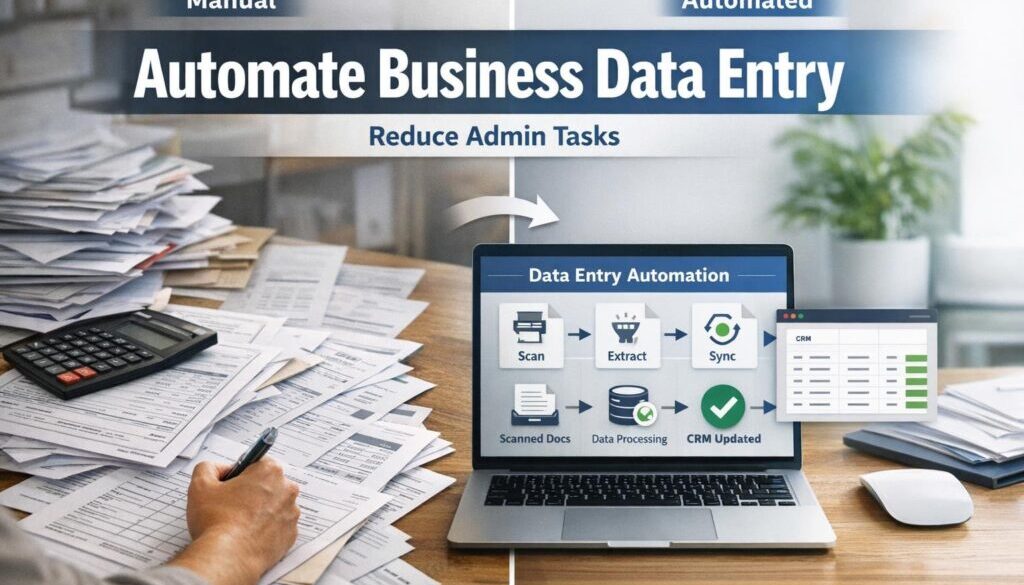
A practical workflow often follows this pattern:
- Information arrives in an email, form or uploaded document.
- The system captures the key details.
- The data is checked or validated.
- The record is sent to the right place.
- A person reviews exceptions if needed.
That simple structure is often enough to remove a large amount of admin without making the process fragile.
Add human approval for exceptions
Not everything should move automatically. Missing fields, unusual amounts, duplicate records and unclear documents should be sent to a person for review. That keeps the workflow controlled and reduces the risk of bad data spreading through the system.
Test before rolling out fully
Start with a small sample of real records and check the workflow carefully. Make sure it captures the right fields, handles errors properly and stores information in the correct place.
This is where a practical automation partner can help design something simple and safe rather than overly complex.
For a real example of a repetitive administrative process being simplified, see our trust account automation case study. It is a useful reminder that document-heavy workflows are often good candidates for structured automation.
What to check before buying software
If you are comparing tools, focus on how well they fit your business process rather than on flashy features. A tool only helps if it makes the work simpler and more reliable.
Integrations
Check whether the tool connects with the apps you already use, such as accounting software, email, forms, spreadsheets or CRM systems. If it cannot connect cleanly, you may end up creating more manual work.
Australian support and compliance fit
For Australian businesses, it is worth checking whether the tool suits local record-keeping, GST and privacy requirements. That does not mean every tool must be Australian-made, but it does mean the workflow needs to make sense for an Australian business environment.
Error handling and audit trail
Good automation should make it easy to see what happened to each record. If something fails, there should be a clear way to spot it and fix it. An audit trail can be especially useful for financial and compliance-related workflows.
Cost and maintainability
Cheaper tools are not always cheaper in practice if they are hard to maintain or need constant fixing. The best solution is often the one your team can actually live with day to day.
That is why many businesses start by exploring business automation resources and then move into a practical implementation only after the process is clear.
Practical examples of business data entry automation
These simple examples show how businesses can reduce admin without overengineering the process.
Lead form to CRM
Current problem: website enquiries land in email and someone manually creates a lead record.
Automation opportunity: capture the form submission and create the CRM record automatically.
How it could work: a form submission triggers a workflow that sends the details to the CRM and notifies the sales team.
Business benefit: faster follow-up and less risk of missed leads.
Receipt to expense queue
Current problem: staff email receipts to admin, who then enter the details later.
Automation opportunity: extract the main fields from the receipt and store them in a review queue.
How it could work: the workflow reads the receipt, captures the details and sends anything unclear to a person for checking.
Business benefit: less manual entry and better organisation of expense records.
Invoice to accounting review
Current problem: supplier invoices are manually entered into accounting software.
Automation opportunity: capture the invoice details and prepare them for review.
How it could work: the system extracts the invoice information, flags anything unusual and routes it to a staff member to approve.
Business benefit: less duplication and a cleaner workflow for finance admin.
For another practical example of repetitive workflow simplification, our content calendar automation case study shows how structured planning work can be made easier when information flows through a clear process.
How automation reduces admin across the business
When you automate business data entry, the benefits go beyond saving a few minutes here and there. The bigger win is a better operational flow.
- Less manual re-keying
- Fewer entry mistakes
- Faster response times
- Cleaner records
- More consistent processes
- Less pressure on busy staff
That is why automation is often most valuable in small businesses where time is limited and admin work is spread across multiple roles.
Where Simple Automations fits
Simple Automations helps small businesses identify repetitive processes, simplify them and build practical automation around them. The focus is not on adding complexity. It is on making the business easier to run.
If you have a process that involves manual data entry, disconnected tools or too much copying and pasting, it may be worth looking at practical automation solutions that fit the way your business already works.
For businesses that want to see a broader range of examples, the automation case studies page shows how different workflows can be streamlined in the real world. Another relevant example is digital product automation, which shows how a repetitive delivery process can be structured to reduce manual handling.
Ready to Simplify Repetitive Admin?
If your team is spending too much time copying information between systems, Simple Automations can help you identify the best workflow to automate first and keep the process practical.
Final takeaways
The best way to automate business data entry is to start with a process that repeats often, has clear rules and benefits from a simple review step. In many small businesses, that means invoices, receipts, lead forms, emails or spreadsheet updates.
AI can help with document reading and classification, but human review still matters for financial data, exceptions and compliance. If you keep the workflow simple and build it around real business needs, automation can reduce admin without creating more complexity.
For small businesses that want to move from manual copying to cleaner workflows, the next step is usually to map the process, choose the best starting point and then build something reliable around it.