How to Automate Supplier Communications Without Losing Control
If you want to automate supplier communications, the goal is not to remove people from the process entirely. The goal is to take repetitive admin off your plate while keeping humans in charge of the important decisions.
For many small businesses, supplier follow-up still lives in inboxes, spreadsheets, and scattered notes. That usually means the same messages get written over and over again, documents go missing, and someone has to chase the next step manually.
In this guide, you’ll learn what supplier communication automation means, which tasks are safe to automate, what should stay manual, and how to start simply without overcomplicating your systems.
null
It also matters to get the balance right. Automation can save time and improve consistency, but supplier relationships still need judgement, especially when there are invoice disputes, contract changes, or payment risks.
For broader context on practical business process improvements, you may also find our small business automation page useful, along with the automation solutions we provide for repetitive workflows.
What is supplier communication automation?
Supplier communication automation means using software, workflows, and sometimes AI to reduce manual back-and-forth with suppliers.
In practice, it often covers routine tasks such as:
- sending purchase orders and confirmation requests
- following up on missing invoices
- requesting delivery updates
- collecting onboarding documents
- reminding suppliers about expiring certificates or renewals
- logging communication history in one place
The basic idea is simple: if a message or task happens again and again, it may be a good candidate for automation.
The types of supplier messages it covers
Most supplier communication automation is not about complex negotiation. It is usually about repeated, rules-based communication such as:
- acknowledgement emails
- status updates
- request-for-information messages
- reminders
- internal approval steps
- document collection
That is why this type of automation often works best in small businesses that have predictable purchasing, invoicing, or onboarding processes.
Why businesses automate this work
Businesses usually look to automate supplier communications for a few practical reasons:
- to reduce repetitive admin
- to cut down on manual follow-up
- to improve consistency
- to reduce data entry errors
- to make it easier to track what has been sent and received
When these tasks are managed manually, it is easy for things to slip through the cracks, especially in busy offices and small teams.
Which supplier communications are best suited to automation?
Not every supplier interaction should be automated. The best candidates are usually the ones that are repetitive, predictable, and low risk.
Supplier onboarding
When a new supplier is added, businesses often need the same set of details every time. That can include an ABN, contact details, bank details, insurance certificates, and other documents.
Current problem: Staff often email back and forth asking for the same information.
Automation opportunity: A form or workflow can request the standard information as soon as onboarding starts.
How it could work: A new supplier record triggers a welcome email and document request. The responses are stored in a shared location and a task is created for human review.
Business benefit: Less chasing, fewer missing documents, and a more consistent onboarding process.
This type of workflow is often a sensible first step for businesses wanting to automate your small business without making the process too technical.
Purchase orders and confirmations
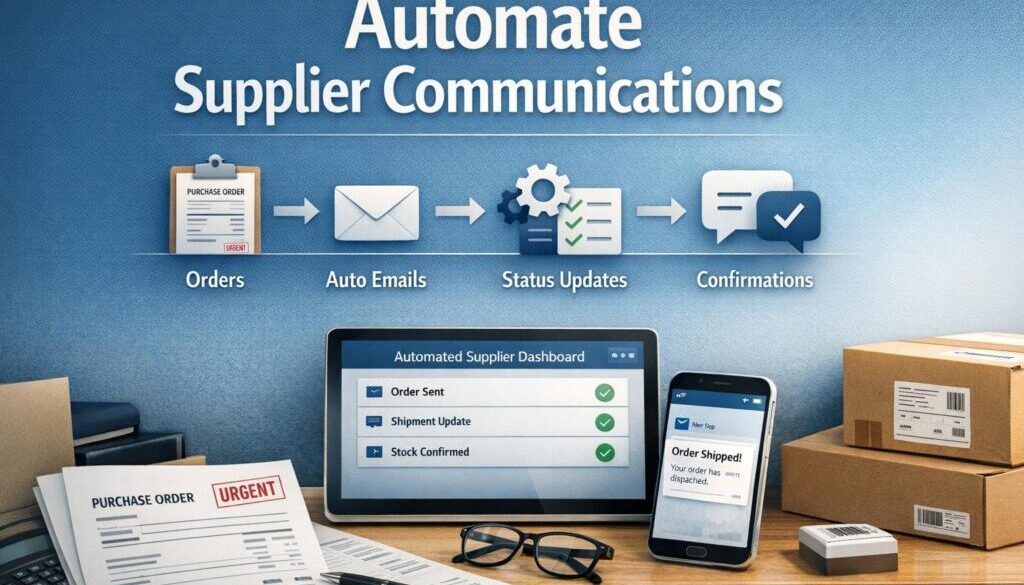
If your business regularly sends purchase orders, it may be possible to automate the dispatch and confirmation follow-up.
For example, once a purchase order is created, the system can send it to the supplier and create a reminder if confirmation has not been received after a set time.
This is a simple example of how to automate supplier communications without changing the whole purchasing process.
Delivery and ETA updates
Delivery updates are often a good fit for automation because they are factual and time-sensitive.
Where a supplier replies with a tracking number or estimated delivery date, that information can sometimes be routed into a spreadsheet, task board, or inventory system. Staff can then be notified if something is delayed.
This is especially useful when a delay affects customer commitments or project schedules.
Invoice reminders and payment messages
Invoice follow-up is one of the most common reasons businesses want to automate supplier communications. A workflow can help confirm receipt, route invoices for approval, and create reminders when something is missing or due.
It can also help send routine payment notices or remittance advice, where appropriate.
That said, payment-related workflows should always allow for human review where exceptions or disputes are involved.
Document requests and renewals
Many businesses need to request and track documents such as insurance certificates, tax details, or updated contact information.
Automation can help by sending standard document requests, reminding suppliers before something expires, and flagging overdue items for staff attention.
This is useful for reducing manual follow-up while keeping compliance steps visible.
Routine status follow-ups
If your team regularly asks, “Has that been sent yet?” or “Can you confirm the ETA?”, that is usually a sign the workflow could be improved.
Automation can send follow-ups after a delay, escalate repeated non-response, and keep a record of the conversation history.
That does not remove the need for judgement. It simply reduces the amount of repetitive chasing.
What should still be handled manually?
This is where many businesses get the balance wrong. The safest approach is to automate the routine and keep humans on the exceptions.
Disputed invoices and payment exceptions
If an invoice looks wrong, is duplicated, or does not match what was ordered, a person should review it before action is taken.
Automation can flag the issue, but it should not be the one deciding what to pay.
Negotiations and contract changes
Supplier negotiations are not usually suitable for full automation. Price changes, revised terms, and contract variations often require context that software cannot understand properly.
A workflow can support the process, but a person should make the decision.
Compliance issues
If a supplier’s documents are incomplete, outdated, or unclear, automation can flag the issue and request more information.
It should not make the final judgement about whether the supplier is approved.
High-value or high-risk approvals
Any workflow involving large payments, sensitive banking changes, or unusual requests should include human verification.
That is especially important in Australian businesses where invoice fraud and email compromise are real risks. The Australian Cyber Security Centre provides general guidance on cyber security risks, including phishing and email compromise, which are relevant to supplier communications.
How small businesses can start simply
You do not need a complex platform to get started. In many cases, the best automation begins with a basic, tidy process.
Start with email templates and checklists
If the same supplier message is being written repeatedly, turn it into a template first. Templates help standardise tone, reduce drafting time, and make sure key details are not forgotten.
A simple checklist also helps define what must happen before a message is sent.
Add forms, spreadsheets, and task reminders
Once the basic message is standardised, you can add a form to collect information, a spreadsheet to track the workflow, and task reminders to follow up when needed.
This kind of setup is often enough for small businesses that want to reduce manual work without introducing heavy software.
Connect accounting, inbox, and workflow tools
Supplier communication often sits across several tools. Email, accounting software, and task management systems may all be involved.
Workflow automation platforms can help connect these steps so that an event in one system creates an action in another. For example, a new supplier form could create a task, update a spreadsheet, and trigger an email.
Tools such as Microsoft Power Automate, Zapier, Make, and n8n are commonly used for this kind of workflow connection, but the right choice depends on your existing tools and needs.
How AI can help without taking over
AI can be helpful in supplier communication, but it should support the process rather than replace human judgement.
Drafting follow-ups and reminders
AI can draft reminder emails, follow-up notes, and acknowledgement messages. That can save time when your team sends similar messages often.
Even then, the content should be checked carefully before sending, especially if it includes dates, prices, commitments, or compliance language.
Summarising email threads
Long supplier conversations can be hard to follow. AI can help summarise a thread so staff can quickly see what was said, what is missing, and what still needs action.
That is useful when a supplier issue has been discussed across multiple emails over several days.
Extracting data from invoices and documents
Some tools can extract information from invoices or other documents, such as invoice numbers, dates, amounts, or ABNs. This can reduce manual entry.
However, extracted data should be checked before it is posted into accounting or inventory systems. AI and document extraction tools can make mistakes.
Classifying incoming supplier messages
AI can also help sort incoming messages into categories such as invoice, delivery update, quote, compliance document, or bank detail change.
That makes it easier for the right person to review the message quickly.
Microsoft’s Microsoft 365 Copilot documentation and Google’s Gemini for Google Workspace support pages are useful starting points if you want to understand current AI assistance options in common office suites. Feature availability changes, so it is worth checking official documentation before assuming a tool can do everything you need.
The tools commonly used for supplier communication automation
There is no single best tool for every business. Most small businesses use a mix of systems depending on what they already have in place.
Email and office suites
Many supplier workflows begin in Microsoft 365 or Google Workspace. These tools are often where messages are written, stored, and reviewed.
For some businesses, the simplest gains come from improving email templates, shared folders, and spreadsheet tracking before introducing anything more advanced.
Workflow automation platforms
Workflow platforms help move data and tasks between systems. They can be useful when a supplier form, email, spreadsheet, and approval step all need to work together.
These tools are often used to automate supplier communications because they can connect many different business apps without custom software.
Accounting and bookkeeping systems
Accounting platforms often sit at the centre of supplier invoice handling. Depending on the product and setup, they may support bill capture, approvals, document storage, or workflow triggers.
Current features change over time, so it is important to check the official support documentation for systems such as Xero, MYOB, and QuickBooks Australia.
Forms, document storage, and task tools
Forms are useful for collecting supplier details in a consistent way. Shared storage keeps supporting documents in one place. Task tools help ensure nothing is missed.
Used together, these simple tools can form a solid starting point for supplier communication automation.
Privacy, security, and fraud risks Australian businesses should consider
This is one of the most important parts of the process. Supplier communications often include sensitive business information, and sometimes personal information as well.
Personal and banking data handling
Supplier onboarding often involves collecting bank details, identity documents, and contact information. If your business is covered by the Australian Privacy Principles, that information needs to be handled carefully.
Even when a business is small, it is sensible to restrict access, use secure storage, and keep a clear process for who can view or change supplier details.
Recordkeeping and audit trail requirements
Supplier invoices, payment records, and related communications can form part of your business records. The Australian Taxation Office record-keeping guidance and business recordkeeping guidance are useful reminders that records should be stored in a way that makes them easy to retrieve later.
If you automate supplier communications, make sure the communication history is still traceable. You want to be able to see what was sent, when it was sent, and who approved it.
Invoice fraud and bank-detail change scams
One of the highest-risk supplier workflows is changing bank details. Fraudsters may try to intercept emails or impersonate a supplier to divert payments.
That is why bank detail changes should not be fully automated without verification. A human should confirm any request through a trusted channel before the payment details are updated.
Why human verification still matters
AI and automation can support a process, but they should not be the final authority for sensitive or high-risk actions. A person should still review:
- bank detail changes
- large or unusual payments
- invoice disputes
- compliance exceptions
- contract changes
That is the safest way to use automation while keeping control.
A practical starter workflow
Here are a few simple examples of how supplier communication automation can work in a small business.
Example: onboarding a new supplier
- A new supplier is added through a form or spreadsheet.
- The system sends a welcome email with the required documents list.
- The supplier uploads ABN, bank details, insurance evidence, or other requested information.
- The documents are stored in a shared folder.
- A task is created for someone to review and approve the setup.
This is a good example of automating the routine while keeping the approval step manual.
Example: chasing an overdue invoice
- An expected invoice has not arrived by the due date.
- A reminder email is sent automatically.
- If there is still no response, a follow-up task is created for staff.
- If the supplier replies with a dispute, a human reviews the issue.
This reduces inbox chasing and helps keep the process moving.
Example: confirming a delivery delay
- A supplier sends a message with a late delivery update.
- The message is classified and routed to the right staff member.
- An internal task is created to notify the customer or reschedule work.
- If the delay has business impact, a person decides the next step.
This is often where automation adds value without removing the need for judgement.
Document-heavy workflows like this are also the kind of process we explore in our trust account automation case study, where repetitive administrative handling was simplified through a structured workflow.
What to check before automating supplier emails
Before you automate anything, it is worth checking a few basics. This prevents messy workflows and reduces the chance of errors later.
Data quality
Automation is only as good as the data behind it. Make sure supplier names, email addresses, contact details, and payment information are accurate and up to date.
Integration fit
Check whether your tools can actually talk to each other. Not every accounting or office platform integrates cleanly with every automation tool.
That is why it is important to confirm the current documentation for the software you use rather than assuming a workflow will work end to end.
Approval steps
Decide which actions must be reviewed by a person. This is especially important for payments, supplier changes, and any message that creates a commitment.
Privacy settings and retention rules
Think about who can access supplier data, how long records should be kept, and where documents are stored. Good recordkeeping makes automation more useful, not less.
If your team is building broader workflow improvements, our Business Hub is a helpful place to explore related resources and practical ideas.
Real-world examples of automation thinking
Supplier communication is not the only place where repetitive business workflows can be improved. Similar principles apply in content management and digital product delivery as well.
For example, our content calendar automation case study shows how a recurring planning process can be organised more efficiently, while our digital product automation work demonstrates how a repeatable delivery workflow can be streamlined.
The common thread is the same: identify the routine steps, automate the repeatable parts, and keep human oversight where judgement matters.
Final takeaway: automate repetitive tasks, not judgement
If you want to automate supplier communications, start with the repetitive work: onboarding requests, reminders, status updates, and routine follow-ups. These are often the best places to save time and improve consistency.
Keep humans involved in exceptions, disputes, approvals, and anything involving payment risk or compliance decisions. That gives you the benefits of automation without giving up control.
For a practical next step, review the workflow that causes the most inbox chasing in your business and ask whether it can be simplified with templates, forms, reminders, or a connected workflow. If you need help mapping the process, Simple Automations can help design a practical approach that fits the way your business already works.
Ready to Simplify Supplier Admin?
If supplier emails, follow-ups and document requests are taking too much time, a simple automation workflow could help reduce the manual work while keeping the important approvals in your hands.
In the end, the best approach is straightforward: automate the routine, keep humans on the exceptions, and use technology to make business simpler.