How to Automate Business Handover Tasks Without Losing Context
If you need to automate business handover tasks, the goal is usually simple: reduce missed steps, lost context and manual admin when work changes hands. That might be an employee leaving, a client moving to a new account manager, a job being reassigned, or a project passing from one team member to another.
The best approach is not to automate the judgement part of a handover. It is to automate the repeatable steps around it: collecting details, assigning tasks, sending reminders, moving files and recording what happened. That keeps the process faster and more consistent without removing human oversight where it matters.
In this guide, we will look at what business handover automation is, which tasks suit automation, what should stay manual, and how small businesses can build a simple workflow that is practical and secure.
null
For many small businesses, handovers are where things quietly break down. Information lives in inboxes, notes are incomplete, and access changes are forgotten. A structured process helps, and a well-planned way to automate business handover tasks can make that process much easier to follow.
You can also explore our broader approach to small business automation if you are looking for other ways to reduce repetitive admin across your business.
What Is Business Handover Automation?
Business handover automation means using software, workflows, templates and AI-assisted tools to streamline the transfer of work, information, responsibilities and context between people or teams.
In practical terms, it helps with the structured parts of a handover. For example:
- collecting the right handover details
- routing tasks to the next owner
- creating checklists
- sending reminders
- updating records
- requesting approvals
- generating a summary for the next person
The key idea is that a handover is not just a document. It is a process. That process usually includes identifying what is being handed over, deciding who owns it next, transferring files and access, confirming completion and keeping a record for accountability.
Why handovers fail when they are done manually
Manual handovers often fail for the same reasons across different businesses:
- important details sit in one person’s head
- notes are incomplete or inconsistent
- files are stored in too many places
- ownership of tasks is unclear
- reminders are forgotten
- access is removed too late, or not at all
That creates delays, security risks and frustration for the person taking over. If your business has ever had a project stall because nobody knew the next step, you already know why it is worth trying to automate business handover tasks.
For more general process improvements, the automation solutions page explains how Simple Automations approaches practical workflow problems for small businesses.
Which Handover Tasks Can Be Automated?
The most useful handover automations usually cover the structured, repeatable work around the transition. The judgment-heavy parts still need a human.
Intake forms and structured data capture
A handover can begin with a form that captures the basics:
- who is handing over the work
- who is receiving it
- the deadline
- linked files or folders
- active tasks
- risks or blockers
- required approvals
This gives the business a consistent starting point and reduces the chance of missing critical information.
Task routing and checklist creation
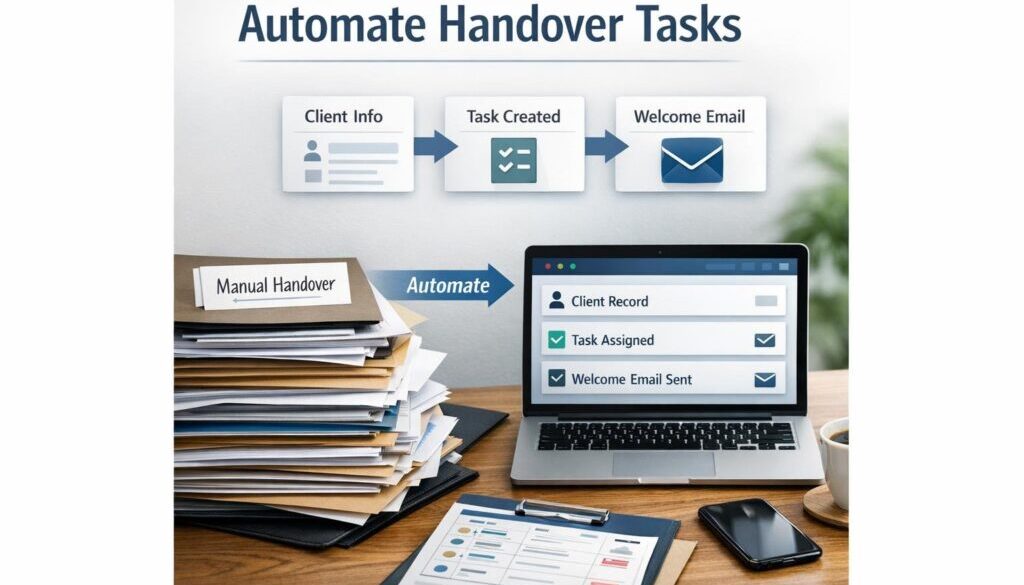
Once the details are captured, software can create a checklist and assign tasks to the right person or team. That can be useful for project handovers, client transitions, leave coverage and offboarding.
Instead of someone manually writing the same steps every time, the workflow can create the list automatically and notify the people involved.
Reminders, approvals and escalation
Handover work often gets stuck because someone forgets to respond. Automated reminders can prompt the outgoing person, the incoming person or a manager when a deadline is approaching.
Approvals can also be routed automatically. That is useful when a handover needs sign-off before the next person starts working from it.
File transfer and access management
Handover automation can help move or share the right documents, folders and records. It can also trigger access requests or access-removal tasks where appropriate.
This is especially important during staff offboarding. If access remains open after the handover, there is a security risk. If access is removed too early, work can stop.
Summary generation and documentation
AI can help draft a summary from structured notes, meeting points or email content. That summary can give the next person a clearer view of what is in progress, what has been decided and what still needs attention.
For a practical example of structured document-heavy workflow design, see our trust account automation case study. It shows how repetitive administrative processes can be simplified when the workflow is well defined.
Ticket escalation and job reassignment
In service businesses, handovers often happen when a ticket, job or support request is reassigned. Automation can copy the key context into the new record, assign the new owner and set reminders so the work does not go cold.
This is a common place to automate business handover tasks because the process is repeated often and the cost of missed context can be high.
What Should Stay Manual?
Automation is useful, but it should not replace human judgment in areas where the business needs careful review.
Final sign-off and responsibility decisions
Someone still needs to confirm that the handover is complete and that the right person is now responsible. Software can support that step, but it should not make the decision on its own.
Legal, financial, safety or client-sensitive handovers
If the handover involves legal responsibility, financial authority, safety-critical work or sensitive client information, human oversight is essential. Those situations need review, not just workflow.
High-risk offboarding situations
Offboarding is one of the most sensitive handover scenarios. Access removal, record handling and file ownership changes should be checked carefully. Automating the checklist is helpful, but the business should still confirm that every required step has been completed.
A Simple Handover Workflow for Small Businesses
If you are trying to build a simple system, start with a workflow that is easy to use every time. The aim is consistency, not complexity.
Step 1: Collect the handover details
Use a form or template to capture the basics of the handover. Keep it short enough that people will actually complete it, but detailed enough to be useful.
Step 2: Assign ownership
Make sure every item has a next owner. This is one of the biggest differences between a tidy handover and a messy one.
Step 3: Move files and access
Share the relevant documents, move them into the right folders and trigger any access changes that need to happen.
Step 4: Confirm completion
Send reminders if the handover has not been finished by the deadline. Where appropriate, ask for approval from a manager or team lead.
Step 5: Record the handover
Keep a record of what was handed over, when it happened and who accepted it. This creates an audit trail and makes future handovers easier.
That simple flow is often enough to make a big difference. It is also a strong starting point if you want to automate business handover tasks without overbuilding the process.
Our Business Hub has additional resources if you want more practical guidance on improving everyday business workflows.
How AI Can Help With Handover Tasks
AI is useful when a handover includes messy or unstructured information. It can help turn notes into something cleaner and easier to use, but it should not be treated as the final authority.
Summarising messy notes
If the outgoing person has written a long set of notes, AI can help turn them into a shorter summary. That can make it easier for the next person to understand what matters most.
Drafting checklists and action items
AI can also help draft a first version of a checklist based on the type of handover. For example, a project handover might need action items around deadlines, contacts, documents and outstanding decisions.
Extracting key points from emails or meetings
Sometimes the useful information is spread across several emails or meeting notes. AI can help extract the main points and create a cleaner starting draft for the handover record.
Why human review still matters
AI-generated summaries can miss context or make assumptions. That is why human review matters, especially for sensitive, legal, financial or client-related handovers.
For a simple content workflow example that uses automation to organise repeatable work, you can also look at our content calendar automation case study.
If your business publishes digital files or downloadable products as part of a handover or delivery workflow, our digital product automation example shows how structured delivery steps can be simplified.
Best Tools for Handover Automation
The right tool depends on what your business already uses. In many cases, the best option is the one that fits your existing workflow rather than adding another system to manage.
Microsoft 365 and Power Automate
Microsoft provides workflow automation tools through Power Automate, and its documentation explains how those workflows, approvals and connectors work. Microsoft also offers Copilot support for drafting and summarising in Microsoft 365.
Learn more from the official documentation here:
Google Workspace tools
Google Workspace can also support handover workflows through forms, documents, shared drives and AI-assisted drafting. Its official Gemini product page and admin help pages are useful references when checking current capabilities.
Project and task platforms
Tools such as Jira, Asana and Monday.com can help with assignment changes, reminders and workflow rules. Their official documentation is the best place to confirm current automation features.
Helpdesk, CRM and workflow tools
If your handover sits inside support, sales or client delivery, helpdesk and CRM platforms may be more useful than a generic task tool. The best choice depends on where the work already lives.
Automation platforms such as Zapier and Make can also connect systems together when native workflows are not enough. Their help centres are a good place to check current options.
Privacy, Security and Records Considerations in Australia
If handover tasks involve employee, client or customer information, Australian businesses need to handle that information carefully. The Office of the Australian Information Commissioner provides guidance on privacy obligations, and the Australian Privacy Principles are especially relevant when personal information is collected, used or disclosed.
Useful government references include:
- Australian Privacy Principles
- Notifiable Data Breaches scheme
- Australian Cyber Security Centre
- Business.gov.au
For Australian employers, handovers can also intersect with record-keeping and payroll obligations. If that applies to your business, the Fair Work Ombudsman and ATO guidance are useful starting points.
In practice, the biggest risk is often informal handover through email, chat or memory, with no formal record or access control. If you want to automate business handover tasks safely, privacy and access management should be part of the workflow from the start.
Common Handover Automation Mistakes
Automating a bad process
If the handover process is unclear, automation can make the problem faster rather than better. Before building anything, map out the actual steps.
Leaving knowledge in inboxes and chat
Important context should not stay buried in a private inbox or a long chat thread. Capture the key points in a shared system.
Failing to remove access
This is one of the most serious mistakes. If someone has left the business or changed roles, access should be checked and updated promptly.
Trusting AI summaries without review
AI is helpful for drafting, but it can be wrong or incomplete. Treat the output as a first draft, not a final record.
How to Choose the Right Level of Automation
The right level of automation depends on how often the handover happens, how much repetition is involved and how risky the process is.
Start with a checklist
If your handover process is not consistent yet, begin with a simple checklist. That alone can improve consistency and reduce missed steps.
Add workflows where repetition is high
Once the basic process is clear, automate the repetitive parts such as task creation, notifications, record updates and reminders.
Use AI only where it reduces friction safely
AI is best used for summarising, drafting and extracting action items. Keep humans involved where accuracy, responsibility or confidentiality matter.
If you are looking for help designing a workflow that suits your business, our automation solutions page is a good place to start.
Ready to Simplify Your Handover Process?
If your business is losing time to repetitive handover admin, Simple Automations can help you map the process and identify the parts that can be automated safely and practically.
Final Takeaway
The smartest way to automate business handover tasks is to focus on the repeatable parts: forms, checklists, reminders, task routing, file transfer and record keeping. Keep judgment-based decisions manual, especially when the handover involves privacy, security, finances, client relationships or offboarding.
For small businesses, a simple and well-used workflow is usually better than a complex one that nobody follows. If you build it around clear ownership, secure access and a reliable record of what was handed over, you will reduce confusion and make transitions much smoother.
If you want to improve the handover process in your business, start with a checklist, then automate the repetitive steps around it. That is often the simplest path to a more organised and less stressful workflow.