How to Automate Estimate Follow-Ups Without Losing the Human Touch
Following up on quotes and estimates takes time, and for many small businesses it is easy for a good lead to slip through the cracks. If you want to automate estimate follow-ups, the goal is not to replace people. It is to make sure the repetitive parts happen on time, every time, while still leaving room for judgment, conversation, and relationship-building.
This guide explains what estimate follow-up automation is, what you can automate safely, where human review still matters, and how to build a simple workflow that works in a real small business.
null
For businesses that send quotes regularly, this is one of the most practical places to start with automation. It can reduce admin, improve consistency, and help you respond before a customer moves on. If you are looking for broader support with this kind of process improvement, Simple Automations works with small businesses on small business automation that removes repetitive work without making systems harder to manage.
What is estimate follow-up automation?
Estimate follow-up automation means using software to trigger reminders, tasks, messages, or status changes after a quote has been sent. Instead of relying on memory or a spreadsheet reminder, the system does the chasing for you based on a rule you set.
What it means in practice
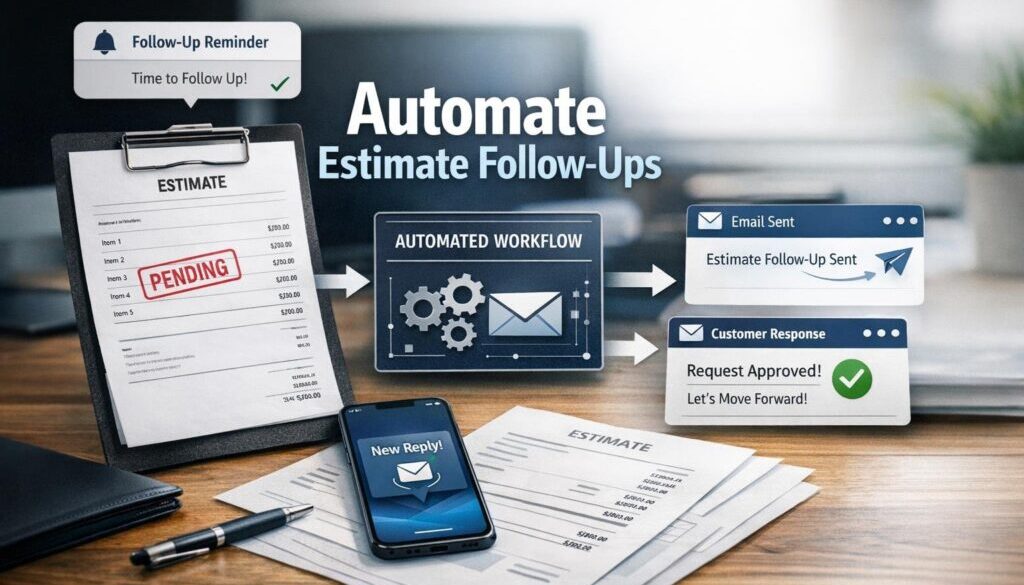
A basic workflow might look like this:
- a quote is sent to the customer
- the system waits a few days
- if the quote has not been accepted, a reminder is sent
- if there is still no response, a follow-up task is created for staff
- if the estimate is accepted, the job moves to the next step
That simple structure can save a lot of repetitive admin. It also creates a more consistent customer experience, because no quote is left sitting unnoticed for too long.
Why it matters for small businesses
For many small businesses, quote follow-up is one of those tasks that is important but easy to delay. Staff get busy, the inbox fills up, and the follow-up gets pushed back. When that happens, the business can lose time and revenue simply because the process depends too much on memory.
That is why many owners look for automate estimate follow-ups solutions that are simple, reliable, and easy for a small team to use.
Why manual quote follow-up breaks down
Manual follow-up usually starts with good intentions. Someone sends the estimate, makes a mental note to chase it later, and then the day gets busy. By the time they remember, the customer may already have gone elsewhere.
Lost reminders and inconsistent processes
When quote follow-up is handled manually, it often depends on:
- memory
- calendar reminders
- spreadsheet notes
- inbox searches
- someone remembering to act on a status change
That creates inconsistency. One quote may get followed up quickly, while another is forgotten entirely. For a growing business, that inconsistency is hard to see at first, but it can quietly affect lead conversion and customer experience.
Slower responses, slower revenue
Quote follow-up is not just admin. It is part of the sales process. If a prospect is interested but has not yet replied, a timely reminder can help keep the conversation alive. If the follow-up is late, the customer may assume the business is too busy, too slow, or not interested.
That is why many teams use automation to keep the process moving without having to chase every estimate manually.
What parts of the follow-up process can be automated?
Not every part of estimate follow-up should be automated, but several repetitive steps usually can be.
Reminder emails
A polite reminder can be sent after a set delay if the estimate has not been accepted. This is one of the simplest ways to automate estimate follow-ups.
Follow-up tasks and CRM stage changes
If a quote has not been answered, automation can create an internal task for a team member or move the deal to a different stage in the CRM. That helps staff see what still needs attention without checking every record manually.
Escalations for quotes nearing expiry
Some estimates are time-sensitive. Automation can flag a quote that is close to expiring so someone can review it, call the customer, or send a final reminder.
Post-acceptance handoff to invoicing or job scheduling
When a customer accepts an estimate, the workflow can move to the next step. Depending on the business setup, that may mean creating an invoice, scheduling the job, or notifying operations. The exact tools vary, but the principle is the same: once the estimate is accepted, the business should not need to start the process again from scratch.
For businesses that want a practical implementation approach rather than a generic software setup, the automation solutions page is a good place to see how process problems can be turned into simple workflows.
A simple automated quote follow-up workflow
If you want to keep things straightforward, start with one workflow only. A common small-business sequence looks like this.
1. Send the quote
The customer receives the estimate by email or through quoting software. At this point, the workflow should log the date and status so there is a clear starting point.
2. Wait a set number of days
Choose a sensible delay based on the type of job. A short, urgent quote may need faster follow-up than a larger project estimate. The delay should fit the sales cycle, not a random rule.
3. Trigger the first reminder
If the estimate has not been accepted, the system sends a polite reminder. The wording should be simple and helpful, not pushy.
4. Trigger a second reminder or call task
If there is still no response, a second reminder can be sent or a follow-up task can be created for a call or personal message. This is often the point where human contact becomes especially useful.
5. Mark the outcome
Once the estimate is accepted, declined, or left overdue, the system should update the status. That gives the team a clearer view of the pipeline and stops people chasing jobs that are already closed.
This is the kind of repetitive, document-heavy process where a workflow can make a big difference. Simple Automations has also applied this thinking in a different admin context through trust account automation, which shows how structured workflows can simplify repeatable business tasks.
Where automation works best — and where it does not
Automation is best used for predictable steps. It is not a replacement for judgment.
Good fit for repetitive follow-ups
Automation works well when the follow-up pattern is fairly standard. For example:
- a reminder after a fixed delay
- a task when a quote remains unanswered
- a status update when a quote is accepted
- a notification when an estimate is nearing expiry
Human review for high-value or complex quotes
Some quotes deserve a personal call or manual review. That is especially true when the job is large, the scope is unclear, the pricing may need adjustment, or the customer has already raised concerns.
In other words, the best way to automate estimate follow-ups is to let the software do the routine work while people handle the exceptions.
Email, SMS, CRM, or task automation: what’s the difference?
Different tools can support the same follow-up process, but they do different jobs.
Email reminders
Email is usually the easiest place to start. It suits polite reminders, quote updates, and simple follow-up sequences. It is also easier to template and review before sending.
SMS follow-ups
SMS can be useful for short, time-sensitive follow-ups, but it should be used carefully. Because text messages are direct and personal, they can feel intrusive if overused. They also need careful attention to Australian anti-spam rules.
CRM workflows
A CRM can track the quote stage, remind staff to follow up, and show where each lead sits in the pipeline. This is useful for businesses that want one place to manage sales activity instead of relying on inboxes and memory.
Internal task automation
Sometimes the best automation is not a customer message at all. It may simply be a task created for a staff member, such as “call this lead tomorrow” or “check whether this quote has expired.”
If you want to see the kind of practical business content that supports these workflows, the Business Hub is a useful resource for further reading.
How AI can help with estimate follow-ups
AI can be useful in quote follow-up, but it should support the process rather than control it.
Drafting and rewriting messages
AI can help draft a reminder email, shorten a message, or adjust the tone so it sounds more friendly and natural. That can save time when staff are sending similar follow-ups every day.
Classifying replies
AI may also help sort incoming replies into broad categories such as “needs revision,” “not now,” “accepted,” or “declined.” That can make it easier to route the next step to the right person.
Why human review still matters
AI should not be trusted blindly with pricing, scope, dates, or customer commitments. If the message refers to a specific estimate, it should be checked before it goes out. A small error in a follow-up email can create confusion or damage trust.
For businesses that want automation and AI to work together in a simple, practical way, the goal is usually to automate the first draft or the first action, then keep human review where judgment matters most.
Software that can help automate estimate follow-ups
There is no single tool that suits every business. Most setups use a combination of quoting software, a CRM, and an automation platform.
Quoting and accounting tools
Some accounting and quoting tools let you create and send estimates directly. Official product pages from Xero Quotes, MYOB quotes, and QuickBooks Online estimates show that these platforms support estimate creation and management in their own systems.
CRM systems
A CRM helps keep the quote pipeline visible. Instead of wondering who still needs a follow-up, the team can see the lead stage, status, and next action in one place.
Automation platforms
Tools like Microsoft Power Automate and Zapier are often used to connect systems and trigger actions when a quote changes status or reaches a certain age. Exact features and pricing can change, so it is worth checking the current official documentation before making a decision.
Office tools for simpler setups
In some smaller businesses, a simpler stack can be enough. Shared inboxes, calendars, and spreadsheets from Google Workspace or Microsoft 365 can support a basic follow-up process if the business is not ready for a full CRM-based workflow.
When a business wants help choosing the right mix of tools, a structured implementation through automation for small business is often the more sustainable option than adding tools one by one without a clear process.
Australian privacy and anti-spam considerations
Any system that sends quote follow-ups is handling customer contact details, so Australian privacy and anti-spam rules matter.
Privacy Act and personal information
The Office of the Australian Information Commissioner explains the Privacy Act and the Australian Privacy Principles on its official website. If your business is covered by the Privacy Act, you need to manage personal information appropriately, including how it is collected, used, disclosed, and secured.
For official guidance, see the OAIC Privacy Act overview and the Australian Privacy Principles.
Spam Act and commercial electronic messages
The Australian Communications and Media Authority provides guidance on commercial electronic messages, including consent, identification, and unsubscribe requirements. This matters if your quote follow-up includes email or SMS messages that are promotional or commercial in nature.
See the official ACMA Spam Act information and ACMA guidance on consent and commercial electronic messages.
Why consent and unsubscribes matter
Even if a message is helpful, it should still be sent in a way that respects the customer’s preferences and the law. The safest approach is to make sure follow-up is lawful, relevant, and not excessive. That keeps the automation useful rather than annoying.
Common risks to avoid
Automation can help a lot, but only if it is set up carefully.
Over-messaging
If customers get too many reminders, the sequence can feel pushy. A good follow-up system should be helpful and restrained.
Wrong details in automated messages
If the automation inserts the wrong name, quote amount, or date, it can cause confusion fast. Always test the workflow before using it live.
Weak integrations and duplicate records
When quoting software, CRM tools, and email systems do not sync properly, the business may end up with duplicate tasks or conflicting statuses. That can create more admin instead of less.
Over-reliance on AI
AI is useful for drafting and sorting, but it should not be left to guess at important quote details. Human review is still important for anything sensitive or high value.
Practical automation should reduce friction, not create new problems. That is the same thinking behind Simple Automations’ work in content and workflow systems, including content calendar automation and digital product automation, where repeatable processes are simplified without losing control.
The simplest setup for a small business
If you want to start without overcomplicating things, keep the first version small.
Start with one workflow
Pick one quote type and one follow-up sequence. For example, send a reminder three business days after the estimate is issued if there is no response.
Review, test, and improve
Test the wording, timing, and status changes before rolling it out to all jobs. Check that the right person gets the right task at the right time.
Add complexity only when needed
Once the basic process is working, you can add a second reminder, a task escalation, or a handoff to invoicing or scheduling. There is no need to build a complex system from day one.
The best systems are usually the ones staff actually use. A simple, reliable workflow is far better than a complicated one that no one trusts.
Conclusion: automate the follow-up, keep the relationship human
If you want to automate estimate follow-ups effectively, focus on the repetitive parts first. Let software send reminders, create tasks, update statuses, and trigger the next step. Keep human judgment for the moments that need conversation, negotiation, or care.
That balance is what makes automation genuinely useful for small businesses. It saves time without making the business feel robotic.
If you would like help identifying what could be automated in your quote process, Simple Automations can help you turn a manual follow-up workflow into something simpler, clearer, and easier to manage.
Ready to Simplify Your Quote Follow-Up Process?
If estimate chasing is taking too much time, we can help you map the workflow and identify the easiest automation opportunities.