How to Automate Customer Feedback Requests Without Sounding Spammy
If you want to automate customer feedback requests, the goal is usually simple: ask at the right time, make it easy to respond, and keep the process compliant and respectful. For small businesses, that means less manual follow-up, more consistent feedback collection, and a better chance of learning what customers actually think.
The challenge is that feedback requests can quickly become annoying if they are too frequent, badly timed, or unclear. In this guide, you’ll learn how to build a practical feedback workflow, what can be automated, what should stay human-reviewed, and what Australian businesses need to keep in mind around privacy and spam rules.
null
We’ll also look at where automation tools, CRM systems, forms, and AI can help simplify the process without making it feel robotic.
What does it mean to automate customer feedback requests?
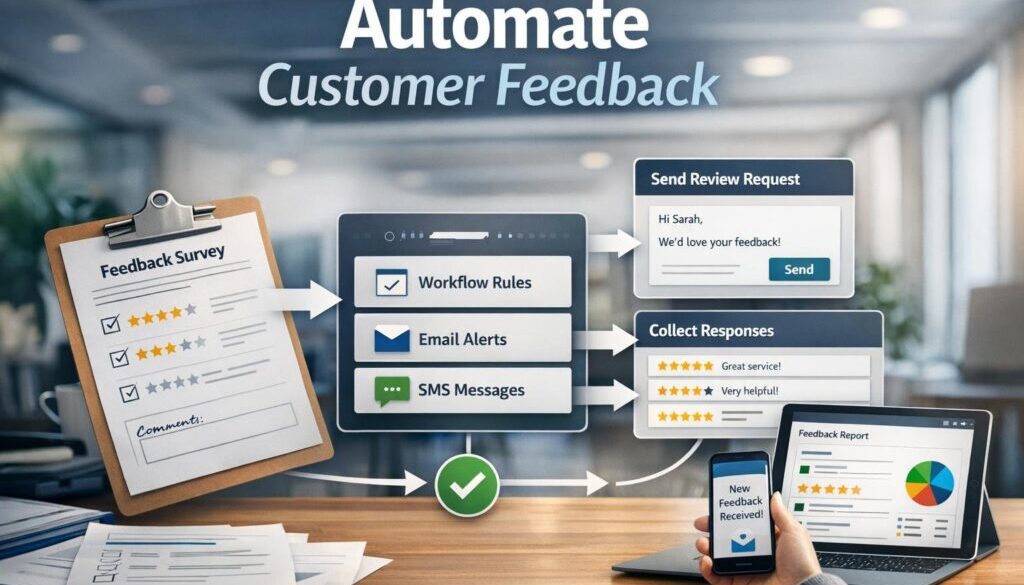
To automate customer feedback requests means setting up a workflow that sends a message or form automatically after a specific business event. Instead of a staff member remembering to follow up every time, the system does it for you based on rules you set.
Feedback requests vs surveys vs review requests
These terms are related, but they are not always the same thing.
- Feedback request: a broad request for a customer’s opinion, rating, or comments.
- Survey: a structured set of questions, often used to measure satisfaction or collect detailed responses.
- Review request: a prompt asking the customer to leave a public review on a platform or listings page.
A good system may use one or more of these, depending on the business goal. For example, a service business might send a short survey first, then ask happy customers for a review.
What automation actually means in a small-business workflow
In practice, automation usually follows a simple pattern:
- A customer action happens.
- The system waits for the right time.
- A feedback request is sent automatically.
- Responses are stored or routed to the right place.
- Negative feedback is flagged for human follow-up.
This kind of workflow can be built with CRM tools, form tools, survey tools, and automation platforms. For a broader overview of practical setups, see our small business automation page and automation solutions.
Why automate customer feedback requests?
There are three big reasons small businesses choose to automate customer feedback requests: time, consistency, and better timing.
Save time and reduce manual follow-up
Manually asking every customer for feedback takes time and is easy to forget, especially when your team is busy. Automation removes that repeat task from the daily to-do list.
Improve consistency and timing
A request sent too early can feel irrelevant. A request sent too late may be ignored. Automation helps you send the message at a consistent point in the customer journey, such as after a job is completed or an invoice is paid.
Capture more useful feedback
When the request is timely and relevant, customers are more likely to reply with useful detail. That makes the feedback more helpful for improving service, spotting issues, and understanding what is working well.
Businesses often use this same principle in other repeatable workflows too. For example, our trust account automation case study shows how a document-heavy process can be simplified when the right steps are automated. For a content workflow example, see our content calendar automation case study. And for digital delivery workflows, our digital product automation example shows how repetitive admin can be reduced.
What triggers a feedback request?
The best feedback workflows are based on a real business event. That way, the request feels relevant instead of random.
After a sale is completed
This works well for ecommerce, retail, and digital products. Once payment is confirmed, the system can wait a set amount of time and then send a short feedback request.
After a job, booking, or appointment
Service businesses often use this trigger because the customer has just experienced the service and the details are still fresh.
After a support case is closed
If a customer has contacted support, a follow-up survey can help you understand whether the issue was resolved clearly and respectfully.
After an invoice is paid or a product is delivered
These are common trigger points because they mark a clear end to the customer journey. The request should still be timed carefully so it feels useful, not intrusive.
How to build an automated feedback workflow
If you want to automate customer feedback requests in a simple, low-admin way, start small. You do not need a complex system to get useful results.
Step 1 — choose the trigger
Pick one event that clearly signals the right time to ask for feedback. Good starting points are job completion, booking completion, or case closure.
Step 2 — set the delay
Do not always send the request immediately. Sometimes a short delay gives the customer time to experience the product or service properly. The right delay depends on the business and the interaction.
Step 3 — send the request
The request can be sent by email, SMS, a form link, or through a CRM workflow. Keep the message short, clear, and specific.
Step 4 — follow up once, if needed
A single reminder can lift response rates, but repeated reminders can annoy customers. Use this step sparingly and only when appropriate.
Step 5 — route responses to the right place
Responses should not disappear into an inbox no one reads. Route them into a CRM record, spreadsheet, support queue, or task list so they can be acted on.
This routing step is where automation becomes especially useful. For example, positive responses might go to a review workflow, while negative responses might create an internal task for follow-up.
Which tools can handle feedback automation?
You do not need one perfect tool. Many small businesses build feedback workflows from a combination of systems they already use.
CRM tools
Customer relationship management systems can trigger messages based on customer status, deal stage, or job completion. HubSpot’s workflow documentation is a good example of how CRM-based automation is structured: HubSpot workflows.
Email and form tools
Tools like Microsoft Forms and Google Forms are often used for short surveys. They are simple, familiar, and easy to connect to other systems. See the official documentation for Microsoft Forms and Google Forms.
Automation platforms
Automation platforms connect your tools together so one event in one system can trigger action in another. Examples include Power Automate, Zapier, and Make.
Survey and review tools
Dedicated survey tools such as SurveyMonkey, Typeform, and Jotform are useful when you want a cleaner feedback form or a more polished customer experience.
The right mix depends on what you already use and how simple you want the workflow to be. If you are still working out what could be automated, the Business Hub is a good place to explore practical ideas.
What should stay human-reviewed?
Automation should reduce manual work, not remove judgment where it matters. Some feedback should always be looked at by a person.
Negative feedback
A low rating or unhappy comment may need a personal response, especially if the issue is urgent or recurring.
Complaints and refund issues
These often need context. A system can flag them, but a human should decide the next step.
Privacy-sensitive responses
If a customer shares personal details or sensitive information, that response should be handled carefully and in line with your privacy processes.
Escalations and follow-up decisions
Automation can identify that something needs attention, but it should not always decide the final action on its own.
Privacy and spam rules Australian businesses need to know
If you use email or SMS to automate customer feedback requests, compliance matters. In Australia, the main issues are privacy and spam rules.
Privacy Act and APP considerations
The Office of the Australian Information Commissioner explains the Privacy Act and the Australian Privacy Principles, which govern how personal information is collected, used, disclosed, and stored. Review the official guidance here: Privacy Act 1988 and Australian Privacy Principles.
Depending on the business and how customer data is handled, these rules may apply. The key point is to be clear about why you are collecting data and how feedback will be used.
Spam Act requirements for email and SMS
The Australian Communications and Media Authority provides guidance on the Spam Act 2003. In general, commercial electronic messages need consent, identification, and a working unsubscribe mechanism. See the official guidance here: ACMA Spam Act 2003.
Consent, identification, and unsubscribe basics
At a practical level, your message should make it clear who is sending it, why it is being sent, and how the recipient can opt out if they no longer want messages.
If you are unsure how your feedback workflow fits privacy and spam requirements, the Australian Government’s small business privacy resources are a useful starting point: privacy and data security guidance.
How to avoid annoying customers
One of the easiest ways to damage response rates is to send too many messages or send them at the wrong time. If you want to automate customer feedback requests well, the customer experience has to come first.
Use the right timing
Ask after the customer has had enough time to experience the product or service. The best timing depends on what you sell.
Segment by customer type or service
Different customers may need different messages. A repeat client, a first-time buyer, and a support customer may each need a different approach.
Keep messages short and relevant
Do not over-explain. A short, polite request is usually more effective than a long one.
Don’t over-remind
A single reminder is often enough. Multiple reminders can feel pushy and reduce goodwill.
How AI can help with feedback workflows
AI can be useful in a feedback workflow, but it should support good process design rather than replace it.
Drafting request copy
AI can help write a clear first draft of a feedback request in a friendly tone. That can save time, especially if you want different versions for different customer groups.
Summarising feedback
If you receive a lot of responses, AI can help summarise common themes so you can spot patterns faster.
Classifying sentiment
AI may help sort responses into positive, neutral, or negative categories. This can be useful for triage, but the output should still be checked when the feedback is important.
Where human review is still essential
AI can miss tone, context, or urgency. That is why complaints, refunds, and sensitive issues should still be reviewed by a person.
For AI-assisted workflow design, it is also worth understanding how information is handled by the tools you use. OpenAI’s official documentation is a useful reference point for AI product and API basics: OpenAI documentation.
What to measure
Automation is more useful when you measure whether it is actually helping.
Response rate
How many customers reply to the request?
Rating trends
Are scores improving or declining over time?
Common themes
What subjects come up repeatedly in open-text responses?
Follow-up completion
When feedback is negative, does the issue get resolved properly?
These measures help you see whether the workflow is simply collecting data or actually improving the business.
A simple setup for very small businesses
If you are a solo operator or small team, start with the smallest workable system.
Minimal-tool workflow
- Choose one trigger, such as job completed or invoice paid.
- Send one short feedback request by email or form link.
- Store responses in one place.
- Manually review anything negative or unclear.
- Adjust the timing and wording if response rates are low.
Low-maintenance version
A low-maintenance setup is usually better than a complicated one. The more moving parts you add, the more likely something is to break or be forgotten.
When to add more automation
Once the basic workflow is working, you can add extras such as reminders, routing rules, review requests, or AI summaries.
How this connects to better customer experience
Feedback automation is not just about saving admin time. It also helps you create a more responsive business. When customers are asked at the right moment, they feel heard. When problems are flagged quickly, they can be dealt with sooner. And when positive feedback is captured well, it can support reputation and retention.
That same focus on clear, well-timed communication is part of good experience design in any business, including travel and guided experiences. If you are interested in that broader customer-experience mindset, you may also find Walkables relevant as an example of a brand where timely follow-up and experience quality matter.
Need help simplifying a feedback workflow?
If your team is still sending feedback requests manually, there is usually a simpler way. The right setup can reduce admin, improve consistency, and help you collect better responses without sounding robotic.
Ready to Simplify Your Feedback Process?
If you want to automate customer feedback requests in a way that suits your business, Simple Automations can help design a practical workflow around your existing tools.
Conclusion
To automate customer feedback requests effectively, focus on three things: the right trigger, the right timing, and the right follow-up. Keep the process simple, make sure the message is relevant, and treat privacy and spam compliance as part of the workflow, not an afterthought.
For most small businesses, the best system is not the most complex one. It is the one that is easy to maintain, respectful to customers, and reliable enough to use every day.
If you want to take the next step, explore our automation for small business page or contact Simple Automations about a workflow that fits your customer journey.