Customer Onboarding Automation: How Small Businesses Can Make Onboarding Simpler
Customer onboarding automation helps small businesses reduce the manual work involved in turning a new lead or customer into an active, paying client. Done well, it can make onboarding faster, more consistent and easier to manage without losing the human touch.
This matters because onboarding often includes a lot of repetitive admin: capturing details, sending forms, collecting documents, creating records, assigning tasks and following up with customers. When those steps are handled manually, things can slip. Customer onboarding automation gives you a way to simplify the process without overcomplicating your business.
null
In this guide, you’ll learn what customer onboarding automation is, which parts of the process can be automated, where human review is still important, what tools small businesses commonly use and how to keep customer data secure in an Australian business context.
If you are also thinking more broadly about simplifying repetitive admin, it may help to look at automation for small business as a wider approach to reducing manual work across your business.
What is customer onboarding automation?
Customer onboarding automation is the use of software and workflows to handle repeatable onboarding tasks automatically, or with less manual effort. It does not mean removing people from the process completely. It usually means letting systems handle the routine steps while your team focuses on exceptions, approvals and relationship building.
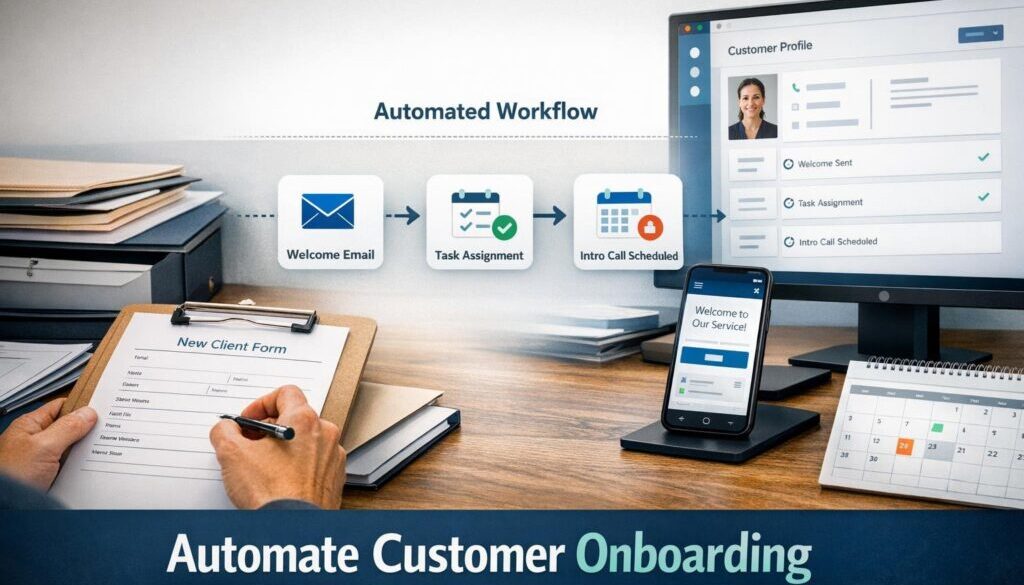
For a small business, onboarding may include:
- capturing customer details
- creating a CRM or contact record
- sending welcome emails and forms
- collecting required documents or approvals
- setting up projects, accounts or services
- invoicing or taking payment
- booking kickoff meetings
- assigning internal tasks
- tracking onboarding until completion
The goal of customer onboarding automation is not to make the process robotic. The goal is to make it clearer, faster and less dependent on someone remembering every step.
Why small businesses use automation for onboarding
Small businesses often run onboarding across email, spreadsheets, shared inboxes, paper forms and folders. That can work for a while, but it becomes harder to manage as the business grows.
Customer onboarding automation is useful because it can help with:
- saving time on repetitive admin
- reducing missed steps
- keeping customer communication consistent
- reducing manual data entry
- making handoffs between team members clearer
- improving record-keeping
In practice, many businesses start by automating the parts of onboarding that happen the same way every time. That is usually the easiest place to begin.
Which onboarding steps can be automated?
Not every onboarding step should be automated, but many of the repetitive ones can be simplified. The best approach is usually to automate the admin-heavy parts first.
Intake and contact capture
A common starting point is the first customer intake step. Instead of manually copying details from an email into a spreadsheet or CRM, a form can collect the information directly.
This can help with:
- contact details
- service selection
- basic project information
- preferred communication details
- notes about customer needs
From there, the data can be used to create a contact record, tag the customer correctly and trigger the next step in the process.
Document collection and reminders
If onboarding requires identity documents, signed forms, scopes, briefs or supporting information, automation can help request and track those items.
For example, a workflow might:
- send a welcome email with the documents required
- provide a secure upload link or form
- send reminders if items are still missing
- notify the team once the onboarding pack is complete
This reduces the need for staff to manually chase documents and helps customers understand what they still need to provide.
Internal task assignment and handoffs
Onboarding often involves more than one person. Sales may hand over to operations, finance may need to set up billing and delivery teams may need to prepare the service.
Customer onboarding automation can create tasks for the right people at the right time. That can make handoffs more reliable and reduce the chance that a step is missed between departments.
This is often where practical automation solutions are most valuable: not in replacing the whole process, but in making the workflow more consistent.
Welcome emails and customer updates
Customers usually want to know what happens next. Automated welcome emails, confirmation messages and status updates can help set expectations early.
A basic onboarding communication flow might include:
- a welcome email after form submission
- a message explaining the next steps
- reminders for any missing information
- a confirmation once onboarding is complete
This kind of communication supports a smoother customer experience and reduces follow-up questions for your team.
Billing, invoicing and payment setup
In some businesses, onboarding includes invoicing, deposits or subscription setup. Where appropriate, billing workflows can be connected to the onboarding process so that finance steps happen when the customer is ready.
For example, onboarding might trigger an invoice after approval or send a payment request once the required form has been completed. If your onboarding process connects to accounting or invoice-ready workflows, tools such as Xero documentation or QuickBooks support may be relevant depending on your setup.
If billing is part of your onboarding, it may also be worth reviewing business.gov.au guidance on eInvoicing where it applies to your situation.
Which onboarding steps still need human review?
Automation is useful, but it should not handle every decision. Some parts of onboarding still need a person involved, especially where there is risk, judgement or compliance sensitivity.
Identity checks and higher-risk cases
Customer onboarding automation can help collect information, but higher-risk identity checks should still be reviewed carefully. This is especially true when the business handles sensitive documents, financial details or regulated services.
A good rule is to automate the collection and routing, but leave the final decision to a person when the risk is higher.
Contracts, approvals and exceptions
Some onboarding cases involve custom pricing, unusual terms or contract changes. These are usually better handled with human review before the customer is approved or activated.
Automation can still help by routing the case to the right person, notifying the team and storing the signed agreement once it is ready.
Compliance-sensitive workflows
Where onboarding is connected to regulated services or sensitive data, a manual review step is often the safer choice. Automation can move information through the process, but it should not replace judgement where it matters most.
What tools can small businesses use?
Small businesses commonly use a mix of office tools, CRM systems, forms, workflow platforms and accounting software to support onboarding. The right setup depends on what you already use and how complex your process is.
Microsoft 365
Microsoft 365 can support onboarding through forms, shared files, email, task coordination and workflow automation. Microsoft’s official documentation for Power Automate, Microsoft Forms and Microsoft 365 Copilot shows how the platform can be used for workflow and productivity tasks.
Google Workspace
Google Workspace can also be used for onboarding workflows. Google Forms can collect information, Apps Script can help automate actions, and AI features may assist with drafting and summarising depending on the plan and setup.
Useful official references include Google Forms support, Apps Script documentation and Gemini for Google Workspace.
CRM, form and workflow tools
Many businesses use a CRM to keep customer records organised and a form tool to collect intake details. Workflow platforms can then move data between systems and trigger tasks, emails or notifications.
Examples of automation platforms with official documentation include Zapier, Make and n8n.
Accounting, e-signature and task tools
Depending on the business, onboarding may also connect to accounting software, digital signing tools and task management systems. For agreement workflows, the official documentation for Adobe Acrobat Sign and DocuSign can be useful references.
These tools can support a more structured onboarding process, especially when you want to reduce back-and-forth emails and manual follow-up.
How AI can help with onboarding admin
AI can be helpful in customer onboarding automation when it reduces admin rather than replacing decision-making. The best use cases are usually the simple, repetitive ones.
Drafting, summarising and categorising
AI can assist with tasks such as:
- drafting welcome emails
- summarising customer intake notes
- categorising incoming requests
- extracting key details from forms or documents
- suggesting the next onboarding step
For example, AI might summarise a customer’s intake form for the operations team, while a staff member reviews the summary before any action is taken. That is a practical way to use automation without losing control.
Where AI should not make decisions
AI should not be relied on for legal advice, compliance decisions, risky approvals or situations where the consequences of a mistake are significant. It is best used as an assistant, not the decision-maker.
A sensible approach is to let AI help prepare information, then have a person check the final outcome where it matters.
How to keep onboarding data secure and compliant in Australia
Whenever onboarding collects personal information, customer documents or payment details, security and privacy need to be part of the plan. In Australia, this may involve considering the Australian Privacy Principles, the OAIC guidance on small business and the Privacy Act and the business.gov.au privacy guidance.
Privacy and data handling
If your onboarding process collects personal information, it is important to be clear about what you collect, why you collect it and how it will be used. You should also think about access, retention and disclosure, including whether information is stored or processed overseas.
Customer onboarding automation should make this easier to manage, not less secure.
Security basics for onboarding systems
The Australian Cyber Security Centre’s Essential Eight is a useful reference point for general security controls. For onboarding workflows, practical steps often include:
- restricting access to sensitive information
- using multi-factor authentication
- storing documents in secure systems
- keeping audit trails where possible
- reviewing who can edit or approve records
- avoiding unsecured file-sharing habits
If your onboarding process stores sensitive customer information, the security settings of your tools matter just as much as the automation itself.
Data breaches and response planning
If customer onboarding data is compromised, the response may need to follow the OAIC Notifiable Data Breaches scheme guidance. That is another reason to keep onboarding systems simple, secure and limited to the data you actually need.
Common mistakes to avoid
Customer onboarding automation works best when it is built around a solid process. If the process is messy, automation will usually make that mess happen faster.
Automating a broken process
If your onboarding steps are unclear, inconsistent or not documented, fix that first. Automation should support a good process, not replace process design.
Over-automating customer-facing steps
Some customers prefer a personal conversation, especially if the service is complex or premium. Automating every communication can make the experience feel cold or confusing.
Often, the best approach is to automate the routine parts and keep human contact where reassurance, judgement or relationship-building matters.
Ignoring exceptions
Not every customer fits the standard path. Good customer onboarding automation should allow for exceptions, escalations and manual review when needed.
That flexibility is one reason small businesses often benefit from practical automation services rather than trying to force everything into a rigid template.
How to start small
You do not need to automate the whole onboarding process at once. In fact, starting small is usually the safest and easiest way to begin.
1. Map the current process
Write down every step in your onboarding workflow, from the first customer contact to the point where the customer is fully onboarded. Identify who does each step and where delays usually happen.
2. Find one repetitive task
Look for the step that is repeated most often and causes the most admin. That might be form capture, welcome emails, reminder messages or task creation.
3. Automate that step first
Start with one workflow that is simple, repeatable and low risk. Once it works well, you can move on to the next step.
4. Test and improve
Check that the workflow is doing what you expect. Make sure the right people are notified, the right data is stored and the customer experience still feels smooth.
If you want a real-world example of how structured admin work can be simplified, the trust account automation case study shows how a repetitive document-heavy process can be approached more efficiently.
Similarly, for teams that need to plan and publish content regularly, our content calendar automation example shows how a workflow can be organised more clearly. And for businesses delivering downloadable digital products, digital product automation is another practical example of reducing manual fulfilment work.
When to get help with onboarding automation
Many small businesses can begin with a simple workflow on their own. But if onboarding touches multiple systems, involves sensitive information or needs to support several customer types, it can be worth getting help designing it properly.
A good implementation should be simple enough to manage, secure enough to trust and flexible enough to handle exceptions. That is usually where a specialist can help identify what should be automated, what should stay manual and how the process should fit the tools you already use.
If you are exploring automation solutions for a customer intake or onboarding workflow, Simple Automations can help you think through the practical steps without overcomplicating the setup.
Ready to Simplify Customer Onboarding?
If your onboarding still depends on too much manual follow-up, duplicated data entry or inconsistent handoffs, a simple automation can make a real difference. Start with one repetitive step, then build from there.
Conclusion
Customer onboarding automation is one of the most practical ways for a small business to reduce admin without damaging the customer experience. The best results usually come from automating the repetitive parts first: intake, reminders, task creation, communication and record-keeping.
At the same time, important decisions, compliance checks and exceptions should still have human review. That balance is what makes onboarding simpler, safer and easier to manage.
If you want to take the next step, start by mapping your onboarding process and identifying one repetitive task that could be automated. From there, you can build a workflow that saves time and supports a better customer experience.